

Course Shells Question

  • February 23, 2024
  • 8 replies
  • 265 views

anna.messner
Helper I
Forum|alt.badge.img+3

Hey everyone,

I’m a bit confused about this line in the Content Management section of the Study Tracker:

  • Describe how to import mass numbers of course shells

I have never done this and can’t seem to find any information on how to import course shells. Does anyone have any information on this that they can share?

Thanks!

8 replies

KMallette
Hero II
Forum|alt.badge.img+10
  • Hero II
  • February 23, 2024

Check out the Automation App, and the API browser


lrnlab
Hero III
Forum|alt.badge.img+10
  • Hero III
  • February 23, 2024

have a look at this KB article…for Automation app

https://help.docebo.com/hc/en-us/articles/360020082520-Creating-a-rule-for-the-Automation-app#h_01FHZ4DNTG469Z69J0128Y8CZB

The API would allow you to create the full courses (including all details and content, thumbnails, etc.) but you may need an IT resource to help you with that and lots of spinning and testing.


Forum|alt.badge.img+4
  • Guide II
  • February 23, 2024

It’s worth the effort for ILTs since you cannot duplicate from existing courses. 


pmo
Docebian
Forum|alt.badge.img+5
  • Docebian
  • February 26, 2024

have a look at this KB article…for Automation app

https://help.docebo.com/hc/en-us/articles/360020082520-Creating-a-rule-for-the-Automation-app#h_01FHZ4DNTG469Z69J0128Y8CZB

The API would allow you to create the full courses (including all details and content, thumbnails, etc.) but you may need an IT resource to help you with that and lots of spinning and testing.


 @anna.messner You won’t be required to have in depth knowledge about APIs in order to answer this question but it is important to know that the automation app and APIs are possible solutions for this task. It would be a good idea to take a look at the automation app in conjunction with the KB. 


dwilburn
Guide III
Forum|alt.badge.img+7
  • Guide III
  • February 26, 2024

I could really use some help with automation, but I have yet to find anything that I needed to automate, that it can help with. It seems very limited.


pmo
Docebian
Forum|alt.badge.img+5
  • Docebian
  • February 26, 2024

I could really use some help with automation, but I have yet to find anything that I needed to automate, that it can help with. It seems very limited.

 
Just curious but what sorts of things are you looking to automate?


dwilburn
Guide III
Forum|alt.badge.img+7
  • Guide III
  • February 26, 2024

@pmo that is a fair question. I didn’t know there would be a test. 😉

I used to go over and look at the automation app pretty often for solutions but when I never found anything I stopped. Currently we do not have a SFTP instance to try to drive solutions.

Most of it was if this user additional field (or user attribute) is this, then do that.

I know one thing I would like to do is if a power user is assigned a particular profile, then populate this user additional field with a value. My goal being to have automatic groups for specific power user profiles.


trose23
Helper III
Forum|alt.badge.img+4
  • Helper III
  • February 26, 2024

I could really use some help with automation, but I have yet to find anything that I needed to automate, that it can help with. It seems very limited.

It’s been a long time since we did this, but we were able to load a lot of courses in bulk at the beginning of our implementation.  We did have to go back an individually add training material/tweak some settings, though some additional items might be able to be done via API.

We did ours via the Automation app with the settings:

  • Scheduled Rule (Even though we turned this off, it had to be selected as a schedule to do what we wanted.)
  • IF: The administrator has uploaded a file in the FTP Folder
    • Insert SFTP with credentials, including appropriate folder and File Name
  • THEN Import courses via CSV
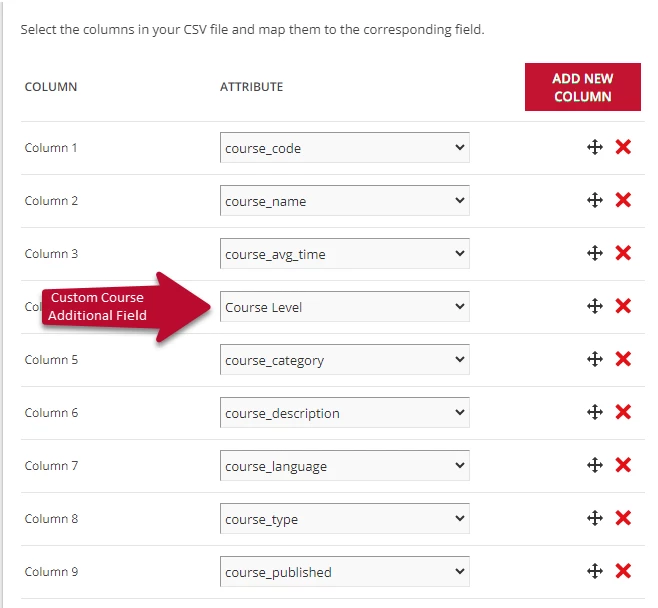
    • CSV File UTF-8 with your email as error log email address.  Auto-detect separator and check Consider first row as header.  Import Schema Layout
  • Save your automation app rule.
  • Create your CSV file and save appropriately.  Upload to SFTP and run rule.

Check the attachment for the template for the Course Shell Upload, which would need to be saved/converted as a CSV UTF-8 File before uploading to the SFTP.  Note that some pieces could fail depending on if you entered the information the way the system likes (i.e. elearning cannot be hyphenated, and the “Course_Published” has to be “unpublished” instead of under maintenance.”)