24 hr email notification from the start of an event

  • March 1, 2023
  • 9 replies
  • 132 views

Forum|alt.badge.img

Hello,


I am having trouble getting a 24hr notification sent for the start of an event in a session. I have tried both

ILT event starting” and “ILT session Starting” and got nothing.


Any suggestions?

9 replies

lrnlab
Hero III
Forum|alt.badge.img+10
  • Hero III
  • March 1, 2023

we use the Session Starting one and have no issues...perhaps check to whom they are being sent. If you are testing with a non-user like a PU profile or superadmin, these would not be received. A proper test ID who is part the a group or branch aligned in your notification would be the best test.


NateC
Helper I
Forum|alt.badge.img+2
  • Helper I
  • March 1, 2023

Hi @Sgrullon12 

This is one notification that typically works for me. My main suggestions would be to make sure the time zones are all in synch, & that you try ‘1 day’ instead of ‘24 hours’ if you have not already (or vice versa). I’m pretty sure i’ve used both ‘Event starting’ & ‘Session starting’ with equal efficacy.

Also, make sure you’re checking your junk mail. sometimes these things get caught, even when they typically work.

Hope this helps.
Nate


captainzelda
Helper II
Forum|alt.badge.img

Always learning something new, thanks for asking the question because now I know I can send event reminders! :) 


admin_mhshomes
Influencer I
Forum|alt.badge.img

Has anyone had issues with the notification not being sent at the right time?

I set up an “ILT session starting” notification to  be triggered 1 hour before the session, but they were sending 1.5 hours before, which confused a lot of people!


lrnlab
Hero III
Forum|alt.badge.img+10
  • Hero III
  • November 4, 2024

Has anyone had issues with the notification not being sent at the right time?

I set up an “ILT session starting” notification to  be triggered 1 hour before the session, but they were sending 1.5 hours before, which confused a lot of people!

Can’t say we ever had anyone report the type of issue so it’s hard to say...Are you comparing the “send” timestamp to your own clock? Docebo runs on UTC time for the most part so it should be pretty accurate..are you in an area with multiple time zones? You can also reach out to support to ask about this.


admin_mhshomes
Influencer I
Forum|alt.badge.img

@lrnlab thanks, I’ll reach out to support.

Forgive me if I’m being stupid, but how do I see the “send” timestamp of a notification? When calendar invites are sent in “real-time”, the “sent” time on that matches the actual time.

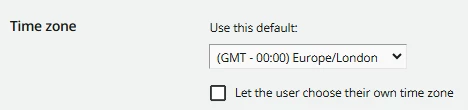
I’m in the UK and our time is set to:


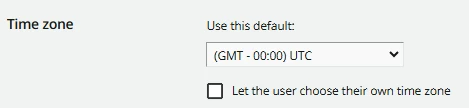
Do you think I should change it to the following?


It just seems odd that the notifications are being triggered 90 minutes before the scheduled session start time, as opposed to any other integer value.


lrnlab
Hero III
Forum|alt.badge.img+10
  • Hero III
  • November 4, 2024

The timestamps is the date/time when the email was received...so you can compare it to the session/event start date/time...this will be useful for support to have when they investigate…

As for chaining the time zone...you probably don't want to do that...I was thinking in terms of someone being a in time zone that is 30 min ahead of yours as a potential cause for this issue (like we have in Canada where those in Newfoundland are 30 min ahead of the other Atlantic provinces and 90 min ahead of the Eastern time zone)...


admin_mhshomes
Influencer I
Forum|alt.badge.img

@lrnlab I thought so.

Unfortunately, I haven’t been on the receiving end of the notifications, and nobody has forwarded them onto me. I’m just going by what people have told me, and the vast majority have reported getting a notification saying “[Session_Name] starts in 1 hour”, but that 1 hour didn’t match up with the actual start time.

So, we had people panicking and turning up 30 minutes early (which kind of annoyed the trainers because they needed that time to set up).

I’m sure I’ll get to the bottom of it eventually, but have changed the wording in the notification to say the session is “starting soon”, haha 😂.

P.s. I never knew that about time zones in Canada! I thought they were all 1-hour increments.


lrnlab
Hero III
Forum|alt.badge.img+10
  • Hero III
  • November 4, 2024

I feel your pain..testing time based notifications is always difficult...hopefully support will be able to look in to it...they might be able too access logs now that we have that option coming soon...(it’s in sandbox now if you have one)