Question

MS Teams Issue - Instructor send a meeting invite from MS Teams

  • April 29, 2025
  • 16 replies
  • 158 views

Forum|alt.badge.img

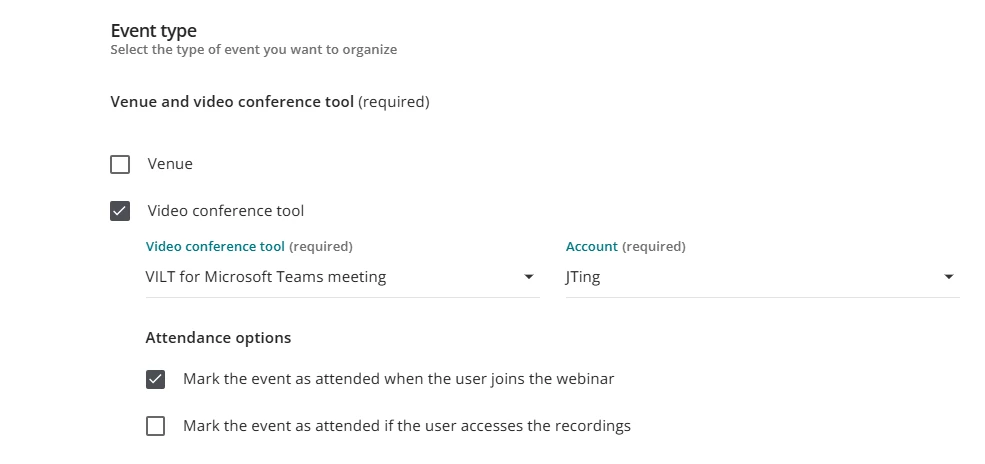
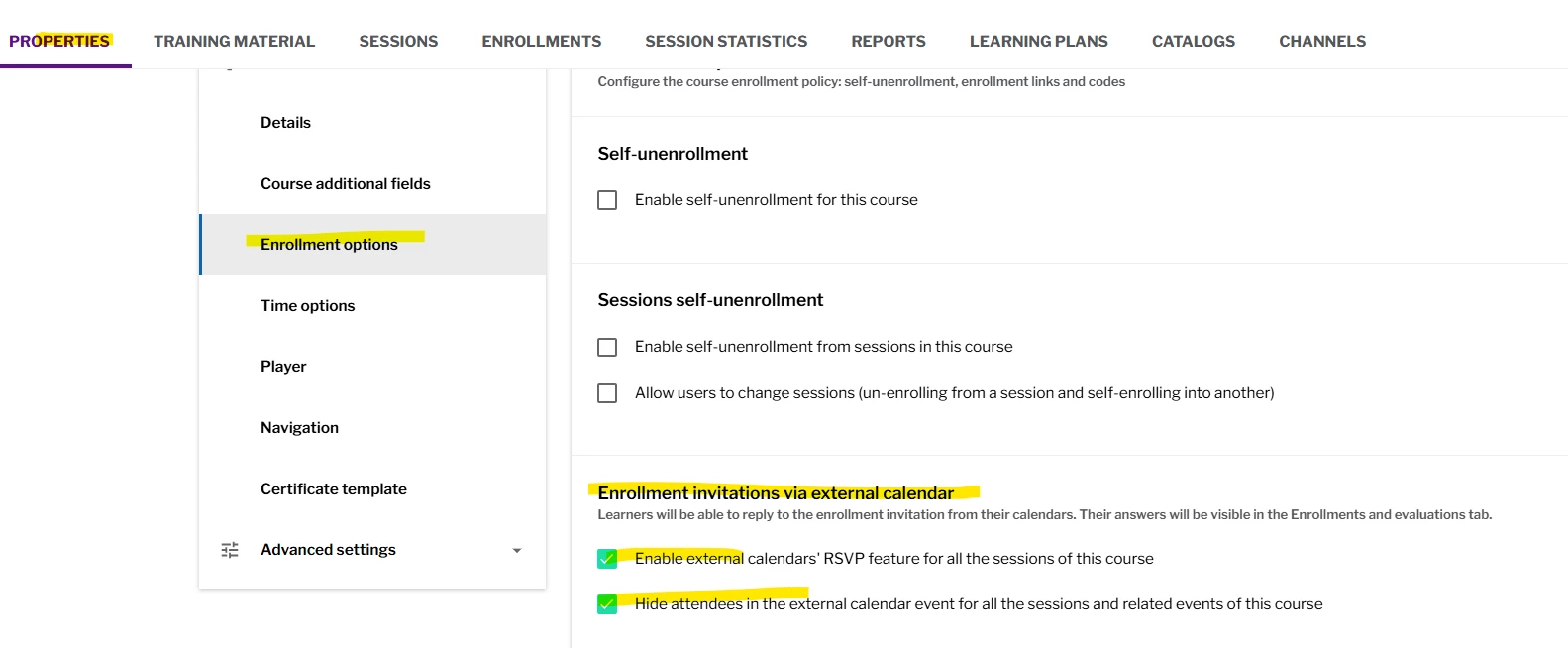
While doing testing of MS Teams ILT, after I created my session, MS Teams sent me an invite to start the event in MS Teams, which is not the behavior for starting a class that will mark participants completed.

Has anyone else had this issue?  Did you find a solution to stop these meeting requests from MS Teams?

If so, what’s the trick.

16 replies

lrnlab
Hero III
Forum|alt.badge.img+10
  • Hero III
  • April 29, 2025

While I havent experienced that myself, I would imagine this is a setting in Teams, not Docebo> Did you look to see if there are any options to suppress emails


Forum|alt.badge.img
  • Author
  • Influencer I
  • April 29, 2025

@lrnlab 
When I asked my MS Teams Admin, he seemed to think that the Docebo API used to create the event is setting this preference vs it being a local setting.   Which is why I put this out the the community.

To see if:

  • This is standard behavior
  • Each paired instructor need to set on their own preferences in MS Teams
  • This is this a global setting in MS Teams
  • None of the above and we need to talk to development because the API creating the event is making these decisions.

lrnlab
Hero III
Forum|alt.badge.img+10
  • Hero III
  • April 29, 2025

Did you set something up using Docebo Connect?


  • Newcomer
  • April 30, 2025

@RonB 

From my experience, when a session in an ILT is created using VILT for MS Teams meeting (as the video conference tool), the normal behaviour =

  • The account holder (MS Teams) that you’ve selected (instructor/host) will automatically get the event added to their Outlook calendar.
    • The calendar event is the only place where the organizer can access the URL to make edits to the meeting options (e.g., add co-host, add a waiting room, etc.). There is no where to edit any of this directly in Docebo. 
      • Note: Participants will NOT get the event automatically added to their Outlook calendar.
    • Important!: Please make sure the account holder sees the meeting added to their calendar. We are currently having issues of only some account holders seeing the event (still unresolved).
  • If the instructor sends out the MS Teams link (from the Outlook Calendar event) to participants and they join the session via this link, their attendance will not be marked.
    • For attendance to be marked: Participants must join the session via the join link that appears in the ILT course in Docebo.
  • If the instructor wants to create breakout rooms during the session, I’ve noticed the option is only available when they join the Teams meeting via Teams app (vs. joining via Docebo or via browser).

Forum|alt.badge.img
  • Author
  • Influencer I
  • April 30, 2025

@jting When I read this part of your response,

“The calendar event is the only place where the organizer can access the URL to make edits to the meeting options (e.g., add co-host, add a waiting room, etc.). There is no where to edit any of this directly in Docebo.”

What I interpret that to mean, to modify the meeting settings prior class, an Instructor can use the link from the Teams Meeting to edit/configure class, without “starting” the event prematurely.

While I see value in that, I am concerned about instructors who don’t start the class using Docebo.


  • Newcomer
  • April 30, 2025

@RonB What is the downside when an instructor starts the class using the MS Teams link and not Docebo? 


Forum|alt.badge.img
  • Author
  • Influencer I
  • April 30, 2025

@jting in my last LMS, attendance was not recorded if the Instructor did not start the event from the LMS.

So I was very concerned that Docebo would act the same.   

Since my last post I ran a test class with a colleague, I joined as from using the Teams meeting link and he was marked as completed.

Good news….Docebo-MS Teams integration, does not require the instructor start the class from Docebo.  

@lrnlab I did find something new.  During our test, I showed my colleague how to pair his account.  When I created a 2nd event for the session.  He started getting invites from Teams to attend the 2nd event as a participant, which is bad.

It appears that pairing your account triggers a Teams notifications for any event you are associated with regardless of you role in the event.


lrnlab
Hero III
Forum|alt.badge.img+10
  • Hero III
  • April 30, 2025

interesting...I have not seen that behaviour with our installation. Or I havent heard of anyone also getting the emails from Team directly. Did you ask support about this?


Davefox
Helper III
Forum|alt.badge.img+3
  • Helper III
  • May 1, 2025

So we have been using a teams integration in our platform for a few years. A few things to answer your questions, we found out the hard way. 

Your presenters and instructors should ABSOLUTLY join from their calendar or teams app instead of through Docebo. Because when you click the join button in the Event it passed the log in token ( which is how the student names appear and attendance is taken) , but it does not move over your teams credentials.

So if you have any enhanced or functions for presenters or organizers , any presenter coming from Docebo won’t get it.  We found this our when one of our presenters couldn’t start recordings of events. 

Similarly if you have attendees or learners who log in through teams but not Docebo, the will not get their attendance marked. Or have expanded rights like screen sharing. 

Last bit and this is specific to the new player and class pages is in your Event/Session there is a button labeled start meeting that is only visible to admins, power users, and instructors. Someone has to click this button regardless of your event settings, or the join button in your event does not appear for your learners thus preventing them from joining. ( that was a fun mornng)


Hope this helps

David 


Forum|alt.badge.img
  • Author
  • Influencer I
  • May 5, 2025

@Davefox we are using MS SSO for our site authentication and will be pairing every instructor’s Docebo and MS Teams account.

With our initial testing, it did not seem to matter if the Instructor started the event from Docebo or via Teams.  Both session were marking the users completed and I did not see any limitations to the features and functions.

Yes well aware that participants need to join thru docebo.

Ron


Davefox
Helper III
Forum|alt.badge.img+3
  • Helper III
  • May 5, 2025

We use MS SSO as well. One of the things we did was instead of creating a specific teams instance for every instructor, was to create a shared account in outlook and link that to Docebo. So there is only 1 Teams option when creating events and all the meetings go to a single calendar that multiple can access and manage. 

Then in Outlook after the meeting is created, we make changes there to meeting settings and creating organizers, presenters and any other properties. We then forward that through outlook to our instructors and presenters. 

This gave us one place to look for meetings and one choice when creating new events.


Full disclosure, we a team administrating the system and building courses for our instructors. Our instructors and presenters are not responsible for their own ILT/Session/Event creation. 


Good to know that you don’t need to click start meeting for teams. In our initial testing fter changes was with Adobe Connect so the event used an outside UZRL. In that case clicking start is needed. 


Forum|alt.badge.img
  • Author
  • Influencer I
  • May 5, 2025

@Davefox I think we don’t need to click start meeting in Docebo because we:

  • Both Docebo and MS Teams are using the MS SSO 
  • Every instructor’s account will be paired between Docebo and MS Teams

I would recommend some testing if you don’t need to start from Docebo or not.

We have not yet gone live and are still in the testing phase.


Forum|alt.badge.img
  • Novice II
  • November 4, 2025

@Davefox ​@RonB I’m currently testing VILT via Teams - We have a similar setup to yours. 

Are you sending a notification to users enrolled in the session and attaching the calendar invite? I’m looking for best practice so the user can add to their Teams calendar but then go to the ILT in Docebo to join the session when it starts. 


Davefox
Helper III
Forum|alt.badge.img+3
  • Helper III
  • November 5, 2025

Send options are limited and let’s not talk about calendar integrations between Docebo and anything not Google because grrrrr. If you figured out how to send a direct calendar invite, I’d love to know how you did it.  We also put a calendar on the learner home page, so they could see events when they log in without having to go into a class. 

We used a standard ILT notifications with reminders 1 day before and 1 hour before the event that contained a link to the ILT. You can’t link to a session, but the invite will only go to learners enrolled in a session that has an event that matches the criteria ( see previous grrrr)

This way everything the user saw was directed to the ILT.  I did make sure to add date and time fields into the notification so that they were either easy for a user to scrape or device OS would allow you to click the date to add a cal event. 


Hope this helps

David


Forum|alt.badge.img
  • Author
  • Influencer I
  • November 6, 2025

@Davefox so we have been tweaking our configuration. So we are doing 2 things.

  1. We have the Outlook integration, so when we build an ILT 
  2. We are using an automation to once a day all Instructors assigned to the ILT courses using the integrated MS Teams (with one master paired account) are added as Co-Presenter in Teams.  This then triggers a Teams invite and access to:
    • Teams attendance records
    • Teams recording
    • Teams whiteboards

@ravi.shankar.nyulangone.org did I explain the Teams integration correctly?

I hope this helps.


Davefox
Helper III
Forum|alt.badge.img+3
  • Helper III
  • November 19, 2025

Sorry for the delay in my reply. That does make sense. I have no firsthand knowledge of the outlook or teams integration. Didn’t want to pay for it. My only experience was wrestling teams meetings and ILT events to work together. 


this looks great, would love to play with it.