Question

New Notifications Broken

  • June 19, 2025
  • 12 replies
  • 534 views

Hi everyone,


I’m reaching out to the community because I’m really struggling with the new Notifications update and hoping I’m not alone here.

Before the update, whenever a customer purchased access to the LMS, they’d automatically get an email with the LMS URL, their username, and instructions to create their password. Since the new Notifications update rolled out, no emails are being sent at all. Even manually triggering a notification from the user’s profile doesn’t work.

This has created a huge headache for me and my team — we’re spending so much extra time on support calls just to get customers set up properly. It’s putting a lot of strain on our regular workload and has basically turned us into a manual email help desk overnight.

Is anyone else dealing with this?

I’ve also noticed a couple of other issues:

  • If I try to force-send a notification, the link opens the old “legacy” page and then I get a 404 error.

  • When I deactivate the default “User has been created (by administrator)” email and try to use a custom notification instead, it doesn’t pick up the new one — it keeps referencing the inactive default one.

My notifications have been broken for over a week now (I’m in Australia, not sure if that makes a difference).

Any advice or workarounds would be really appreciated.

Thanks in advance for any help.
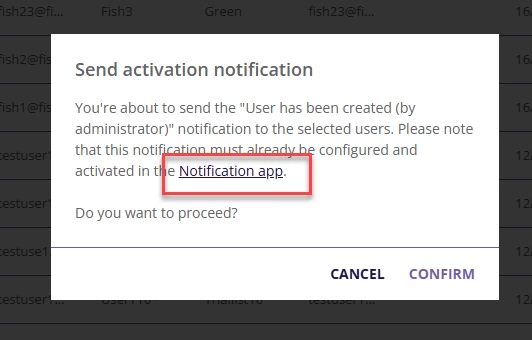


FYI… I did submit a support ticket. It’s been ongoing and it seems like they don’t know what’s happening or how to fix it. And they will not roll back to the previous version of Notifications that was working. I’m stuck. My customers are getting frustrated and I’m undone :(

12 replies

jckemv
Helper I
Forum|alt.badge.img+2
  • Helper I
  • June 19, 2025

Yep, notifications are not sending. I think it is a problem that is widespread. Mine hasn’t been working for a week now. I’m told the top level support are working on it and it is related to the roll out of the new notifications environment. I’m in Melbourne Australia, g’day neighbour.


aswartz
Helper II
Forum|alt.badge.img
  • Helper II
  • June 19, 2025

This is quite alarming. I’ve not noticed any issues (or changes) to notifications in our system. 

Has this change not been rolled out universally? 

I did find this help document but it isn’t clear when/how it is being rolled out. 

https://help.docebo.com/hc/en-us/articles/22875539857938-Transition-to-the-new-notification-service


Thanks,

Aimee


John
Docebian
Forum|alt.badge.img+3
  • Docebian
  • June 19, 2025

Good morning ​@jckemv and ​@aswartz!

Thanks for raising this. It’s clear that the behavior you’re experiencing doesn’t align with expectations. When email notifications suddenly stop sending after previously working as intended, it usually points to one of two things: a configuration shift (on either end) or a deeper system-level issue.

If you haven’t already, I’d recommend opening a Support ticket so our team can dig in with the right tools and logs. Also flagging this recent Product post which outlines some changes that may be relevant depending on your setup.

We recognize the disruption this rollout has caused for a number of admins. The teams have already reviewed the situation as part of a larger root cause and retrospective effort, and those learnings are being actively applied to ensure future releases -- especially those involving Notifications -- are rolled out with more clarity and confidence.

Appreciate you taking the time to surface this here.


  • Newcomer
  • June 19, 2025

Hello,

I had the same issue. I reached out to help desk and it seems a setting under advanced settings - Date and Time was incomplete causing the issue. I thought maybe it was an oversight on our end but seeing that other people are experiencing the same thing after the new notification update, it might be that the update changed those settings? Take a look, we had “Force date format” checked off and under “Language” French (odd selection for us) but then “the date format will be forced as follows” was blank. Once I changed it to English and picked the date format (month/day/year...)  notifications started sending again.


  • Contributor I
  • June 19, 2025

Hello Group,

I appreciate this opportunity to share my frustration with the new Notification tool. This is what I’m struggling with:

  • Links in Notifications that had been working perfectly are now getting a 404 error message.
  • Header image of the company logo looks fine in the Notification creation area after I use the resize handles but is huge on the actual Notification.

I have submitted tickets on these two issues, but have not received an explanation on why this is happening.


  • Contributor II
  • June 19, 2025

We had the new notifications roll out months ago and had issues.

  • Our global CC wasn’t working, which was a oversite on the Docebo side.
  • We had instructors receiving emails for classes they were not instructors for, which was another Docebo side error. 
  • There was a period of time where there were no emails being sent at all.  Were told we needed to validate our SPF record, even though nothing had changed on our side and notifications had been working without issue for a year. The resolution was that Docebo needed to enable the SPF macro for our email sender domain on their side, but like I said, nothing had changed on our side.

Hope this gets resolved for you soon!!!!


  • Author
  • Contributor III
  • June 19, 2025

Hi Team,


Thank you all for responding. Wanted to let you know, after eight or nine days of non-working notifications, mine are working again. I tested the notifications this morning and they are sending. 

The support agent noted that the problem was a regional issue. 

I’m still getting the 404-issue mentioned in my original post when clicking on the Notifications button after force sending a notification. Not idea, but the most important part is working, my customers are getting their setup and password emails. 


If you had the issue yesterday, it’d be worth testing today to see if your setup is working. 


jckemv
Helper I
Forum|alt.badge.img+2
  • Helper I
  • June 20, 2025

I’ve been on a day off today but I checked and today they are working again. I had reported the problem to my CRM and they had escalated it with Docebo which is great. Not sure what has happened, but they are working again, well seem to be. 😀


John
Docebian
Forum|alt.badge.img+3
  • Docebian
  • June 20, 2025

Hey everyone!

I’m realizing now that the link I posted wasn’t really the right one. 

The post above ☝ is the one I meant to add which covers updates on why we were seeing issues and what our team is actively doing to correct.


  • Novice III
  • June 23, 2025

Hi, in some of our notification we have noted that the triggers were removed so they have not been sent. It seems that we had the issue just for the notification valid for “all branches”. Now i have manually set them again. I keep my finger crossed.


JEntis
Helper I
Forum|alt.badge.img+4
  • Helper I
  • June 23, 2025

I wanted to chime in on this thread that our notifications changed over from the old to new UI during a ticket about notifications I already had open with them, which was interesting, but mostly worked out for the better. We haven’t had issues with stuff sending out thankfully, but when my existing notifications were copied over from the old to new UI it wasn’t perfectly done, so I had to go through every notification and make minor corrections here and there. If you’ve been switched it’s worth it to go through your setup and check to make sure everything is as it should be.


  • Author
  • Contributor III
  • June 24, 2025

I’ll continue to expand on my journey…. 

I am now receiving emails from customers who joined the LMS over a year ago, and they are being sent email notifications generated by Docebo. These emails were about their account creation and setup.

The new notification system is a serious issue. I am extremely dissatisfied with Docebo right now — this situation has caused significant reputational damage to my department and to my company as a whole.

We now have to repair the confusion and frustration this has caused our customers.

Was there something that I could have done prior to the release to prevent this from happening? I’m so down in the dumps… I don’t feel like Docebo did their part in letting us know how to prepare for this. 


I’m really curious to hear from Docebo….

I’ve submitted another support ticket, but the damage is already done.