


Saving a Page without Showing Name

  • November 21, 2025
  • 6 replies
  • 203 views

JKolodner
Helper III
Forum|alt.badge.img+6

Now that the Content Center is coming (currently in Sandbox), we cannot hide the Header Bar because it hides the NEW and CREATOR buttons in the upper right corner. However, hiding the Header Bar is necessary to avoid ridiculous repetition and waste of screen space at the top of our page (see below).



When I try to save a page with *space* in the name of the page, I get a Something Went Wrong alert message (see below). 
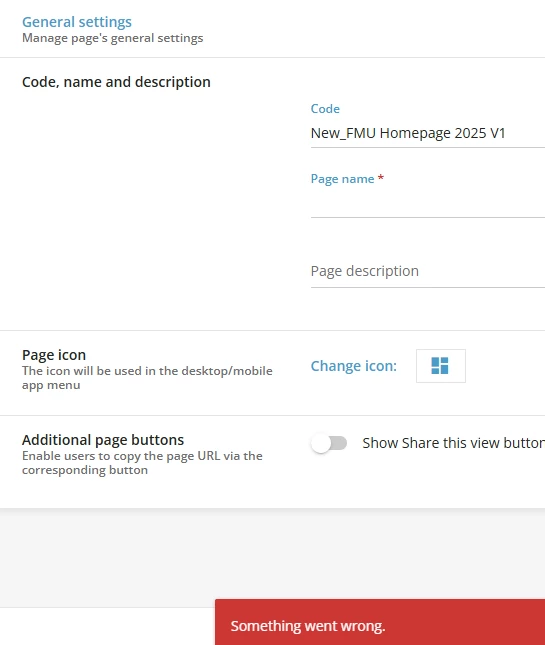


Does anyone have a suggestion?

6 replies

missyb
Novice III
Forum|alt.badge.img
  • Novice III
  • November 21, 2025

I’m glad you posted this because I was wondering why these buttons weren’t showing in our sandbox. You can use CSS to hide the page name but I agree it is a waste of space and we do not generally show it either. 


lrnlab
Hero III
Forum|alt.badge.img+10
  • Hero III
  • November 21, 2025

Good catch thank you for sharing.


Forum|alt.badge.img+2
  • Helper II
  • November 21, 2025

Hello - for what it is worth - years ago we stopped hiding the top page name because it also hid the Follow button on the channels when someone clicks a channel name to view on a whole page. Just mentioning that as something to test and a benefit of not hiding the page name. 


JKolodner
Helper III
Forum|alt.badge.img+6
  • Author
  • Helper III
  • November 21, 2025

Hello - for what it is worth - years ago we stopped hiding the top page name because it also hid the Follow button on the channels when someone clicks a channel name to view on a whole page. Just mentioning that as something to test and a benefit of not hiding the page name. 


@Sdinnoce - do you have any tips for making that header less redundant with other screen elements?


Forum|alt.badge.img

We don´t hide this header as we use it for other purposes, but the page name is a required field, and it won´t allow you to save it until you save it with a name. 

“The platform’s instructions for creating both widget custom pages and external link pages clearly state that a Page name must be entered in the Details tab. This field is mandatory, red asterisk, and the system will not allow you to save a page if the page name is left blank. This helps ensure clarity and proper organization within your platform”. 


Forum|alt.badge.img+2
  • Helper II
  • November 21, 2025

Hello - for what it is worth - years ago we stopped hiding the top page name because it also hid the Follow button on the channels when someone clicks a channel name to view on a whole page. Just mentioning that as something to test and a benefit of not hiding the page name. 


@Sdinnoce - do you have any tips for making that header less redundant with other screen elements?

Sorry - I don’t have any tips. We had originally hid it but years ago had to unhide because of the way we wanted to user the Channels pages better. Now we just let people know it is the breadcrumb path







