Storyline test, need to report on initial score

  • March 3, 2026
  • 8 replies
  • 49 views

JKolodner
Helper III
Forum|alt.badge.img+6

I am looking for advice on how to track learners’ initial test score in the system, when a test is created in Articulate Storyline and imported as a Training Material (SCORM file).

If we set it up so that the initial score is tracked, then we also have to set it up so that the learner gets the course marked complete once they take it regardless of the score. Otherwise, they will end up having to re-take it and the most recent score will be reported.

Our concern is that if we set a passing score to 0%, learners will get a message that they’ve passed and be confused.We would like to set something up that would allow learners to re-take, while still recording the initial score or to record an initial score and have the course marked complete. 

 

8 replies

JZenker
Guide II
Forum|alt.badge.img+2
  • Guide II
  • March 3, 2026

I ran into this recently - it seems the system is only able to receive one score from the SCORM file. I believe it will always take the first score (pre-test).

Additionally, we found that in order to see the answers to the questions the users actually submitted, we had to download all of this data manually one by one. Open course → Reports tab → scroll down and search for user and click their username to see individual answers. There doesn’t seem to be any actual report that natively pull test answers from tests in SCORM files.

Next time, we are going to be using the built-in tests by Docebo so that reporting is easier. The issue with that is there isn’t a localization feature yet for tests. So, we have to build out each test individually by language, and then build a HTML language selection menu training material for them to easily find and choose their preferred language. 


JKolodner
Helper III
Forum|alt.badge.img+6
  • Author
  • Helper III
  • March 3, 2026

Thanks ​@JZenker. I appreciate your response.

We only need one score from the SCORM file (there’s only 1 test). 

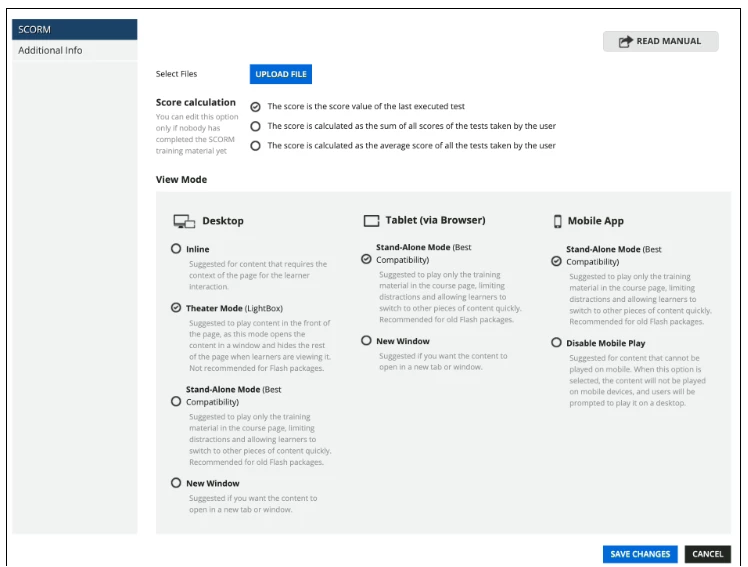
And I see we have 3 options when we are importing a SCORM file as a training material:

  • The score is the score value of the last executed test
  • The score is calculated as the sum of all scores of the tests taken by the user
  • The score is calculated as the average score of all the tests taken by the user

But what I’m trying to get at is if it’s possible to only record the first time someone completed that test.


JZenker
Guide II
Forum|alt.badge.img+2
  • Guide II
  • March 3, 2026

Ah I see. If no other solution, perhaps it would be worthwhile to lock that slide in Articulate so the user is only able to take the test once? If they fail, a notification could be setup to a power user to have the course manually reset - but first time answers could be recorded at this time.


lrnlab
Hero III
Forum|alt.badge.img+10
  • Hero III
  • March 3, 2026

Not sure if this will work...can you try forcing the “end object marker” on the learning object to see if that locks it in?


Forum|alt.badge.img+1
  • March 5, 2026

Hello, my suggestion would be…

  1. Ensure you have a passing score set in the assessment properties in Storyline.
  2. Ensure Storyline publish settings are set for pass/fail based on the assessment (not slides viewed).
  3. Leave the training material setting to default (last executed test).
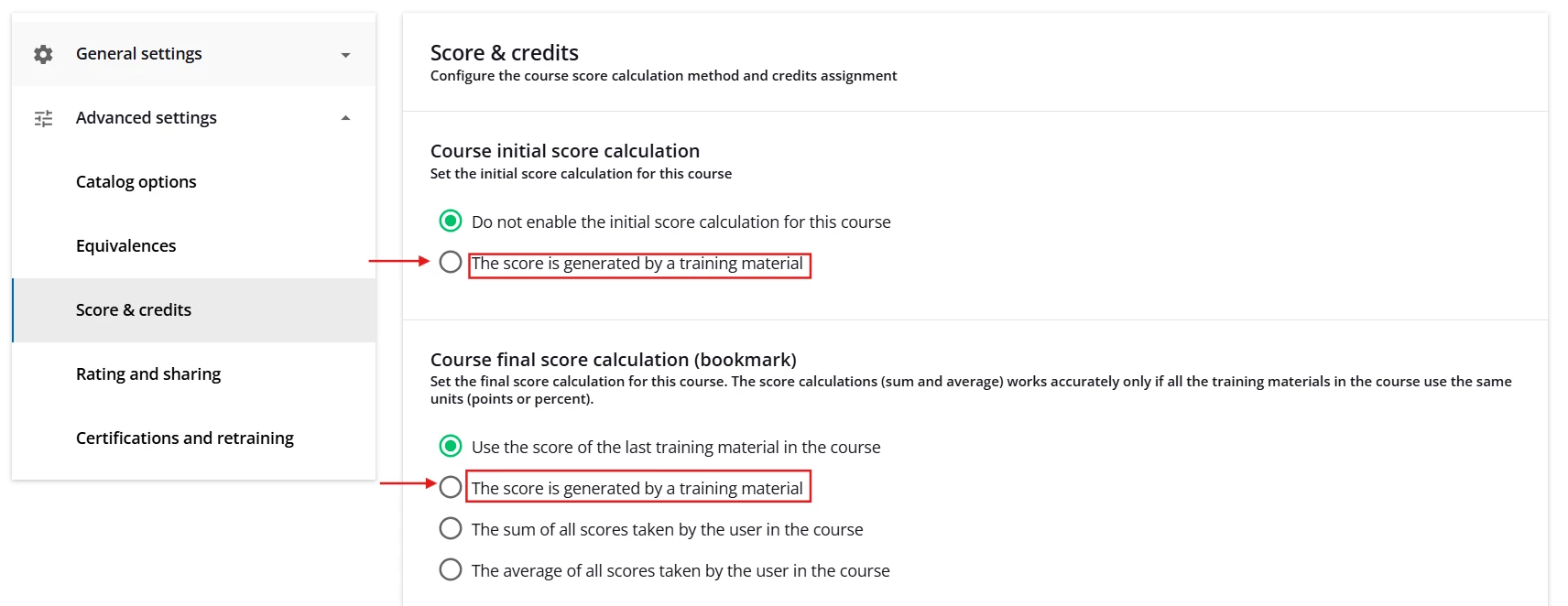
  4. Under Score and Credits: Set the Course Initial Score and Final Score calculations to Generated by Training Material and select the applicable training material in your course for both.
  5. Configure a report and include initial and final score.


JKolodner
Helper III
Forum|alt.badge.img+6
  • Author
  • Helper III
  • March 6, 2026

Thanks, everyone, for your responses. Here’s what we heard from our CSM:


What Docebo actually does with Storyline/SCORM scores

For SCORM packages in Docebo:

  • When a learner re‑opens a completed SCORM package, the status stays Completed, but the tracking (including score) is overwritten on each new playthrough.
  • When a learner retakes a completed e‑learning course, the course status stays Completed, but the latest score is the one that’s retained.

So with a single Storyline Scorm used for the graded test, Docebo cannot keep “first attempt score” and then store new attempts separately, it always “remembers” the last attempt for that Scorm.

Mark the course complete after the initial attempt (any score)

This part is doable.

  1. Use the Storyline Scorm as an end object marker in the course:
    • In Training material → [SCORM] → Settings, set it as an End object marker.
    • When that training material is completed, the course is marked Completed, regardless of whether the learner passed or failed the test.
  2. In Storyline’s LMS publishing settings / triggers:
    • Configure it so that completion is sent when they reach the results screen, not only when they “pass”.
    • Keep your real passing score in Storyline so the on‑screen message can still say “You did not pass” vs. “You passed”.

This lets you record the initial score and mark the course complete right after the first run, without setting the passing score to 0%.

Caveat: if learners re‑open that same Scorm and it still reports a score, their score in Docebo will be overwritten by the latest attempt.
That’s the piece there’s no direct LMS setting to override for Storyline content.


JKolodner
Helper III
Forum|alt.badge.img+6
  • Author
  • Helper III
  • March 6, 2026

And here’s what our instructional designer concluded:


After extensive testing, we confirmed that when a learner takes a test more than once, the most recent score will always overwrite all previous scores.


To ensure that only initial test attempts are reported, the option to retake assessments must be removed, and the following settings should be applied:


Storyline Settings

  • Player → Other → Resume on restart: set to “Always resume.”
  • Remove the retry button at the end of the course.
  • In Form View, set question attempts to 1 for each question.
  • Report to LMS: Complete/Incomplete.
  • Tracking: Mark complete when the learner has viewed all slides and the quiz.


Docebo Settings

  • Under the Training Material tab → Edit Settings → set End Object Marker to “Yes.”


If a learner needs to retake an assessment, there are two options:

  1. Archive and re-enroll the learner, or
  2. Create a duplicate version of the assessment and add it to Docebo as a retake so the score can be tracked separately.

Forum|alt.badge.img+3
  • Helper III
  • March 6, 2026

What Docebo actually does with Storyline/SCORM scores

For SCORM packages in Docebo:

  • When a learner re‑opens a completed SCORM package, the status stays Completed, but the tracking (including score) is overwritten on each new playthrough.
  • When a learner retakes a completed e‑learning course, the course status stays Completed, but the latest score is the one that’s retained.

So with a single Storyline Scorm used for the graded test, Docebo cannot keep “first attempt score” and then store new attempts separately, it always “remembers” the last attempt for that Scorm.

Interesting. I have a vague memory of being told something different way back in our implementation. That the score that marked it completed was the score that stayed no matter if the learner retook the course or not. Anyone know if it really was that way before and it’s different now?