To have different contents for session from a same course

  • August 29, 2024
  • 11 replies
  • 196 views

jeannoel

I would like to know if there is a possibilty to have a different content in a session from a course et another content in another session from the same course ?

11 replies

  • Contributor II
  • August 29, 2024

Are you asking if you can have different training materials associated with different sessions within the same ILT course, as opposed to having the training materials designated at the ILT course level and apply to all the sessions of that ILT course?

No, not that I have found.  If you are having  a virtual session you can have a different recording for each session, but not different training materials.


lrnlab
Hero III
Forum|alt.badge.img+10
  • Hero III
  • August 29, 2024

A session cannot contain any content so the short answer would be No….that said and depending on the content type, you can use the File Repository widget on a course to add files, links, etc and also set who can view this content (all, users, instructors). This content will NOT be tracked but can be played by audiences it’s aligned to.

If you can detail a use case, we may be able to offer some other solutions for you.


msantos
Helper II
Forum|alt.badge.img+2
  • Helper II
  • August 29, 2024

Ji @jeannoel , it´s not possible. You have duplicate the course, and change the content for other session. You may to set these courses with “Equivalences” and if the learner completed one, the another one will be completed too.


dklinger
Hero III
Forum|alt.badge.img+12
  • Hero III
  • August 29, 2024

@jeannoel help us help you.

Some terms in the system are “reserved” so we need a little more detail to help you as @Elaine_Barnes is pointing out.

Beginning Pointers:

  • training materials sit in eLearning Courses. This is your content, your video, your training document, your actual “learning stuff” for a person to consume.
  • ILT/VILT types of courses are supported with session details and are meant to pass along location/date/time details. An instructor is going to mark a roster at the end of a training (or the system can help to do so by a person clicking on a link to attend the course in Docebo itself). You can have training materials sit inside of ILT/VILT types of courses as well.
  • courses (no matter what type) can reside in Learning Plans

You can have a same training material sit within two courses, but there are concerns with doing that (and we can get into that) and there can be some neat effects and implications if you do so. Many of a time out of best practices - I attempt to avoid this for us. You cannot have a same training material in the same ILT course twice...but you can generate that training material again and use a similar (or exact same name) and associate it with that course. Maybe this is where folders can be helpful to organize your approach.

But lettuce know (poor spelling on purpose 😁).

Last note: Here is the help reference - 

https://help.docebo.com/hc/en-us/articles/360020079740-Creating-and-managing-ILT-and-VILT-courses#h_01H98M2TG9X2Y9ZCXWD7G99R2D


  • Contributor II
  • August 29, 2024

We have the same issue.  The need is to have a ILT course (say “300 Advanced Configuration”) and then each session has attendees for unique customers (say “ABC Widgets Inc.”; “123 Enterprises”; etc.).  The need is to be able to upload content only people attending that session can see because it is only pertinent to them and isn’t the “public” course materials.

We have found no way to do this without the extra work of duplicating the course for every instance which messes up reporting and is a lot of work. We finally opted to provide the additional course materials through an external process which isn’t preferable but works.


dklinger
Hero III
Forum|alt.badge.img+12
  • Hero III
  • August 29, 2024

@Michele - thank you for your usecase. It is interesting. The only thing I can think of is working with groups/pages/menus to support showing the group that are attending the session. I can definitely see the value of something as simple as an assignment or training material being available as one of the widgets with a parameter for visibility with a check box of “show only to attendees”.


Forum|alt.badge.img+4
  • Guide II
  • August 29, 2024

There are some workarounds, but it depends on how many different sessions you teach. 

  • Do you reuse the materials for specific sessions vs. new materials for each session? 
    E.g. ABC Widgets Inc. is for multiple sessions throughout the year. 
  • How many different groups are there? 
  • How do the learners know which session to sign up for? 
  • Can you identify who should attend each session by profile data?
  • How far in advance do the learners need to access the materials before attending the session? 

There are workarounds depending on scale and reuse. 


  • August 30, 2024

We have a similar case to @jeannoel , it’s an ILT course with four sessions and we are looking for a way to make training materials available per session to the learners that were not able to attend to one or more sessions.

We were planning to use the file repository just as @lrnlab shared but we were not counting with that action not being trackable, thank you @lrnlab you are a lifesaver!


lrnlab
Hero III
Forum|alt.badge.img+10
  • Hero III
  • August 30, 2024

having another thought….this might sound odd however with the few options we do have, it may work for some…

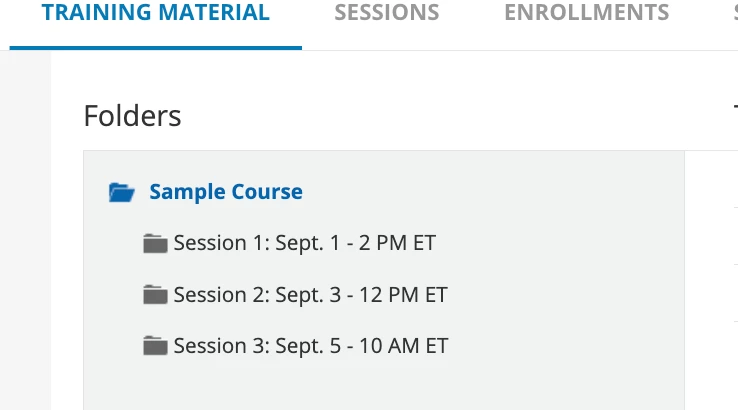
You can create folders named with the date of each session and in the instructions, you can direct your enrolees to open the folder that corresponds to the date they are booked in. 

from the training material perspective, you can make at least 1 object in each folder the “end object marker” so as long as the user completes that part in any of the folders, they would be marked as complete (depends on the session tracking type you prefer to use).

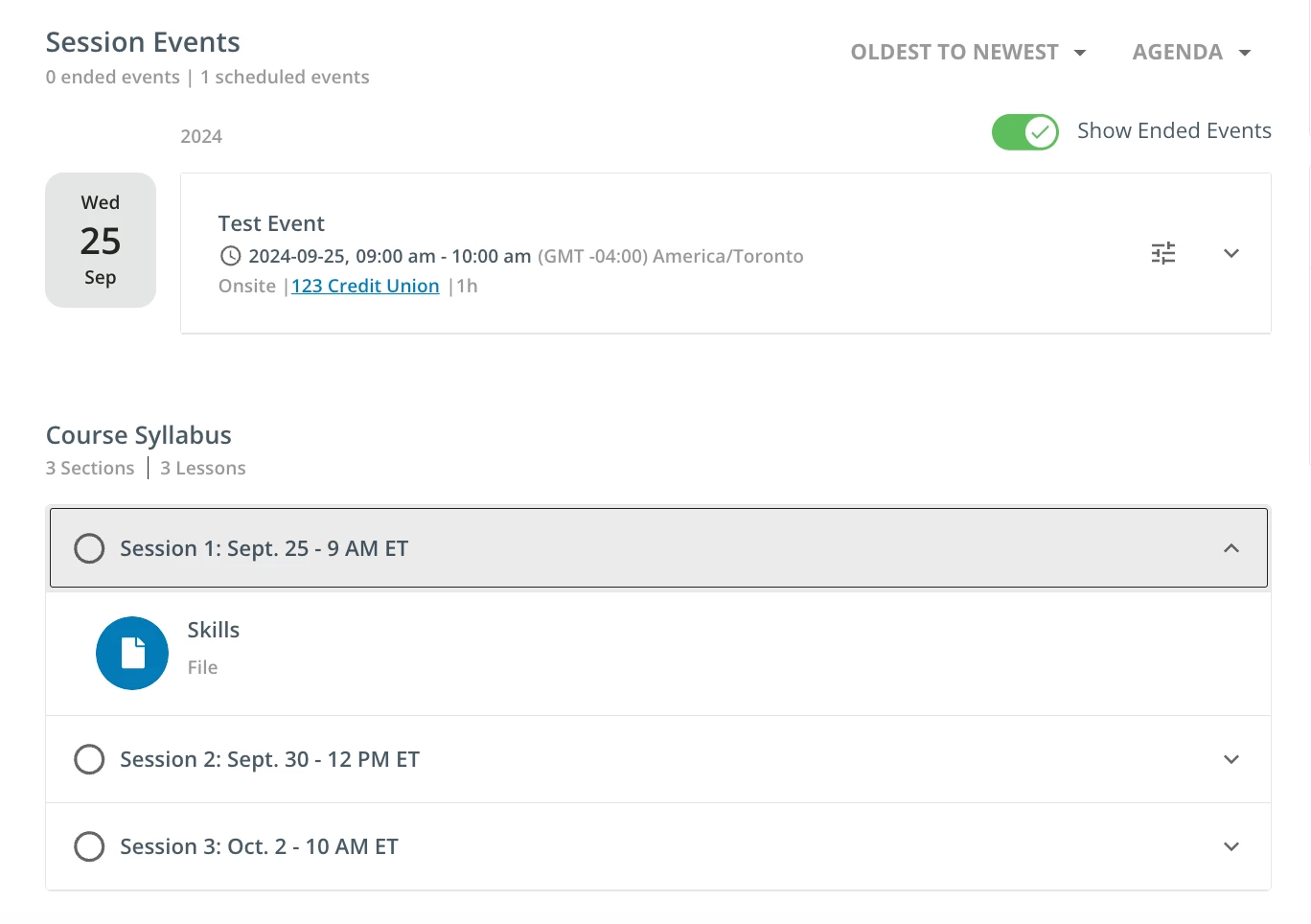
User View:

Admin View:


I guess you could do the same with the File Repository set-up...


Davefox
Helper III
Forum|alt.badge.img+3
  • Helper III
  • September 3, 2024

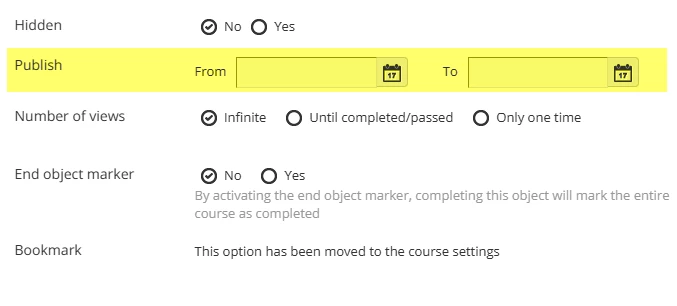
Agreed. Not having the ability to tie training materials to an event or a session has been a hinderance for us as well. One thing I have found is that you can set publication and visibility dates for materials. So you could have materials available for a session only when the session is live. 

It’s not great, but it can work. The drawbacks is ANYONE who logs into the class can see the materials even if they are not enrolled in that session or event durring that time, and you can’t make it available to students outside class.

You can also manually change the dates as needed, but that has a lot of logistical issues. 

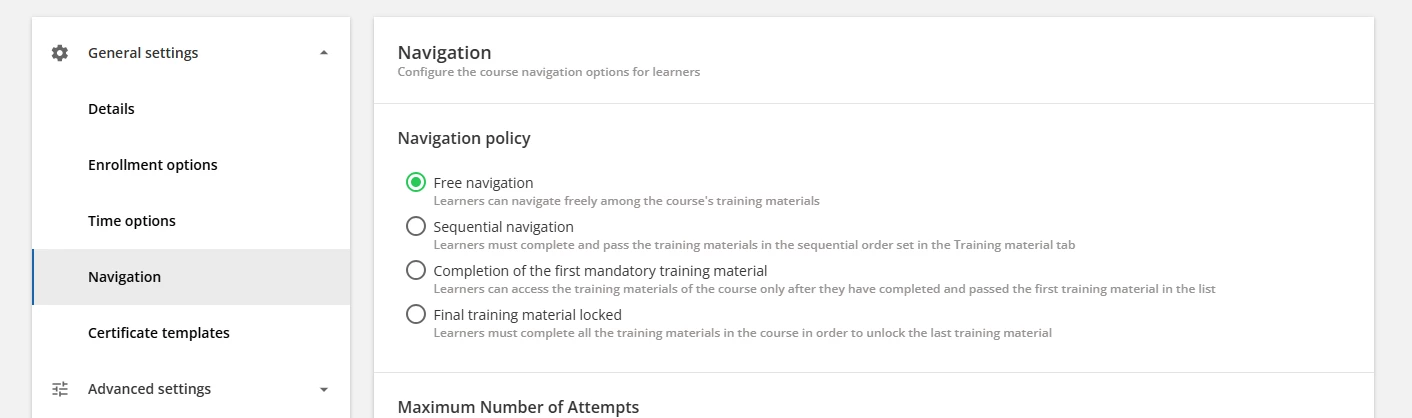
One request we sent to the Dev team was to be able to have more than one sequential order to training materials in navigation. The thought then being is you make one material a prereguisite for a group and then time limit that material to match the session or event. SO anyone who is in the session takes the first material and has access to all materials after it but those who are not in the session never see the first material so their access is blocked.  Alas this is not a feature.

Hope this helps.


Forum|alt.badge.img+4
  • Guide II
  • September 3, 2024

If you have DCS, you could consider using channels. 

I asked, “Can you identify who should attend each session by profile data?” for the possibility of using channels. If you have the profile data, you can configure automatic groups with profile data + enrolled in the course. Then give each group permissions to the corresponding channels with the downloadable and/or consumable assets. 
You can use the user subscribed to a group notification to send an invitation/reminder to enroll in a session (including the nomenclature for the session they should be enrolling in) with the channel link and instructions regarding the material for session. 
Unfortunately, you would not be able to send the link in the session confirmation notification because that would be the same message across all sessions for the given course.   

Many of these decisions depend on how users are enrolled in the course and sessions. If the same materials are used across many sessions, vs. unique materials for each session.