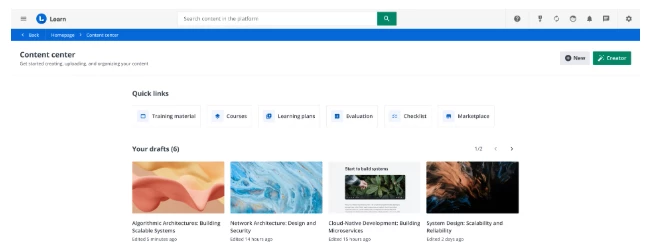
🚀 Feedback Wanted: New Content Center Home & Upload Flow v1 in Sandboxes!

  • November 11, 2025
  • 35 replies
  • 500 views

Show first post

35 replies

  • Author
  • Former Docebian
  • November 24, 2025

​@giulio.latorre Quick update - yesterday I showed the new Content Center to one of my newer power users who LOVED this and thought it was much easier to use as a starting point. Thought you might like to know how someone who is not in the system day in and day out experienced it in a very positive way. 

Absolutely!

It is fundamental for us to have every type of feedback.
If something is liked, we need to be aware of it, just as much as if something is disliked.

So, every type of 'thumb up or down' is extremely valuable!


jessica.lunan
Novice III
Forum|alt.badge.img
  • Novice III
  • November 24, 2025

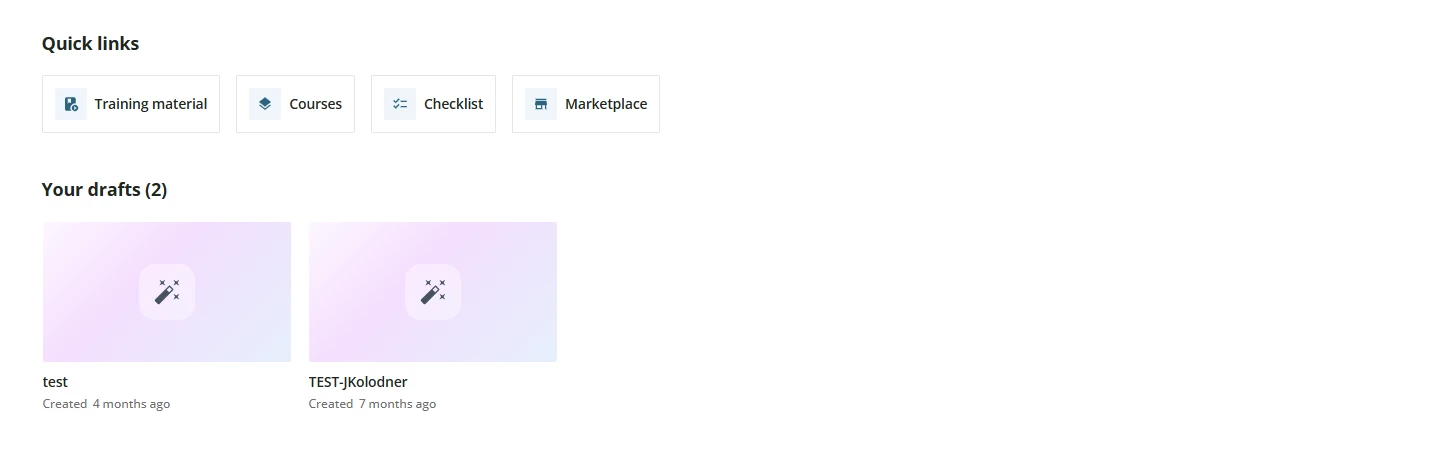
Hi there, perhaps I’m missing something, but when I open the Content Center in our sandbox, it says that there are “no training materials yet” -- is that just because there is nothing recent? There is plenty of content in there.


  • Newcomer
  • November 24, 2025

In the Product Update for the January Sandbox release, I see the New and Creator buttons in the upper right corner.


However, in my Sandbox, I don’t see those buttons. Any thoughts?


Hi ​@JKolodner 

Missing Buttons (Header):

Regarding the disappearance of the buttons to add new content: I would ask you to check if your platform uses customized CSS. We have found that, in some cases of CSS customization, the header bar containing these buttons may be hidden. If this is the case, we recommend contacting our Professional Service team to modify the CSS code and make the header visible again.

Let me know


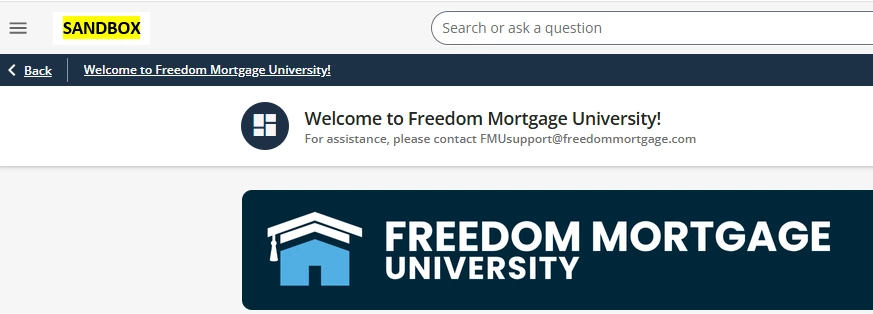
Yes, that was it. I removed the CSS (see below) and the buttons now appear again. HOWEVER, now I’m stuck with the super-repetitive header bar which I REALLY wanted to be able to hide. We need to have a banner image per leadership, but now there is the black bar and the header bar above it, both of which say the same thing. This isn’t great:


Here’s the CSS I was using. Maybe I could adjust it to just hide the header on the home page? Any suggestions?


/** Hide the Header Bar **/

#doc-layout-title-bar {

    display: none;

}


I strongly suggest to ask the support of your CSM or Professional Service.

We had this same issue with the title bar hidden. I tried applying multiple css codes to hide the title bar on all pages except the new Content Center page. However, this new page (Content Center Dashboard) does not have a unique page ID or page-level wrapper to apply a unique identifier. Not sure if that was intentional as it is a new page? I saw the comment earlier that we will be able to have the CLOR page as a “Training Material” quick link in the admin menu that will be helpful. We look forward to experiencing the additional updates to this new page in the coming year. Thank you!


  • Author
  • Former Docebian
  • November 24, 2025

Hi there, perhaps I’m missing something, but when I open the Content Center in our sandbox, it says that there are “no training materials yet” -- is that just because there is nothing recent? There is plenty of content in there.

Pretty weird. Could you write me the platform?


  • Author
  • Former Docebian
  • November 24, 2025

In the Product Update for the January Sandbox release, I see the New and Creator buttons in the upper right corner.


However, in my Sandbox, I don’t see those buttons. Any thoughts?


Hi ​@JKolodner 

Missing Buttons (Header):

Regarding the disappearance of the buttons to add new content: I would ask you to check if your platform uses customized CSS. We have found that, in some cases of CSS customization, the header bar containing these buttons may be hidden. If this is the case, we recommend contacting our Professional Service team to modify the CSS code and make the header visible again.

Let me know


Yes, that was it. I removed the CSS (see below) and the buttons now appear again. HOWEVER, now I’m stuck with the super-repetitive header bar which I REALLY wanted to be able to hide. We need to have a banner image per leadership, but now there is the black bar and the header bar above it, both of which say the same thing. This isn’t great:


Here’s the CSS I was using. Maybe I could adjust it to just hide the header on the home page? Any suggestions?


/** Hide the Header Bar **/

#doc-layout-title-bar {

    display: none;

}


I strongly suggest to ask the support of your CSM or Professional Service.

We had this same issue with the title bar hidden. I tried applying multiple css codes to hide the title bar on all pages except the new Content Center page. However, this new page (Content Center Dashboard) does not have a unique page ID or page-level wrapper to apply a unique identifier. Not sure if that was intentional as it is a new page? I saw the comment earlier that we will be able to have the CLOR page as a “Training Material” quick link in the admin menu that will be helpful. We look forward to experiencing the additional updates to this new page in the coming year. Thank you!

Hi ​@nelskybelsky 
To solve this, I highly recommend reaching out to Professional Services. The quick link for the Training Material (previously the Central Repository) is already in place. We plan to restore it as a dedicated link within the admin menu in the upcoming release.

Let me know


jessica.lunan
Novice III
Forum|alt.badge.img
  • Novice III
  • November 24, 2025

​@giulio.latorre sandbox URL is https://bullhornsandbox.docebosaas.com/


  • Author
  • Former Docebian
  • November 25, 2025

​@giulio.latorre sandbox URL is https://bullhornsandbox.docebosaas.com/

Hey ​@jessica.lunan in this sandbox platform you don’t have training material in Central Repository and this is reflected also in Content Center. When we’ll release in GA (all production platform) you can see the recent activities in Content Center because in your production platform you have many TMs.


jessica.lunan
Novice III
Forum|alt.badge.img
  • Novice III
  • November 25, 2025

​@giulio.latorre ah! got it. i can also definitely move some stuff to the CR in the sandbox.


Forum|alt.badge.img+4
  • Helper III
  • December 3, 2025

Swatson wrote:

Hi ​@giulio.latorre,

Question: Quick Links - Will there be a button for File Repository that we use to put in a course? I’d like to see it there too!


HI ​@giulio.latorre , please see my comments below to your questions in purple.


1. Clarification Question:

Could you please clarify what you mean by "file repository"? Are you referring to the "Training Material" tab within the individual course management? Yes. We add course widget “File repository area” and upload pdfs, PowerPoint slides, etc. However, the files we upload are added to other courses. Sometimes we do not have the document or the person that had the documents had left the company and we have to look in other courses to find the pdf and then download it from one course to add it to another course file repository. It would be great if we could have a place in this new Content Center where we could put all the documents we have in the course management training material tab - file repository. This way when a person leaves or we cannot find the document we can go to the new Content Center and find the document to upload into the file repository in the Training Material tab. 

2. Constraint Explanation:

If so, the direct implementation is not feasible because that section is contextualized and specific to a single course. Consequently, we adopted the solution of redirecting the user directly to the main courses page. With this new Content Center, there should be a place where we can add the documents (pdfs, PowerPoint slides, etc.) that the we can upload to the file repository in the Training Material tab of the course management. In the file repository section the documents in we upload are used in more than one individual course. If a person leaves the company or if the document is in another course file repository, we have to search many courses to find the documents. Instead, there should be a solution where we can add these documents in the new Content Center.


  • Author
  • Former Docebian
  • December 11, 2025

Swatson wrote:

Hi ​@giulio.latorre,

Question: Quick Links - Will there be a button for File Repository that we use to put in a course? I’d like to see it there too!


HI ​@giulio.latorre , please see my comments below to your questions in purple.


1. Clarification Question:

Could you please clarify what you mean by "file repository"? Are you referring to the "Training Material" tab within the individual course management? Yes. We add course widget “File repository area” and upload pdfs, PowerPoint slides, etc. However, the files we upload are added to other courses. Sometimes we do not have the document or the person that had the documents had left the company and we have to look in other courses to find the pdf and then download it from one course to add it to another course file repository. It would be great if we could have a place in this new Content Center where we could put all the documents we have in the course management training material tab - file repository. This way when a person leaves or we cannot find the document we can go to the new Content Center and find the document to upload into the file repository in the Training Material tab. 

2. Constraint Explanation:

If so, the direct implementation is not feasible because that section is contextualized and specific to a single course. Consequently, we adopted the solution of redirecting the user directly to the main courses page. With this new Content Center, there should be a place where we can add the documents (pdfs, PowerPoint slides, etc.) that the we can upload to the file repository in the Training Material tab of the course management. In the file repository section the documents in we upload are used in more than one individual course. If a person leaves the company or if the document is in another course file repository, we have to search many courses to find the documents. Instead, there should be a solution where we can add these documents in the new Content Center.


Hi ​@Swatson sorry for the late answer but I completely miss this message.

Thank you for the clarification. I’ll take it into consideration!