

Question

Switching sessions in an ILT before prereqs are met

  • July 16, 2025
  • 11 replies
  • 118 views

laraeps
Influencer I
Forum|alt.badge.img+1

Use case: 

We have several hybrid programs that contain e-Learning components that must be completed before the ILT components. Each ILT course has several session options. The expectations for our learners is to switch sessions, as needed. To guide the learners through the requirements chronologically, the courses are within learning plans. 

Issue:

Learners are not able to switch sessions until they complete the associated pre-requisite. Often the pre-requisite should be completed within 1-2 weeks of the ILT to ensure the content is fresh, which schedule changes may happen 1-2 months in advance.

The only solution now seems to be for an admin to make the change, which is inefficient and creates confusion with learners - as some courses they can manage on their own and for some they need to reach out to an admin - and it’s not always clear to them which course is which.

Would love to tackle this in this PDG.

11 replies

lrnlab
Hero III
Forum|alt.badge.img+10
  • Hero III
  • July 16, 2025

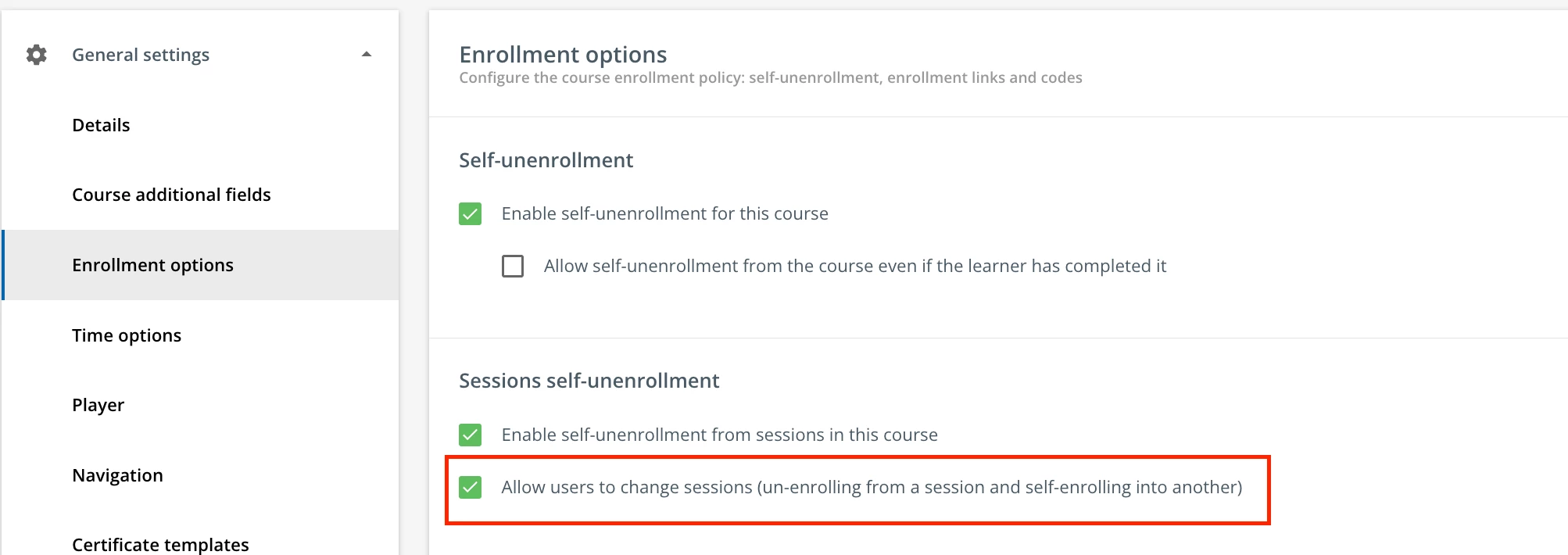
In your course settings, do you allow the user to switch sessions? This work all too well as users who have already been marked as completed/attended on a session can still switch to another which messes up reports.


You should also check any registration deadlines that can also affect whether a user can re-register into another session as that could also be a blocker.


Davefox
Helper III
Forum|alt.badge.img+3
  • Helper III
  • July 17, 2025

+1 to this ​@laraeps. I would love it if you could make training materials in an ILT required before session registration. It would save me a lot of jumping between learning plans and ILT classes. 


laraeps
Influencer I
Forum|alt.badge.img+1
  • Author
  • Influencer I
  • July 17, 2025

@lrnlab Yep! We do allow them to switch sessions in the settings, but that doesn’t work if there is an incomplete pre-req. :-) 


lrnlab
Hero III
Forum|alt.badge.img+10
  • Hero III
  • July 17, 2025

@lrnlab Yep! We do allow them to switch sessions in the settings, but that doesn’t work if there is an incomplete pre-req. :-) 

am guessing your ILT courses are in an LP? 


  • Influencer I
  • July 21, 2025

If your prerequisites are set at Learning Path level, then I suggest to remove the hard prerequisites from the Learning Path, just leave the order of the courses and they will see the recommended order. The Learning Path conditions will apply across the entire platform and they aren’t good if you want to leave learners some flexibility.

If you still want to use hard prerequisites between the eLearning and the ILT components, I would then recommend to create one learning path for each combo e-Learning + ILT to create the prerequisite relationship.

We’re slowly phasing out all our “blended” courses (this is how we called the ones with both eLearning and ILT modules) due to complex administrative work that they generate.


Davefox
Helper III
Forum|alt.badge.img+3
  • Helper III
  • July 21, 2025

@DanielM 

I love this idea, but there is one problem. If you add an ILT to a learning plan, the user is automatically enrolled without being enrolled into a session. History has show us this leads to a HUGE level of confusion for learners as they do not know they need to enroll into a session as well as the ILT.


The end result for us was a constant monitoring of the class and a ton of manual enrollment, which is why we stopped adding an ILT into learning plans. 

Not sure if there is a workaround or a better solution. 


We ultimately added a course into the learning plans with a single HTML page and an assignment module or a quiz.


The HTML page is a list of session based self enrollment links and in the ILT we issue an assignment or the answer to the quiz based on the class.


This allows us to enforce prerequisites to access the enrollment course in the learning plan and a way for users to self mark complete when they complete the ILT. 


It is 100% a workaround, but effective.


In a better version of the software I’d love to see the following

  1. When a learner opens an ILT and is not enrolled into a session they are met with a popup window requiring them to choose a session to enroll into before they can access the course. Theis should be another enrollment option. 
  2. Within an ILT thew ability to add prerequisite materials and if those are in place they must be completed before a user can join an event. With notifications to remind the user
  3. Event or session specific training materials or the ability to assign materials to a session or event. 


  • Influencer I
  • July 21, 2025

@Davefox , you’re right. The double enrollment (course + session) is confusing for learners; partially for the same reason we didn’t enable self-enrollment, and instead we manually enroll learners in sessions.

Your workaround seems a good idea for the eLearning + ILT session combo. I can’t think of something better. Another option would be valid, but it’s more work: you manually enroll each learner to the Learning Plan and the session, only when a session is confirmed for that user; while the eLearning enrollment can still be independent.

If the original poster doesn’t have a problem with self-enrollment, since this is understood from the quote...

The expectations for our learners is to switch sessions, as needed

...then Learning Plans with ILT could still be used though.

And to meet the requirement that the learners to switch sessions, then the courses should be configured with the option to “unenroll” from sessions as well, so that they can unenroll one session and enroll another. But I agree it will be confusing at least for some learners. This is more an L&D type of setup where your learners become very familiar with your LMS and the course+session enrollment meaning; if you have a customer learners environment, I think they will get confused.


Davefox
Helper III
Forum|alt.badge.img+3
  • Helper III
  • July 21, 2025

@DanielM 

Thanks I spent 2 years researching a best workaround for ILT and session registrations before I got here. Manual registration was one path, but my audience changed so often it was turning into a weekly endeavor. Also instructors without power user roles can’t make the changes themselves, so it all fell back on our team to do it.  


What I would really love is an EVENT object in a standard elearning class that lets me add a one and done live component to classes without all the additional overhead an ILT provides. 

I love ILT and use them for all our repeated offerings both live and live online. for that they are ideal. But for one and done sessions they require a lot of extra stuff that is unneeded bot for the learner and the creator.  


  • Influencer I
  • August 1, 2025

@Davefox last time when i replied here I forgot the workaround that we found for the scenario of Learning Paths and ILT sessions: if learners are enrolled in a LP and the LP includes ILT courses, then they will be Suspended for those courses and cannot access the course page, hence they cannot see the upcoming sessions to self-enroll. An administrator / power user can still remove this status and enroll them in the correct session.

We didn’t implement this yet, but this is our plan. Not sure if this useful for you, but wanted to share.


Davefox
Helper III
Forum|alt.badge.img+3
  • Helper III
  • August 1, 2025

@DanielM  How do you default enrollment to suspended for an ILT in a learning plan? Or for an ILT in general? I have never see that before.


  • Influencer I
  • August 1, 2025

We don’t “default enroll”, I don’t think you can. You can enroll normally and then change enrollment status to “suspended” for those specific ILT courses. If you do it quickly, the risk is small for learners to “see” any ILT. And if you do it before you inform the learners that they have access, then you’re completely safe.

I have created for our admin operations an XLSM tool to enroll learners into LPs AND to mark ILTs as "Suspended". The tool works as following:

  • pulls the list of LPs from the a local index where we store metadata of our LPs
  • pulls the list of existing ILT enrollments from a Docebo  Users_to_courses report (you don’t want to suspend these)
  • the operator inserts the list of users to be enrolled (directly in this file tool)
  • then it creates the CSV to enroll those users into the LPs - this CSV will be uploaded through the GUI
  • then it creates the CSV to "suspend" those users for all ILTs in the LPs EXCEPT the ones they were already enrolled (from the Users_to_courses report) - this CSV will be uploaded via API
  • a manual check should be done by the person who executes these steps if the outcome was the one expected: several users can be taken and randomly check several courses for them, including eLearning, new ILTs (they should be suspended) and existing ILTs (they should not be suspended).

We didn’t start using it yet in production, but I tested it successfully in our sandbox and we expect to start using LPs in a few months after the summer holidays, since the the technical infrastructure is ready (including this tool), we just wait for the training product managers to agree upon the LPs’ content.