Update Calendar Invites for ILT sessions with Zoom integration

  • June 9, 2025
  • 12 replies
  • 151 views

We have noticed that learners are having issues with the calendar invites opening a completely new calendar or giving them an error message instead of adding the invite to their calendar. 


12 replies

Do you find this to be true with Outlook versions (old and new)? We are integrating with Teams and noticed the same thing. Most of our team is still using the old version of Outlook. 


  • Author
  • Contributor II
  • June 9, 2025

Yes.  We internally use Microsoft Exchange 2021 and we have partners that use outlook 365 and older version of outlook and getting that same issue. 


  • Influencer I
  • June 10, 2025

We have the same problem with our ILTs - the ICS files attached to notifications related to session change or session deleted create a new event instead of updating an existing one - and the answers received via Docebo support was:

  1. To use the “Docebo Connect with Outlook or Gmail” add-on as an alternative. We were planning to investigate that functionality and see how it can help us, but so far we had other priorities so we didn’t do it.
  2. Later, they have provided an ETA for resolving the actual issue and a fix was expected to be released on June 11th. So that’s tomorrow and potentially may solve the problem. The update containing a fix for this ticket is expected to be released on June 11th.

I won’t go that initially they considered as new functionality and suggested to create an idea, but i’m glad in the end they considered it as a problem and decided on a fix.


  • Influencer I
  • June 10, 2025

Oh, after re-reading your post, I’m not sure I answered the right thing. In case your problem is to add new calendar events in Outlook from ICS files attached to “user enrolled in ILT session” notifications, then instruct your users to “Import” the event and not create a new calendar - but this is a general behavior of the ICS files and how the calendar application handles them.


  • Author
  • Contributor II
  • June 10, 2025

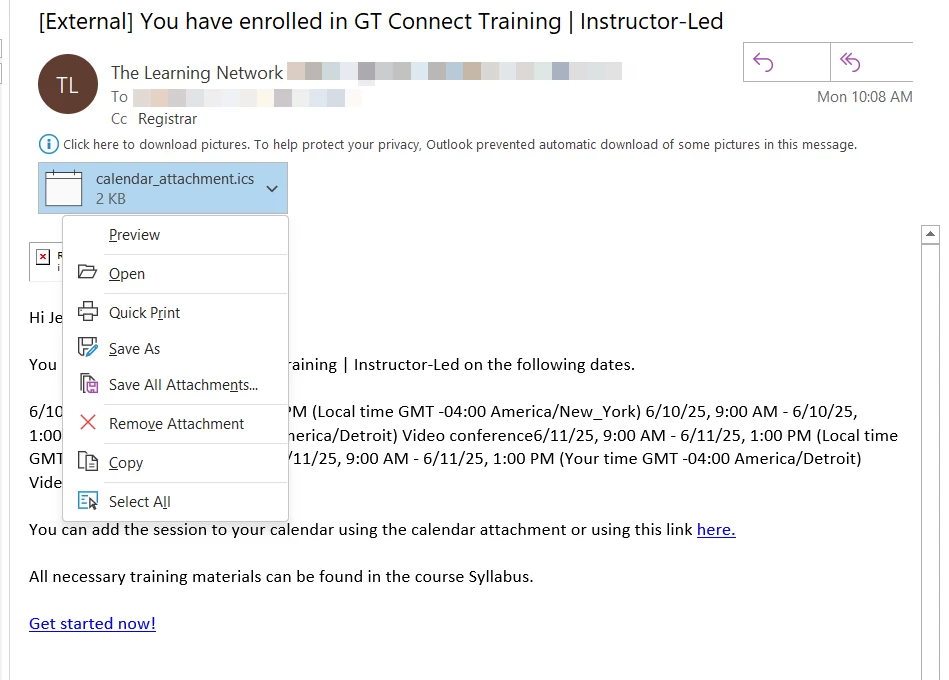
@DanielM In outlook, how would a user import the event? The image below shows the options that a learner gets for the ics file. Any help would be greatly appreciated. 


  • Influencer I
  • June 10, 2025

They have to open the file (double-click or right-click and Open). The “Import” option will show after the ICS file is opened.

Also, I’m pretty sure that different versions of outlook will treat the ICS file differently, so in some versions there may be a different message instead of “Import”. The point is that the calendar application asks you:

  • if to “import” or add the event to an existing calendar - this option adds the event to the user’s calendar

or

  • to create a new calendar with the new event - this option would create a completely new calendar, which has a doubtful purpose, but for sure in case of ILTs the previous option makes more sense, so that the user can follow a single calendar with all their events

  • Author
  • Contributor II
  • June 10, 2025

I just tested this on my own outlook calendar, and we do not get an import option.  So for Microsoft exchange 2021 it doesn’t look like import is an option.  I’m not sure if this is an option for Microsoft 365. Thanks for the suggestion though.


  • Influencer I
  • June 10, 2025

Okay, then this confirms the different behavior for different outlook versions.

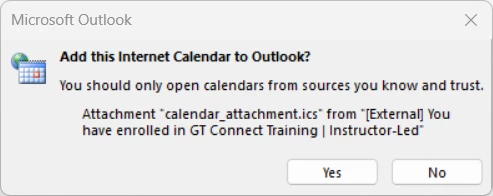
So in the screenshot you attached the two options are not shown. Instead you are being redirected to one of those options or Yes and No are the two options. Since I don’t have this version out Outlook to test, can you say what is the behavior for each of the next options, if you click Yes and if you click No?


  • Author
  • Contributor II
  • June 10, 2025

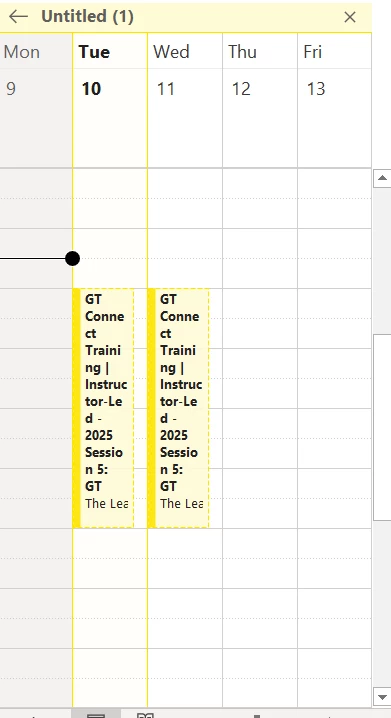
If you click Yes, it opens a brand new untitled calendar. If you click No, nothing happens, the window closes.  


  • Influencer I
  • June 10, 2025

Okay. After some quick research, it seems there is no simple answer:

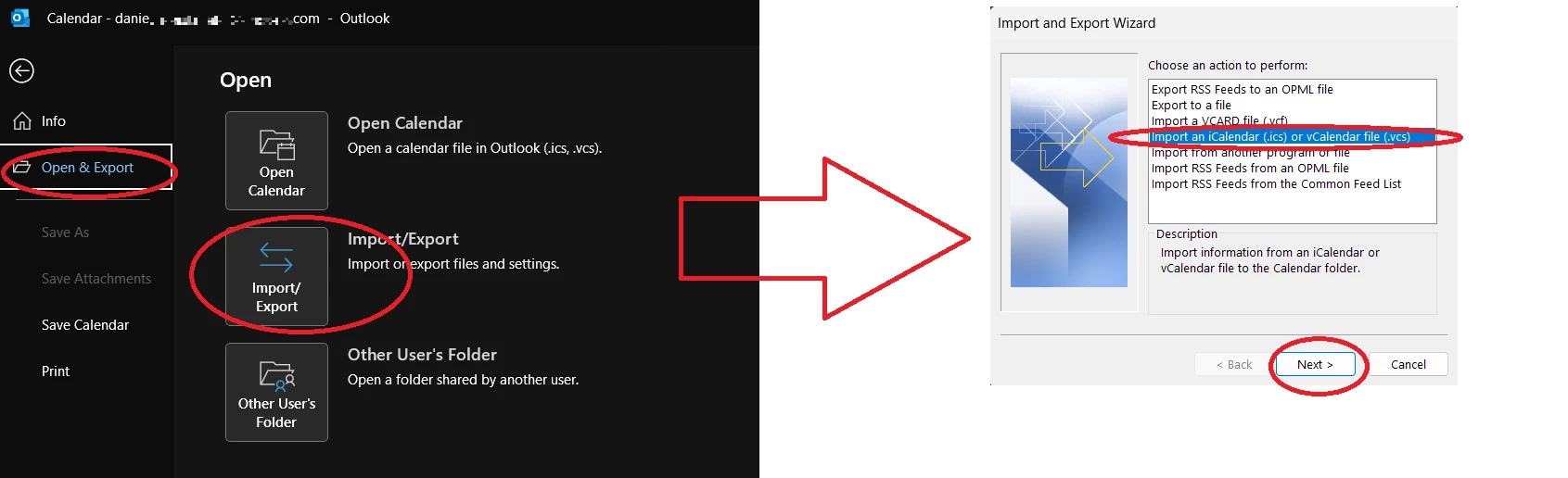
  • it seems your Outlook 2021 simply treats the event as a new calendar and bypasses your options; to force it give you the options, you could try to import the event manually in your calendar: open the calendar, go to File, then Open or Import/Export, then select the ICS from the list and see if you force it to trigger the question if to import or to create a new calendar; since i don’t have Outlook 2021, i cannot test this, but definitely this is not a method to guide end-users (many will be lost along the way).
  • I noticed that ICS files attached to email notifications sent by my sandbox behave as following:
    • “user enrolled in session” notifications and “session starting in XX hours” notifications give me the prompt “Open as New” or “Import”
    • “session change” notifications open directly (as “Import”) and attempt to update the existing event
  • There seems to be many parameters for the ICS files and more combinations of such parameters exist, that can influence the behavior of the email client (outlook); I don’t have the bandwidth to explore this and I think there could be several possibilities, but i think Docebo failed to configured them properly, hence these issues that we notice.

What I suggest is going back to my previous answer:

  • wait until Docebo publishes the fix they promised in our environments (I will test after tomorrow in my sandbox) and let’s test again
  • meanwhile, if you have bandwidth, test that “Docebo Connect with Outlook or Gmail” add-on and investigate what it offers, maybe you have better control of the ICS files with that one; it’s under additional cost by the way

  • Author
  • Contributor II
  • June 10, 2025

Thank you ​@DanielM for your assistance.  The import/export option did work but that is a horrible learner experience as you indicated as well.  Support told me today that this issue was the expected behavior, I will be looking into try the Docebo Connect add on as well.  


Forum|alt.badge.img+4

Hello ​@andrea.bullock,

we had the same issue with the ILT calendar invites so what we did is that we integrated the MS Outlook connector and customized the couple of the recipes there to have proper invites with custom text & RSVP etc.

It was easy to set up and helps with ILTs when it comes to changes and keeping learners up-to-date.
You can find examples of the formulas in the Community how to set up the custom texts (sorry, couldn’t find the page myself to link link it here).