Question

Textfield colors of course status in My Activity page

  • November 8, 2024
  • 6 replies
  • 77 views

Hello,

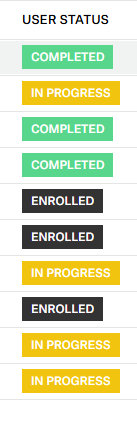
I did not find an answer - does anyone know how to change the textfield colors of the course status displayed in the My Activity page via CSS?
I managed to modify them at most of the other places, but am failing here.

Thanks


6 replies

  • Author
  • Novice I
  • November 9, 2024

Found it, hope it can help someone.

div.user-status.completed {
    background-color: black !important;
}
div.user-status.in-progress {
    background-color: blue !important;
}
div.user-status.to-begin {
    background-color: red !important;
}


luca.rossi
Novice III
Forum|alt.badge.img
  • Novice III
  • November 26, 2024

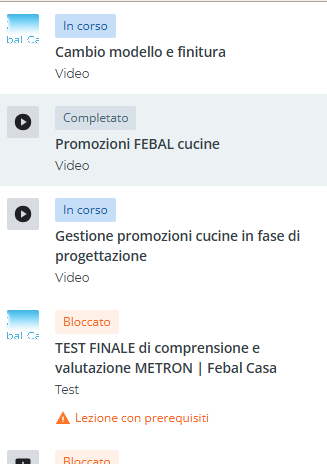
yo, and what about these colors? (they are misleading a bit) :


  • Author
  • Novice I
  • November 29, 2024

Customizing the PLAYER

/* Targeting the active list item */
.dcb-ui-list-item-active {
    background-color: #aaaaaa !important;
}

/* Targeting the badge status for 'In Progress' and changing text color */
.dcb-ui-badge-status-theme-info {
    background-color: #0c6c90 !important;
    color: #ffffff !important; /* Changing text color to white */
}

/* Targeting the badge status for 'Completed' and changing text color */
.dcb-ui-badge-status-theme-success {
    background-color: #06510f !important;
    color: #ffffff !important; /* Changing text color to white */
}


luca.rossi
Novice III
Forum|alt.badge.img
  • Novice III
  • November 29, 2024

Customizing the PLAYER

/* Targeting the active list item */
.dcb-ui-list-item-active {
    background-color: #aaaaaa !important;
}

/* Targeting the badge status for 'In Progress' and changing text color */
.dcb-ui-badge-status-theme-info {
    background-color: #0c6c90 !important;
    color: #ffffff !important; /* Changing text color to white */
}

/* Targeting the badge status for 'Completed' and changing text color */
.dcb-ui-badge-status-theme-success {
    background-color: #06510f !important;
    color: #ffffff !important; /* Changing text color to white */
}


do u mind if i ask you the exact position to put these code?


  • Author
  • Novice I
  • November 29, 2024

Like all of the CSS for customization:
Configure branding and look - Custom styles - 7.0 custom CSS

The position should not matter.


  • Author
  • Novice I
  • August 12, 2025

Actually, all CSS customization of the player failed to work recently. Does anyone know about the reasons? New class names?


Thank you