Best Answer

API - Course custom field

  • June 4, 2024
  • 5 replies
  • 162 views

msantos
Helper II
Forum|alt.badge.img+2

Hello,


I have difficult to find the API to get the information about course custom field, and the course image.

I tried to have a answer from Docebo´s support without success.


Can someone help me?


Thank you

Best answer by Ian

It doesn’t seem to be documented for some reason, but here’s the endpoint for the Course Additional Fields:

GET https://[yoururl.com]/course/v1/courses/{course_id}/additionalfields?page=1&page_size=50

As for the course thumbnail, that’s documented a bit better.

  1. First, you’ll need to get the thumbnail ID by getting course info:
    • GET https://[yoururl.com]/course/v1/courses/{course_id}
    • It’s under data.thumbnail.id
  2. Next, you can make a request to this endpoint:
    • GET https://[yoururl.com]/course/v1/thumbnails/{thumbnail_id}
    • There’s a bit of information there about the thumbnail. If you want to do something with the file itself, you may find it easiest to work with the data.url value.

Hope this helps!

5 replies

Ian
Guide I
  • Guide I
  • Answer
  • June 4, 2024

It doesn’t seem to be documented for some reason, but here’s the endpoint for the Course Additional Fields:

GET https://[yoururl.com]/course/v1/courses/{course_id}/additionalfields?page=1&page_size=50

As for the course thumbnail, that’s documented a bit better.

  1. First, you’ll need to get the thumbnail ID by getting course info:
    • GET https://[yoururl.com]/course/v1/courses/{course_id}
    • It’s under data.thumbnail.id
  2. Next, you can make a request to this endpoint:
    • GET https://[yoururl.com]/course/v1/thumbnails/{thumbnail_id}
    • There’s a bit of information there about the thumbnail. If you want to do something with the file itself, you may find it easiest to work with the data.url value.

Hope this helps!


msantos
Helper II
Forum|alt.badge.img+2
  • Author
  • Helper II
  • June 4, 2024

Hi @Ian , thank you for your help.

About the course custom field, How do I inform the custom field number? In this case is the custom_field_3.


For the Course image, sorry but I need to upload it, not Get. Do you know the correct API?


Thank you again.


lrnlab
Hero III
Forum|alt.badge.img+10
  • Hero III
  • June 4, 2024

The User Additional Fields are numbered in the order they were created…

maybe try this one:

https://doceboapi.docebosaas.com/api-browser/#!/learn/Course/Course_learn_v1_courses_field


Ian
Guide I
  • Guide I
  • June 12, 2024

Sorry for the delay, @msantos.

Regarding uploads, I am fairly sure I managed to get this set up at my previous company, but (a) that was 2022 (maybe even 2021 still), so my memory is foggy; and (b) it was really quite involved.

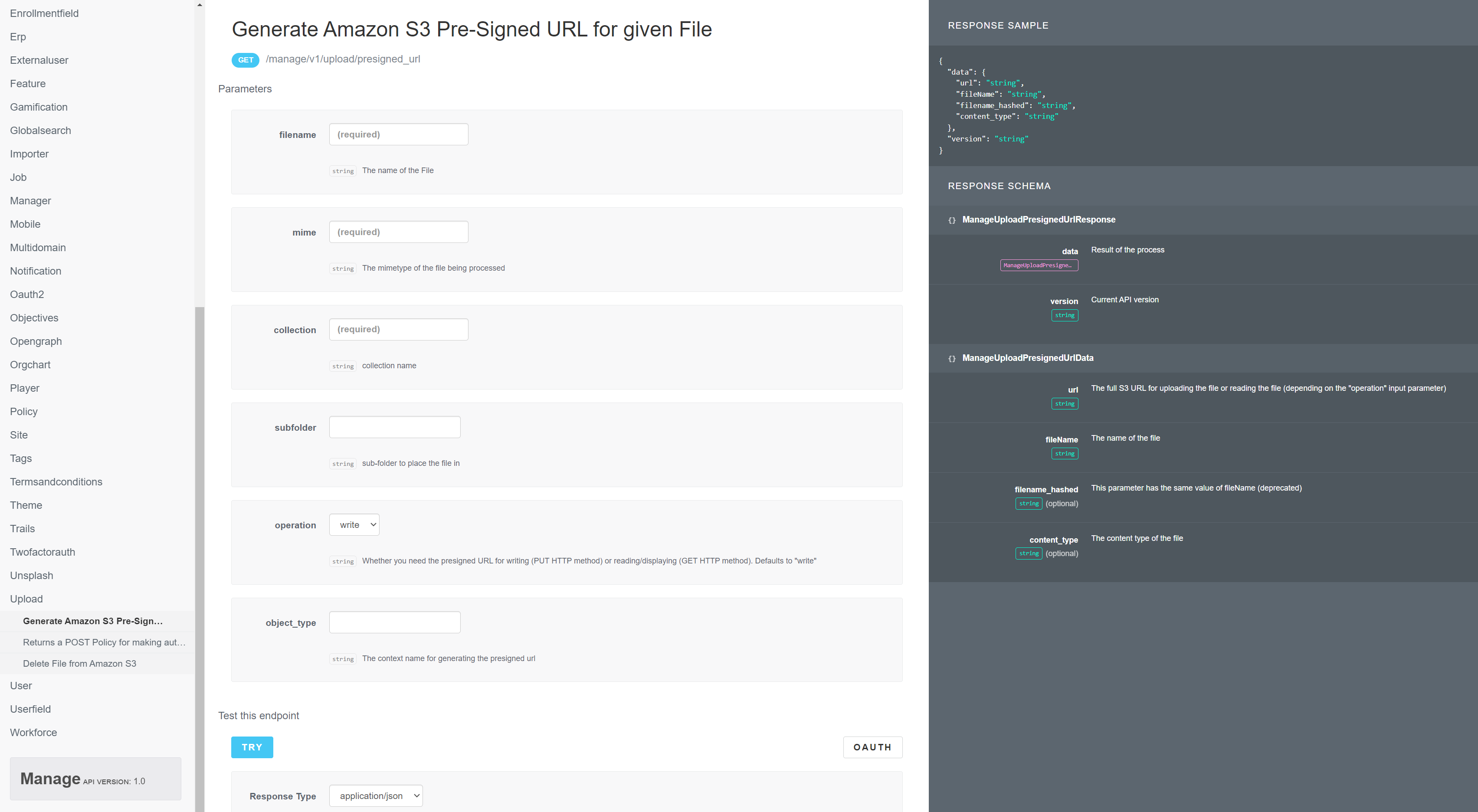
If memory serves, I had to have my own AWS S3 bucket and I was able to somehow transfer the files from there to Docebo’s bucket. I think it involved this endpoint:

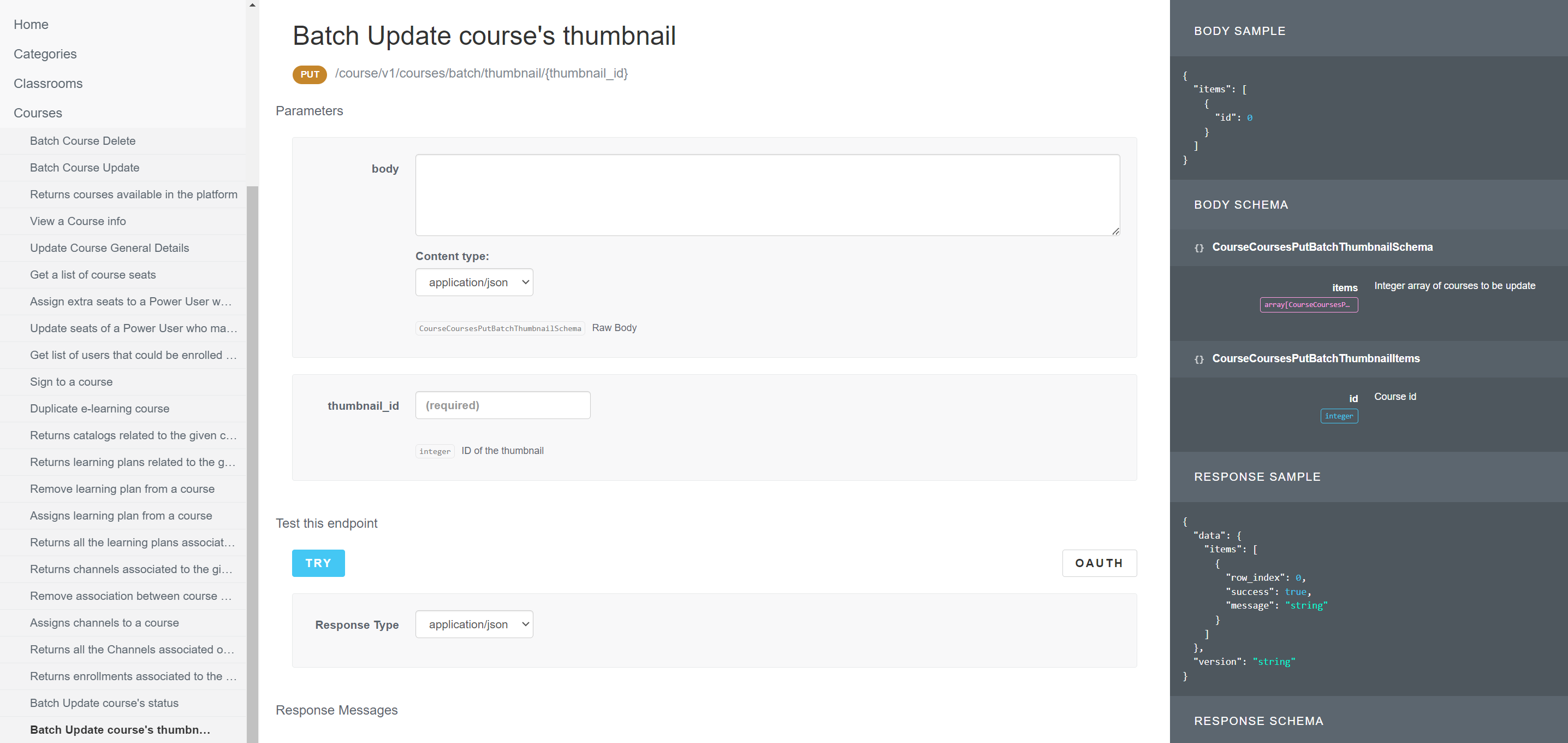
You may find it easier to do the uploads manually and then, once they’re on Docebo’s servers, use a different endpoint for assigning them to courses:

Hope this helps somehow. Sorry I can’t remember more about this.


msantos
Helper II
Forum|alt.badge.img+2
  • Author
  • Helper II
  • June 12, 2024

Sorry for the delay, @msantos.

Regarding uploads, I am fairly sure I managed to get this set up at my previous company, but (a) that was 2022 (maybe even 2021 still), so my memory is foggy; and (b) it was really quite involved.

If memory serves, I had to have my own AWS S3 bucket and I was able to somehow transfer the files from there to Docebo’s bucket. I think it involved this endpoint:

You may find it easier to do the uploads manually and then, once they’re on Docebo’s servers, use a different endpoint for assigning them to courses:

Hope this helps somehow. Sorry I can’t remember more about this.

Thank you.!!!