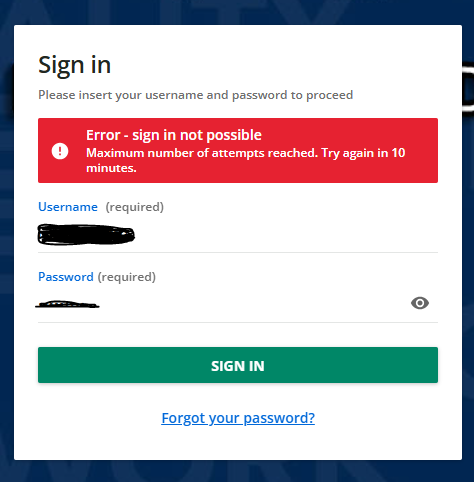
Error - Sign in not possible

  • December 16, 2024
  • 8 replies
  • 168 views

CydBrady

Is anyone else getting this error consistently when they try to log on? We are having 10+ users a day getting this error even if it is the first time trying to log on for the day. Usually clearing cache and cookies fixes the issue, but that is no longer working. I have confirmed that the accounts are not locked. Is there something I am missing here?


8 replies

dklinger
Hero III
Forum|alt.badge.img+11
  • Hero III
  • December 16, 2024

Hi good morning - Most common challenges that we have seen are fat fingering and caching issues. I can't speak to any known challenges with direct authenticating that we have run into over the past 3.5 years with this approach. Maybe there was once a documented platform issue with the SSO at one point for a side of the organization but thats about it.

We do have our service desks acting as our backup and are supporting the reset of password as necessary for individuals and teams as necessary. Overall login has become a minimized concern as we are maturing the app at our organization.


lrnlab
Hero III
Forum|alt.badge.img+10
  • Hero III
  • December 16, 2024

Usually a password reset can clear these up but the user still needs to wait the allotted time before trying again...the admin cannot override the waiting period as far as I know.


CydBrady
  • Author
  • Newcomer
  • December 16, 2024

Even with a password reset the same error is occurring. And they have not maxed out attempts as this will happen on their first try logging in. Usually clearing cache and cookies has fixed the issue and they no longer get the error but that fix seems to have stopped working. 


dklinger
Hero III
Forum|alt.badge.img+11
  • Hero III
  • December 16, 2024

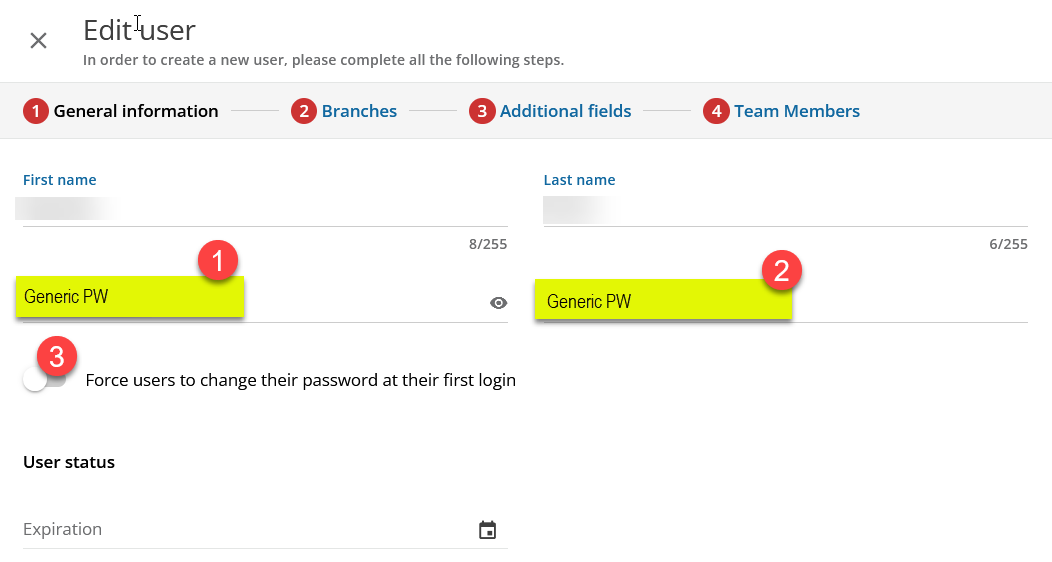
@CydBrady - can i ask - can someone do a hard reset by entering a new password right then and there during the support call with the user as they are attempting to assist?

As in enter a generic one and call out to the learner what the password is? And then enforce a password reset on next login with the option.

Can this workflow work for you?

Some groups won’t support the approach of a generic pw for first use - but entering and saving a password for a user has to work.


CydBrady
  • Author
  • Newcomer
  • December 16, 2024

@dklinger we actually did try that! The same error was received. I thought it must be a widespread issue but then could not find anything in the community about the issue. I have opened a ticket as of this morning as it is now affecting more users, but I figured I would post on the community as well to see if anyone else was dealing with the same issue. 


dklinger
Hero III
Forum|alt.badge.img+11
  • Hero III
  • December 16, 2024

Understood - so keep in mind what ​@lrnlab suggested? Maybe the timing requirement needs to be met? And then try it again???


dklinger
Hero III
Forum|alt.badge.img+11
  • Hero III
  • December 16, 2024

@CydBrady - I would hate to think this happened - but if you are generating imports into the system - has something changed many passwords? With a widespread issue, it maybe good to reset everyone and have them go though the self reset.

Good luck with this one.


dklinger
Hero III
Forum|alt.badge.img+11
  • Hero III
  • December 17, 2024

Um ​@CydBrady - I promise I am done responding here….but it looks as if an issue that was being staged may have interrupted access…