Question

Advanced insights

  • November 22, 2024
  • 5 replies
  • 156 views

Has anyone used the advanced analytics package? We are wondering if it is useful to truly customize dashboards as we would like to report on a lot of our additional fields but don't have that capability even in the custom dashboards. What is your feedback of this new addition and do you find it valuable from a cost perspective?

5 replies

emily.mccarthy
Guide II
Forum|alt.badge.img+4

@pmoro I saw you were talking about this in another post. Decided to add you to this chain so you both could possibly connect and support each other. :)


jckemv
Helper I
Forum|alt.badge.img+2
  • Helper I
  • February 18, 2025

I am keen to hear from others also about success stories in customisation.

Looks like you can do a lot but with the standard dashboards making customisations is very limited. 

There is a course in the Docebo University about this package and I’m currently doing it to learn more.

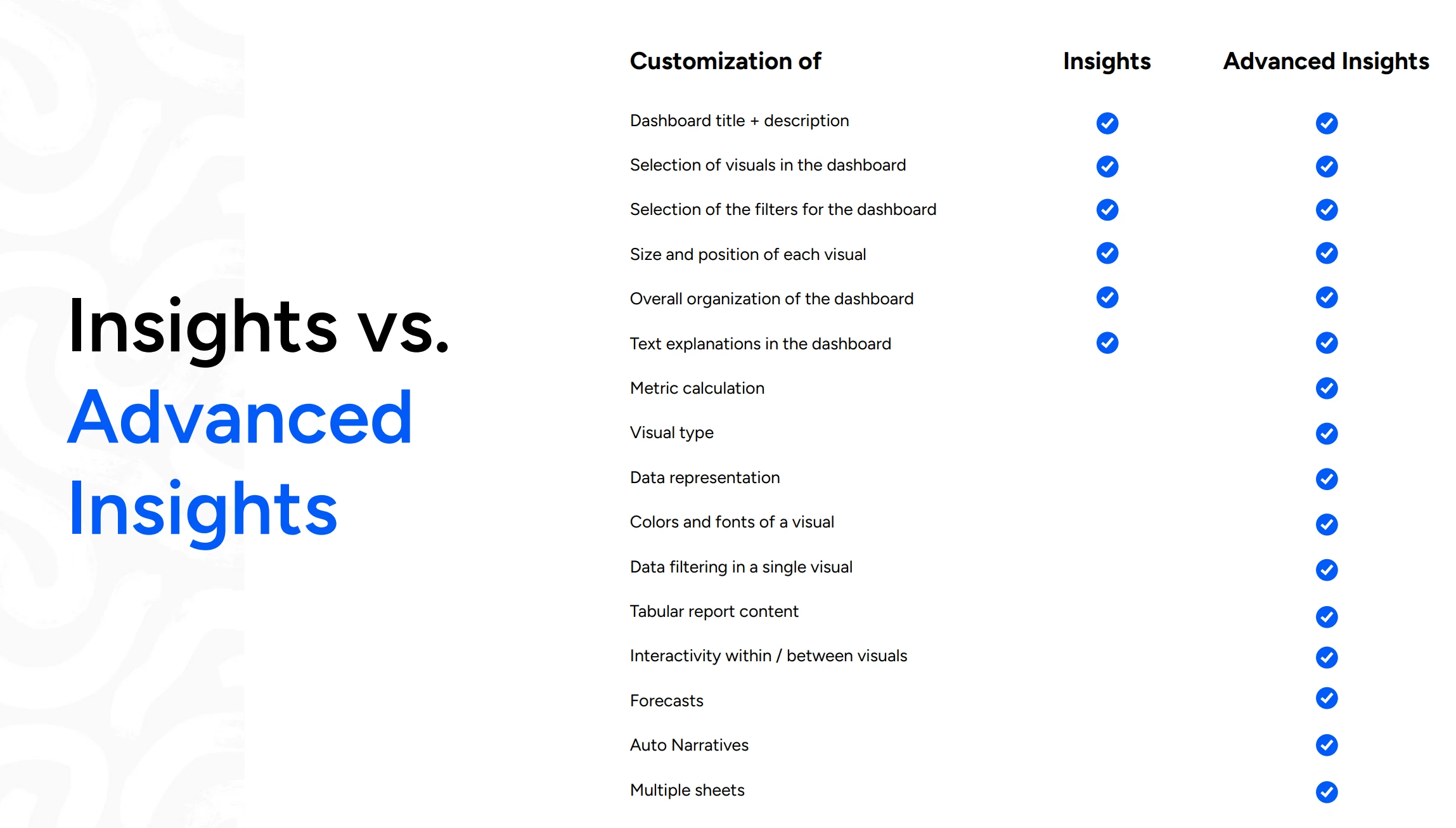
I received this when I asked what is the difference between versions of Insights.


Alan
Guide I
Forum|alt.badge.img+2
  • Guide I
  • February 19, 2025

Hi ​@tsimon23 
We are currently onboarding to Advanced Insights, and I was involved in the Beta. It is certainly a lot more powerful and customisable than standard Insights.  Insights itself is built using AWS’s business intelligence platform called QuickSight. It is similar to Microsoft’s Power BI. With Advanced Insights, the full QuickSight functionality is basically unlocked. 

The main constraint is that you are given a series of pre-defined data tables to work with. Each dashboard can only use one data table.  The current set of tables covers most of the main areas (course and LP enrolments, ILTs, tests, time spent learning) and more will be added over time. 

Another consideration is that QuickSight is a lot more complex than a simple reporting tool. To get the full benefit, you’ll ideally need to be comfortable learning and using QuickSight’s SQL-like scripting language. That said, you can also accomplish a lot with just drag n drop.

We really like the Advanced Insights module and have a lot of important use cases for it. For us it’s one of the best new products Docebo has released. However, you might be best to see whether a trial is possible, in case it’s not quite what you expect.


Lastly, just to flag that you also get the Learn Data module packaged with it. This lets you integrate your own datalake with Docebo’s Snowflake database and download the entire LMS dataset. This does need  people with specialist expertise in your company though.

Hope this helps.
Alan


  • Author
  • Novice II
  • February 25, 2025

Thanks ​@Alan. This is so helpful. We had to eventually use another BI tool and link our reports to the BI tool through an FTP folder. Upon finding out more about the Advanced insights piece I also discovered that for customizations we cannot use more than 5 additional fields to create tables/visuals. In my case this is a little difficult as I have many additional fields and need to report on a bunch of things apart from the standard fields. 


Alan
Guide I
Forum|alt.badge.img+2
  • Guide I
  • February 26, 2025

@tsimon23  Yes, the additional fields limitation can be a bit of a problem in some cases.  Hopefully this will be improved over time!  

Alan