Best Answer

Course assignment changes

  • August 12, 2022
  • 6 replies
  • 50 views

mwilliams
Novice II

Hi everyone,

How can I change courses (for users and groups) that have already been assigned (and some already completed) to users to a “not required” status and maintain their records for auditing purposes?


Thanks in advance!

Best answer by KMallette

@mwilliams If by “assigned” you mean ‘enrolled’, then you are sorted stuck.  Learners are either enrolled or not enrolled so if you want to remove an enrollment for those who show an “Enrolled” or “In Progress” status, you can do so in the Enrollments tab of the Course Management page. If you want to maintain the completed status, you can, but you have to leave them assigned (aka enrolled) to the course. There isn’t really a way to mark a course as required or not required (except as a prerequisite for another course).

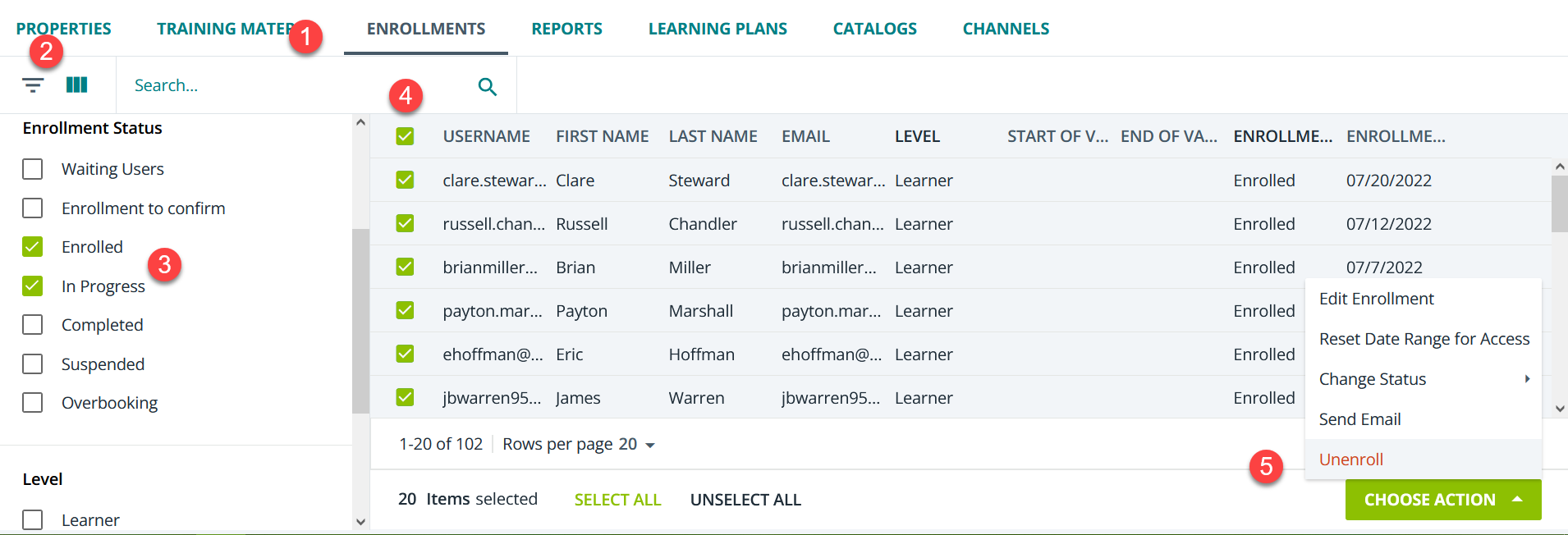
Assuming I understand your question correctly, you can do something like this in Course Management (after clicking the clink for a course). Note: This works by user and course status, not by groups.
 

6 replies

lrnlab
Hero III
Forum|alt.badge.img+10
  • Hero III
  • 5381 replies
  • August 12, 2022

Not sure what you mean by “not required”...can you elaborate please? Thx


mwilliams
Novice II
  • Author
  • Novice II
  • 7 replies
  • August 12, 2022

In our regulated environment we have courses that are required and courses that are available for information only. Some of the courses have been inadvertently assigned during our role out.


KMallette
Hero II
Forum|alt.badge.img+9
  • Hero II
  • 823 replies
  • Answer
  • August 12, 2022

@mwilliams If by “assigned” you mean ‘enrolled’, then you are sorted stuck.  Learners are either enrolled or not enrolled so if you want to remove an enrollment for those who show an “Enrolled” or “In Progress” status, you can do so in the Enrollments tab of the Course Management page. If you want to maintain the completed status, you can, but you have to leave them assigned (aka enrolled) to the course. There isn’t really a way to mark a course as required or not required (except as a prerequisite for another course).

Assuming I understand your question correctly, you can do something like this in Course Management (after clicking the clink for a course). Note: This works by user and course status, not by groups.


lrnlab
Hero III
Forum|alt.badge.img+10
  • Hero III
  • 5381 replies
  • August 12, 2022

@mwilliams if as @KMallette says above, you only need to unenroll users, you can certainly do that..or, you could also look enable the self-unenroll option for those courses that are for info purposes only and let the users decide if they want to keep those on their learning plans or not...might help take away seom fo the guess work.

Same rules apply as mentioned above...if a user is unenrolled, the history is removed from their transcript. However if you just unenroll and do not reset them back to “not started” if they are reassigned, the LMS will recognize they have competed the course but it will change the completion date to the date it was reassigned. something to keep in mind.


mwilliams
Novice II
  • Author
  • Novice II
  • 7 replies
  • August 12, 2022

Thanks!


mwilliams
Novice II
  • Author
  • Novice II
  • 7 replies
  • August 12, 2022

Thank you!