

How do I set up groups that "exclude" those already in a group?

  • December 20, 2023
  • 3 replies
  • 81 views

estarks8
Helper I
Forum|alt.badge.img+5

Is there a way to create a group of individuals who are NOT part of another group? i.e. US employees but exclude those who are in California


We need to enroll users in specific compliance training courses. We want those who are in “California” to be enrolled in one course, while those in the US are enrolled in another course. Groups work for California, but we can’t seem to set up a group for those who are in the US, as we have other employees who are in Canada, UK, Italy, and France. 

3 replies

KMallette
Hero II
Forum|alt.badge.img+9
  • Hero II
  • December 20, 2023

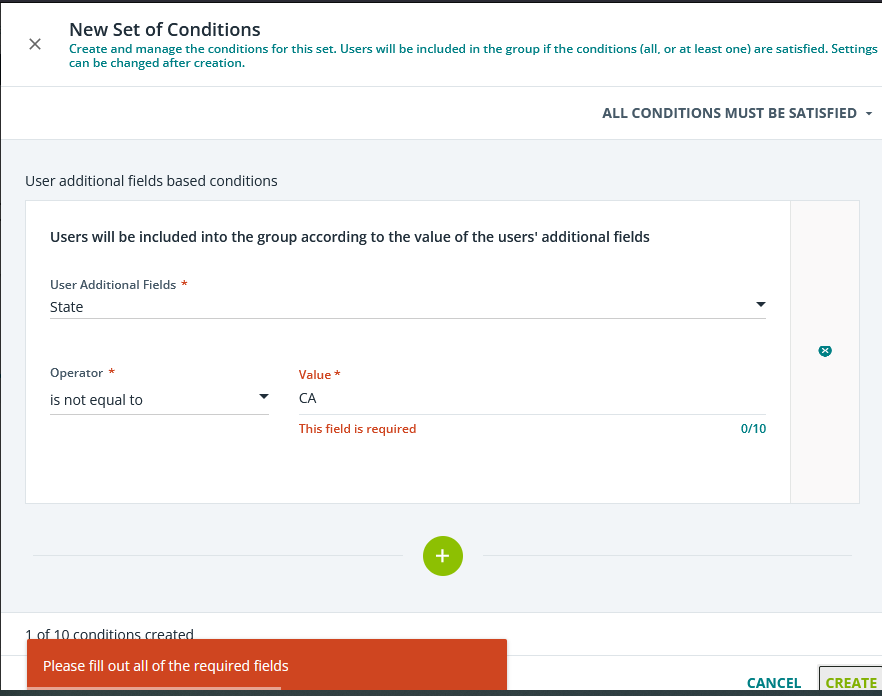
@estarks8 There is the concept of “is not equal to” but I’ve always had an issue getting it to work. I have an additional field called “state”, and when adding either CA or California, it tells me that I need to add a value. Not sure what’s happening there…This is the screenshot I get when I try CA

If your results are the same, I’d put in a ticket to Support.


estarks8
Helper I
Forum|alt.badge.img+5
  • Author
  • Helper I
  • December 20, 2023

@estarks8There is the concept of “is not equal to” but I’ve always had an issue getting it to work. I have an additional field called “state”, and when adding either CA or California, it tells me that I need to add a value. Not sure what’s happening there…This is the screenshot I get when I try CA

If your results are the same, I’d put in a ticket to Support.
 

You need to hit enter after typing “CA” to put in the value. I’ve tried the “is not equal to” but I’m finding the issue is probably with our data not displaying as we need it to (at least to make my life easier)


KMallette
Hero II
Forum|alt.badge.img+9
  • Hero II
  • December 20, 2023

@estarks8There is the concept of “is not equal to” but I’ve always had an issue getting it to work. I have an additional field called “state”, and when adding either CA or California, it tells me that I need to add a value. Not sure what’s happening there…This is the screenshot I get when I try CA

If your results are the same, I’d put in a ticket to Support.
 

You need to hit enter after typing “CA” to put in the value. I’ve tried the “is not equal to” but I’m finding the issue is probably with our data not displaying as we need it to (at least to make my life easier)

THANK YOU!!!! I have to press Enter in other areas of this platform, so I’m embarrassed that didn’t occur to me here. 😣