Best Answer

Instructor Widget

  • October 24, 2024
  • 4 replies
  • 103 views

VRossi
Forum|alt.badge.img

I am in the Course Management section in one of my courses. How do I changed the listed instructor? Thanks! 

Best answer by lrnlab

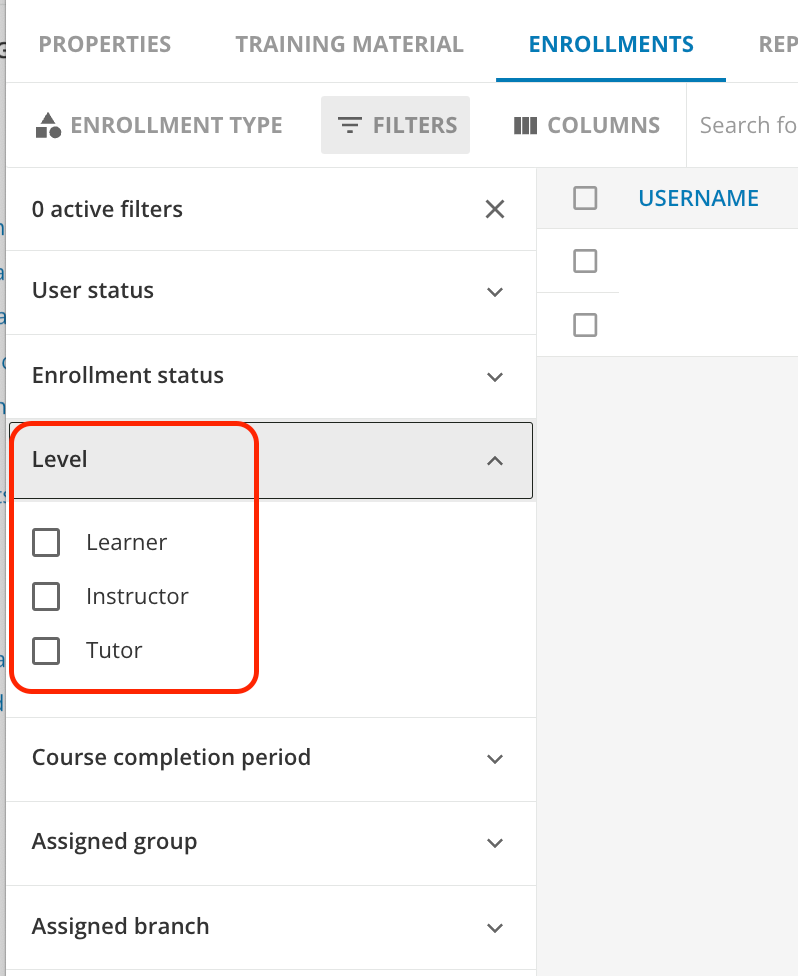
Please look at your enrolments for that course and you can use a filter to find anyone who has a level of Instructor and switch them to Learner...you might also look for anyone with the level of Tutor.

 

4 replies

lrnlab
Hero III
Forum|alt.badge.img+10
  • Hero III
  • October 24, 2024

depends on the course type…

For elearning, just changed the learner level from instructor to learner

If for an ILT courses, there is an instructor section on the “details” tab of the session (or on the event as you can add in both spots)


VRossi
Forum|alt.badge.img
  • Author
  • Newcomer
  • October 24, 2024

Thanks! It is elearning. I added a widget at the bottom on my training materials tab. It lists the wrong instructor, and I need to change the person.


lrnlab
Hero III
Forum|alt.badge.img+10
  • Hero III
  • Answer
  • October 25, 2024

Please look at your enrolments for that course and you can use a filter to find anyone who has a level of Instructor and switch them to Learner...you might also look for anyone with the level of Tutor.



VRossi
Forum|alt.badge.img
  • Author
  • Newcomer
  • October 25, 2024

Thanks! It worked!