



Best Answer

New User Email Not Sending

  • March 7, 2024
  • 4 replies
  • 57 views

Bkatzman
Influencer III
Forum|alt.badge.img+1

Greetings,

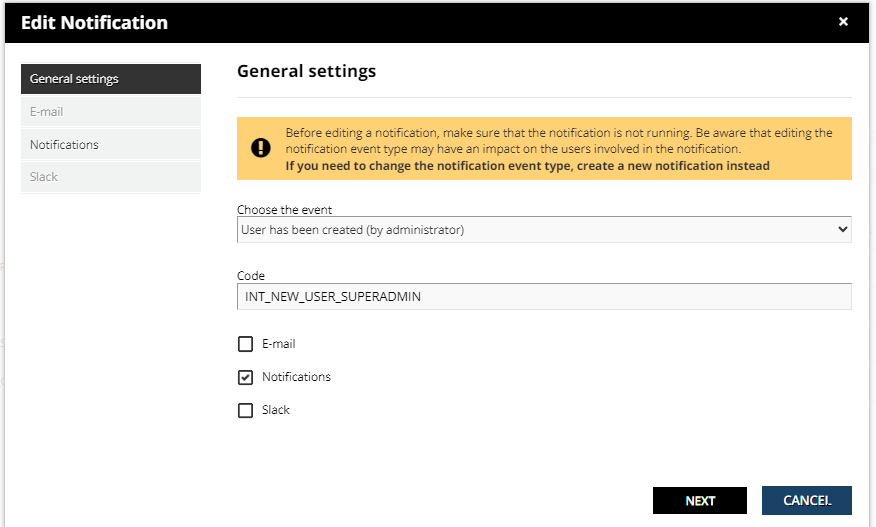
Currently when a new user is created they are not being sent an email. I believe it is due to the setting below. Is this true? Also, if I change the setting to “email” how can I sure it doesn’t send an email to all previously created users? Thank you for your time. BK



Best answer by lrnlab

yes, Notifications are those that appear on the top right o the screen under the bell icon. “email” option is the one you need to configure to send out. Once enabled it will only work for the jobs that are queued up after the notification was enabled. It does not go back in time. You can always turn them OFF/ON as needed. Using the notificaitons is low risk since the worst that could happen is that they would see a large number on the badge next to the bell icon...no spam with that option.

4 replies

trose23
Helper III
Forum|alt.badge.img+3
  • Helper III
  • March 7, 2024

That is true.  Notifications is only for notifications on the platform itself.  Email must be checked for an email to be sent.

All notifications look forward only.  If you create a user right now without the notification on, and then activate the notification 5 minutes later, they would not receive the notification.

Also, if you have the notification coded the way you want in the notification option, you can copy your code from the notification and use that for your email if you had made changes to the standard notification.


Bkatzman
Influencer III
Forum|alt.badge.img+1
  • Author
  • Influencer III
  • March 7, 2024

Thanks so much @trose23 ! Super helpful!


lrnlab
Hero III
Forum|alt.badge.img+10
  • Hero III
  • Answer
  • March 7, 2024

yes, Notifications are those that appear on the top right o the screen under the bell icon. “email” option is the one you need to configure to send out. Once enabled it will only work for the jobs that are queued up after the notification was enabled. It does not go back in time. You can always turn them OFF/ON as needed. Using the notificaitons is low risk since the worst that could happen is that they would see a large number on the badge next to the bell icon...no spam with that option.


Bkatzman
Influencer III
Forum|alt.badge.img+1
  • Author
  • Influencer III
  • March 7, 2024

Thank you, also @lrnlab !




