Question

How toSet Up Google Analytics 4 to Show Aggregate Search Query Data

  • July 5, 2023
  • 3 replies
  • 139 views

vegard.ofstaas
Influencer I

Hi

I have found this tutorial about how to set this up on the old GA, but does anyone hav a description for GA4



3 replies

Forum|alt.badge.img+1
  • Contributor II
  • August 23, 2023

I was trying to locate the same setup data in GA4, were you able to find anything? 


vegard.ofstaas
Influencer I
  • Author
  • Influencer I
  • August 23, 2023

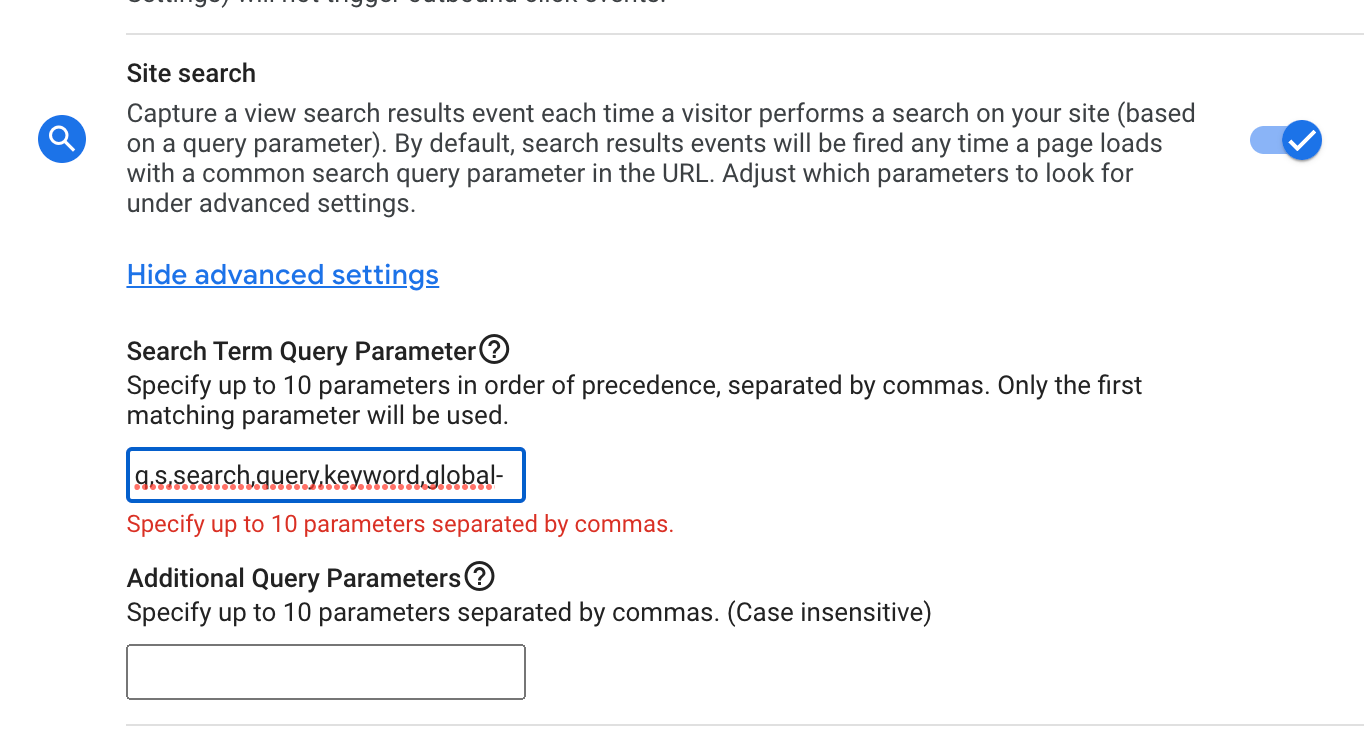
Sorry, I hav not found a solution to this yet, but I might have found the cause of the problem, and that is how the URL for global search is built. If I search for payroll, this URL is created https://www.vismalearninguniverse.com/learn/global-search/payrol
The problem is the hyphen in /global-search/ as the hyphen is not accepted by Google Analytics:
The red error message appears as soon as I type in the hyphen.


Sweely
  • Newcomer
  • October 1, 2025

This is a great question and a very common problem when integrating data from Google Analytics (GA4) into an external reporting tool like Domo.

The core issue, as you started to figure out, lies in how metrics like Sessions are counted in GA4, which is a session-scoped metric, versus how they are aggregated when combined with hit-scoped dimensions outside of the GA4 interface.

When you pull in hit-scoped dimensions such as Page path + query string or Page referrer, GA4's API returns a row for every unique combination of your selected dimensions and the metric.

Because a single session can span multiple unique page paths, page referrers, or other hit-level custom dimensions, that session's session count is essentially distributed across all those rows.

When you then try to SUM the Sessions column in Domo, you are double- or triple-counting the sessions because the original session count is repeated on multiple lines in your dataset, leading to the inflated number you are seeing.

GA4's own reporting interface handles this complexity by applying de-duplication and aggregation logic behind the scenes to show you a distinct session count, which is why your in-GA4 report matches, but the raw data pulled via the API does not.

To solve this, you need a way to either calculate a truly distinct session count in Domo or, more reliably, use an architecture that provides access to the raw, event-level data.

Our approach involves using the Domo API connectors in conjunction with a more robust data pipeline.

A better long-term solution is to move away from relying on the GA4 Data API for complex reporting and use a system that processes the raw event data directly.

This is where services like Google Tag Manager (GTM), an additional server-side tagging solution like Stape, or an architectural choice like exporting to Google Cloud Platform (GCP), specifically BigQuery, become a good workaround.

BigQuery is the only method that provides you with the true, unaggregated, event-level data from GA4.

By exporting your GA4 data to BigQuery, you get every single user interaction (event) with all its associated parameters and timestamps.

Then, you can use Domo's BigQuery connector instead of the standard GA4 connector.

This setup allows you to write SQL queries in Domo to perfectly replicate the session counting logic of GA4, or even define sessions entirely on your own terms using the raw event data, thereby eliminating the double-counting problem you experienced with the API-pulled dimensions.

Although this involves an additional step and cost for BigQuery, it guarantees that your external reporting in Domo will match your GA4 reports, regardless of the dimensions you select.