
Best Answer

Course to User report that shows zero enrollment courses

  • July 5, 2023
  • 2 replies
  • 68 views

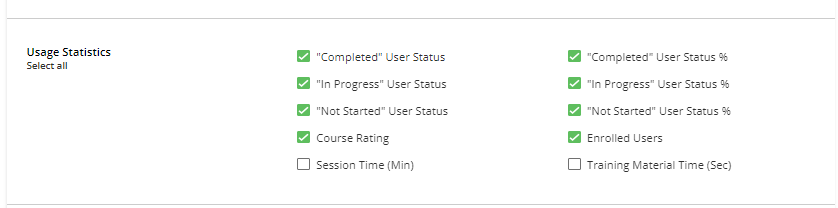
Is there a report or can the Course to User custom report options be updated to allow for the displaying of zero enrollment courses.  I know that you can look at the course meta data on individual courses in the reports tab but this is not helpful.  If a filter could be added to usage statistics to allow for ‘zero enrollments’ that would be great



Best answer by Chelsy Koshy

Currently, there is no option to filter by zero enrollment in the custom reports. However, you can still obtain this information by exporting the course metadata. I recommend submitting this idea as an enhancement request to the Docebo team. They will review your suggestion and consider it for future updates.

2 replies

Forum|alt.badge.img+4
  • Guide I
  • Answer
  • July 6, 2023

Currently, there is no option to filter by zero enrollment in the custom reports. However, you can still obtain this information by exporting the course metadata. I recommend submitting this idea as an enhancement request to the Docebo team. They will review your suggestion and consider it for future updates.


Forum|alt.badge.img
  • Novice III
  • July 18, 2024

Currently, there is no option to filter by zero enrollment in the custom reports. However, you can still obtain this information by exporting the course metadata. I recommend submitting this idea as an enhancement request to the Docebo team. They will review your suggestion and consider it for future updates.

Can you say which part of the course metadata export shows zero enrollments?


