Answer

Moving Widgets for Mobile App

  • January 16, 2023
  • 2 replies
  • 73 views

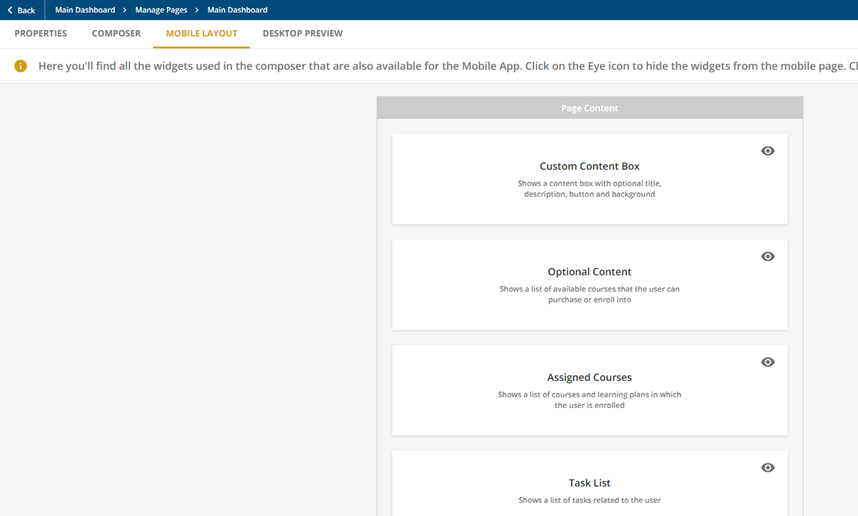
Hello Docebo Community, I would like to be able to move the task list up on the below list for the mobile app. However I have not found a way to accomplish this. I’ve found some article that it can been done but not really how. Is there a way?   


Best answer by eleonora.maggioni

Hi @lrenfrow
as @lrnlab said it is not possible to move the widget in the mobile tab, but you can create a specific page for the mobile that will be different from the one for the desktop, and so design it in the desktop side and see how it is look in the mobile tab. Then in the menu you can add in the mobile menu the page that you have created (you can have different pages for the mobile and the desktop in the same menu)

2 replies

lrnlab
Hero III
Forum|alt.badge.img+10
  • Hero III
  • January 16, 2023

Hi @lrenfrow as far as I know the only layout option are controlled on the Desktop (composer) tab. The mobile version is created based on what widgets are available for mobile but you cannot design a separate page for mobile. 


eleonora.maggioni
Novice II
Forum|alt.badge.img+1

Hi @lrenfrow
as @lrnlab said it is not possible to move the widget in the mobile tab, but you can create a specific page for the mobile that will be different from the one for the desktop, and so design it in the desktop side and see how it is look in the mobile tab. Then in the menu you can add in the mobile menu the page that you have created (you can have different pages for the mobile and the desktop in the same menu)