Question

Users (only) Report

  • January 20, 2022
  • 4 replies
  • 98 views

Forum|alt.badge.img+1

Is there a way to export the list of users in the system and their demographics with the branch?  I can get everything except the branch from the user management screen?   We track our users and I need a clean report without course information tied to it so that we can report out information.

4 replies

Forum|alt.badge.img+1
  • Author
  • Contributor I
  • January 20, 2022

I thought I figured it out but I was missing branch


lrnlab
Hero III
Forum|alt.badge.img+10
  • Hero III
  • January 20, 2022

Hi @lisa.schneer there is an export option on the User Management page…

Select the users you want to export

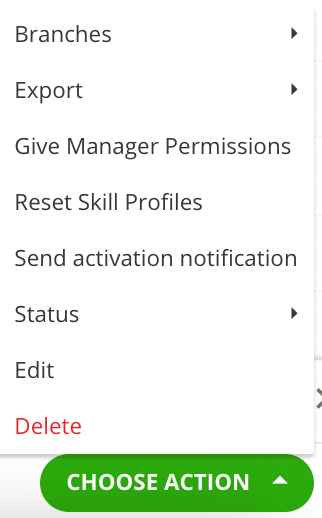
Look at the bottom right of the screen and you’ll see a Choose Action button

Click on that and you’ll the various functions you can do for those selected users including exporting to CSV or Excel

and coming soon you will also be able to include the branch name, code and path indoor export


alekwo
Guide III
Forum|alt.badge.img+1
  • Guide III
  • January 21, 2022

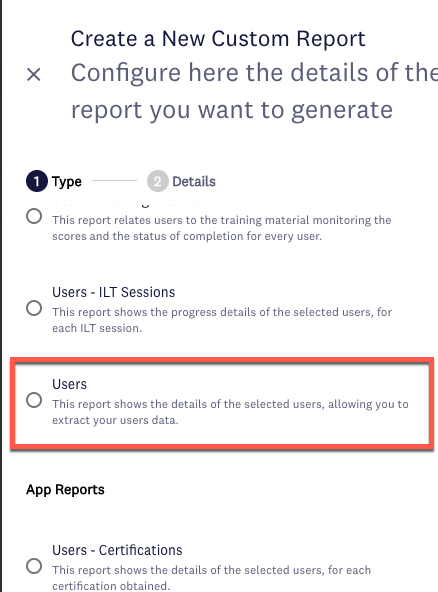
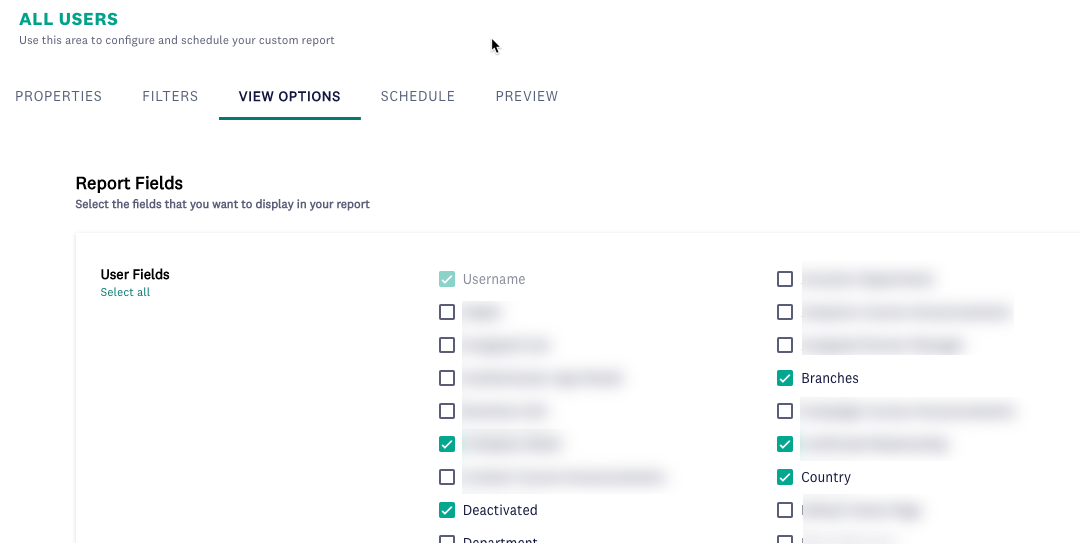
@lisa.schneer in the New Reports section you can create a Users-only report with any data, including the branch.


Bart_at_Yamaha Motor
Helper II

Hi Lisa, know that there is an update coming, that you can actually also do this directly from the users management page. Please see this post: 

Sorry @lrnlab , just noticed you also mentioned this already in your reply, didn't want to steal your thunder :upside_down: