


Answer

Attendance Sheet - location columns/tracking virtual attendance

  • October 26, 2022
  • 5 replies
  • 216 views

zoe.johannsen
Novice I

New to managing this LMS, so thank you in advance for your patience! 

We host a lot of our technical trainings at our HQ. Because of this, we open up a lot of those trainings as a hybrid option so that other office staff can attend. It’s helpful to know which staff are attending in-person vs. in the virtual space (but in real-time, not a recorded session). Occasionally, the learning team is not present for these trainings and it’s helpful for the facilitator to know how many staff from other offices we expect. 

I wrote Docebo support to see if there was a way to customize our attendance sheet with a ‘location' column, but there is no way to do that. Do others have alternative ways to easy track who is where when attending hybrid courses? I’d like to easy say that there will be 3 from our Melbourne office, 2 from our NY office, etc. Or, 5 total from other offices. Whatever is easiest. 

Thanks!
Best answer by lrnlab

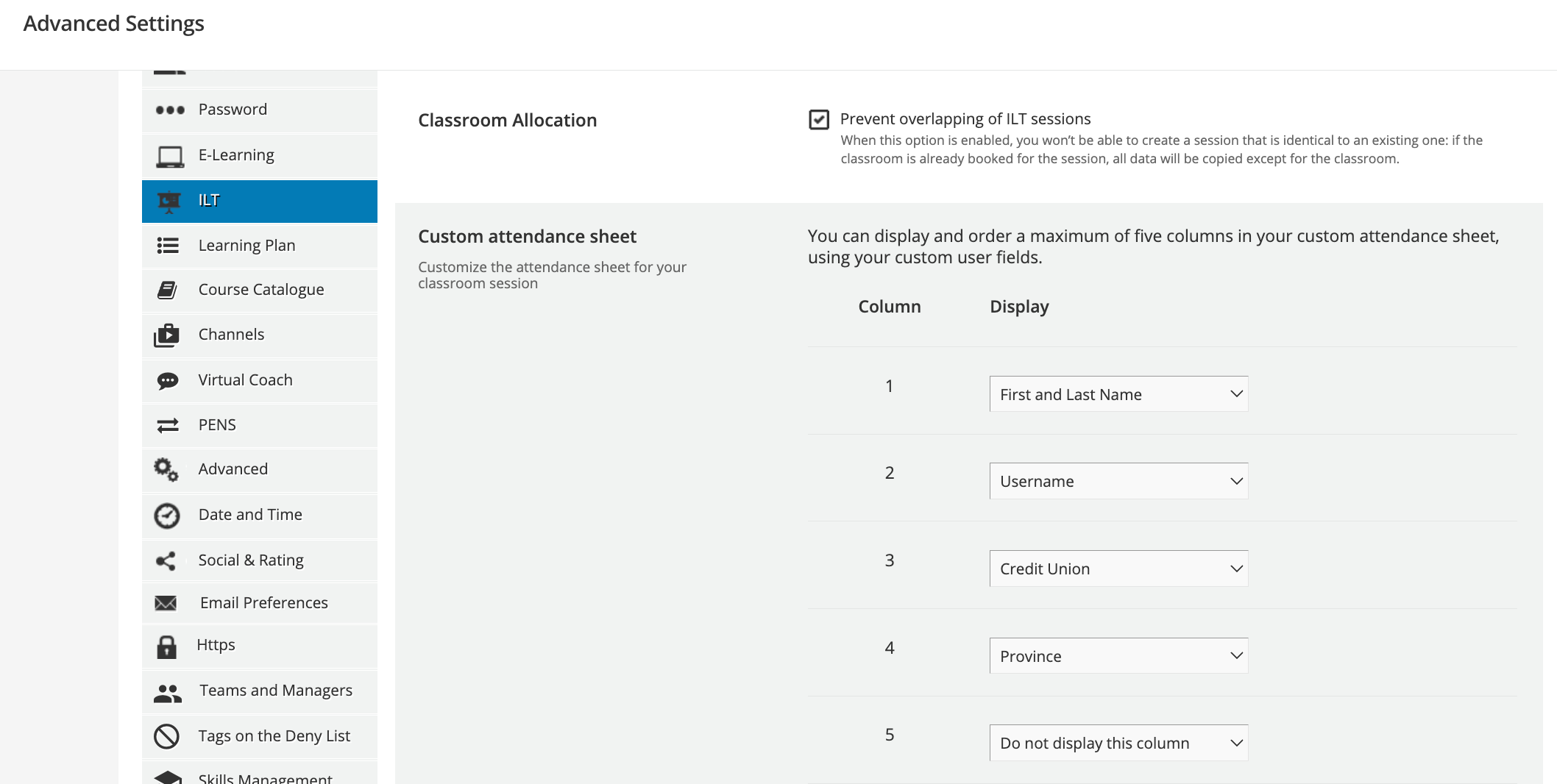
It’s under Advanced Settings > ILT. You can configure it there and add your custom fields as needed. There are only 5 spots though. 


5 replies

lrnlab
Hero III
Forum|alt.badge.img+10
  • Hero III
  • October 26, 2022

Hi @zoe.johannsen if you have a custom field for your locations on your user profiles, you can bring that into the attendance sheet.


zoe.johannsen
Novice I
  • Author
  • Novice I
  • November 28, 2022

Hi @lrnlab -- how do you bring it into the attendance sheet? Under course management/session? Can’t seem to find the spot to add it in. Thanks! 


lrnlab
Hero III
Forum|alt.badge.img+10
  • Hero III
  • Answer
  • November 28, 2022

It’s under Advanced Settings > ILT. You can configure it there and add your custom fields as needed. There are only 5 spots though. 


zoe.johannsen
Novice I
  • Author
  • Novice I
  • November 28, 2022

@lrnlab thank you so much! 


lrnlab
Hero III
Forum|alt.badge.img+10
  • Hero III
  • November 28, 2022

glad to help!


