Answer

Error uploading events via CSV

  • October 10, 2023
  • 4 replies
  • 88 views

Hello, please could anyone help? I have problems uploading events. Error message is ""day"". I already tried all possible formats. Downloading the template gives the following format "01/01/2021" However, it will not accept it when uploading it.
Thanks so much in advance if you could share if and how you had overcome the same issue!
Caro

Best answer by lrnlab

That’s the format I used and it worked (mm/dd/yyyy)...Are you making sure to match up the data fields when you’re doing your imports? Is that the error message you are seeing? I ask since the start and end times are also picky.


4 replies

lrnlab
Hero III
Forum|alt.badge.img+10
  • Hero III
  • Answer
  • October 10, 2023

That’s the format I used and it worked (mm/dd/yyyy)...Are you making sure to match up the data fields when you’re doing your imports? Is that the error message you are seeing? I ask since the start and end times are also picky.



elamast
Hero I
Forum|alt.badge.img+7
  • Hero I
  • October 10, 2023

Via the API or ??  For API I normally use the date format YYYY-MM-DD HH:MM:SS as text. (Excel loves to mess with the date format.)


  • Author
  • Newcomer
  • October 13, 2023

I tried all different date formats and did not succeed unfurtunately
I use the browser for upload

How would you match up data fields? I downloaded the template. It gave me the date format


lrnlab
Hero III
Forum|alt.badge.img+10
  • Hero III
  • October 13, 2023

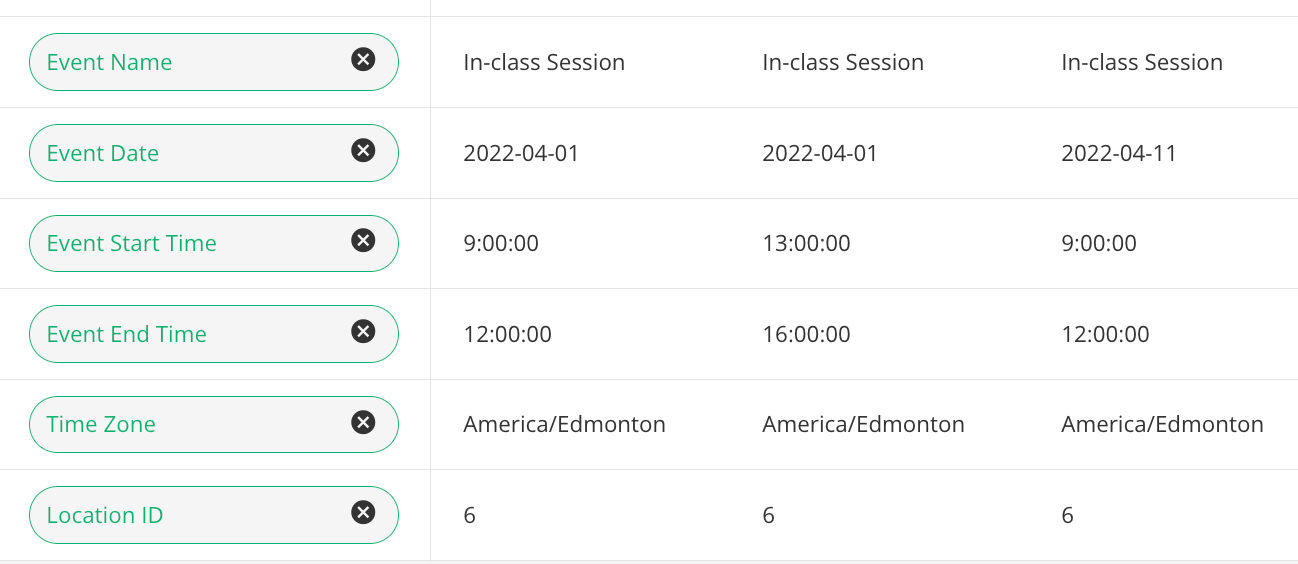
I wonder if the time element is what is causing the trouble…? I pulled one of my previous import templates and it looks like this when I import. Our system date format is YYYY-MM-DD

I created a template that include both the session and event data and when I import, I only match up the fields for either the Session creation or Event creation; you need to start with sessions to get a unique ID that you then use to create the events.