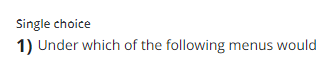
Docebo numbers your test questions in a <#>) format with a font size of 12.
Is there a way to change the font size or the numbering format?
I would prefer 14 pt with a <#>. format.



 +1
+1Docebo numbers your test questions in a <#>) format with a font size of 12.
Is there a way to change the font size or the numbering format?
I would prefer 14 pt with a <#>. format.
Best answer by gstager
I think we can resize this easily enough but replacing the ) with a . would be the obstacle.
In my platform - it looked as though it was at a 14 for font-size already.
I personally thought a bump to 16 was not much of a distinction so I went with 18 and
increased the font-weight to 700 but you can tinker however you desire.
/** Modify the numbering system for quiz questions **/
/** Adjust values as desired **/

.question-block .numbering {
    font-weight: 700;
    font-size: 18px;
}
Enter your email address or username and password below to log in to Docebo Community. No account yet? Create an account
Enter your E-mail address. We'll send you an e-mail with instructions to reset your password.





