Answer

How to Add Due Dates on Learning Plans when Enrolling

  • February 11, 2022
  • 16 replies
  • 940 views

KatieD
Influencer I
Forum|alt.badge.img+2

Hello - we have several customers who like to enroll their employees into learning plans and they want to have due dates on the enrollments. The only way I can figure how to do that is to enroll the users, and then one by one edit each enrollment to add the due dates. When our customers have to do that for 100 enrollments, they get a little grouchy. Is there a better way?

Best answer by lrnlab

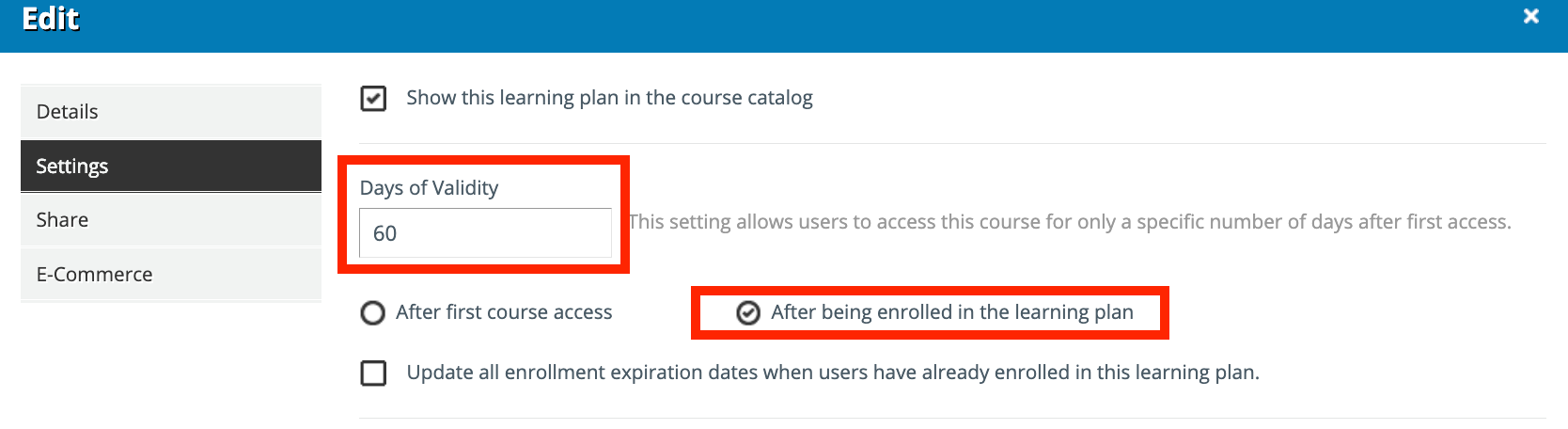
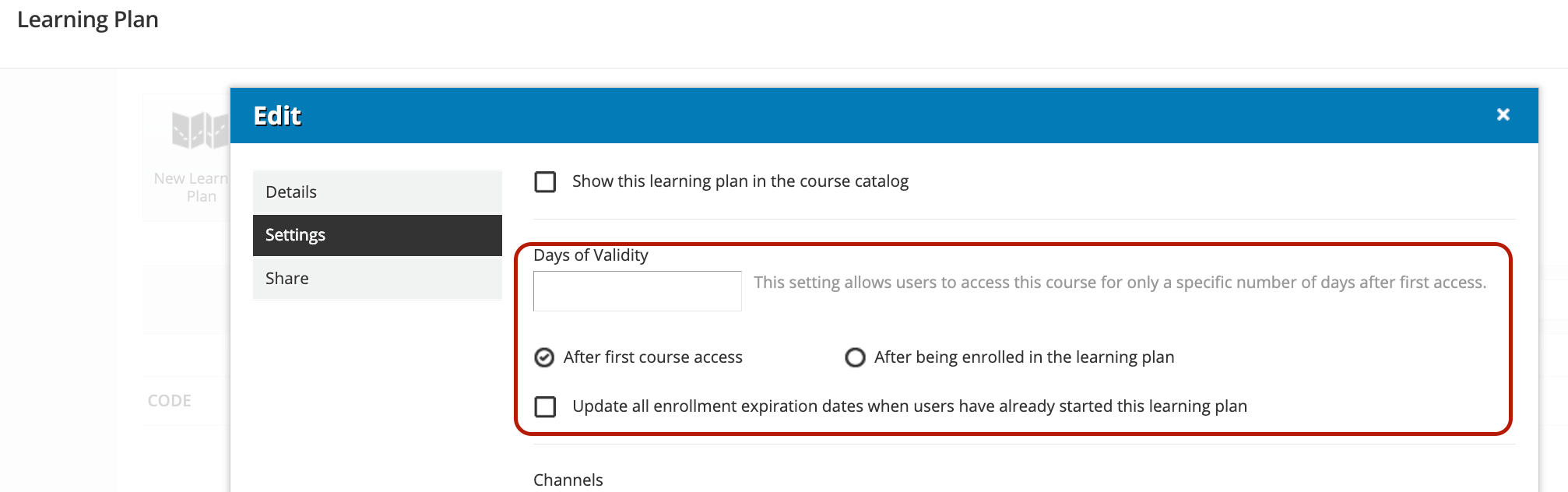
Hi @KatieD not sure if this would work for you but you can set a value on the LP that would automatically set.a due for any one enrolled...
 

16 replies

lrnlab
Hero III
Forum|alt.badge.img+10
  • Hero III
  • Answer
  • February 11, 2022

Hi @KatieD not sure if this would work for you but you can set a value on the LP that would automatically set.a due for any one enrolled...


KatieD
Influencer I
Forum|alt.badge.img+2
  • Author
  • Influencer I
  • February 11, 2022

Thanks @lrnlab - that might work. Certainly better than individually editing 100+ enrollments.


Forum|alt.badge.img+3
  • Helper III
  • February 11, 2022

@lrnlab The days of validity is fine, but it doesn’t work if you have an absolute due date. Say you want everyone to complete it by Dec 31 no matter when they came into the company and were enrolled in the learning plan.


KatieD
Influencer I
Forum|alt.badge.img+2
  • Author
  • Influencer I
  • February 11, 2022

@lrnlab The days of validity is fine, but it doesn’t work if you have an absolute due date. Say you want everyone to complete it by Dec 31 no matter when they came into the company and were enrolled in the learning plan.

We run into this scenario a lot. 


dklinger
Hero III
Forum|alt.badge.img+11
  • Hero III
  • February 11, 2022

So the challenge is windowed training versus a rolling roaming problem.

If it is a roaming problem? Allow people to pull the learning towards themselves - and the LP will calculate the enrollment for you (probably the best approach as you are indicating with @lrnlab as you can put the LP on a page).

If it is not a roaming problem - then is their another element that can group these folk with as they come into your instance? Can they answer a question in their profile? If you do that? Then you can use groups to map people to their corresponding LP and set a hard deadline as well.


dklinger
Hero III
Forum|alt.badge.img+11
  • Hero III
  • February 11, 2022

Last note - you may want to look into the last check box….that one seems like it allow an override of the enrollments previous values based on an option of course first access OR after being mapped.


  • Novice II
  • May 15, 2023

How does the dates of validity work if you have “soft deadlines” as your default in Docebo? Or is that completely separate? 

I want learning plans/courses to automatically enroll users & give them 2 weeks to complete, so that the “your content is almost due” notification will trigger accurately. 


Annarose.Peterson
Hero III
Forum|alt.badge.img+7

That is what you would want if you are setting deadlines for courses.  The course will remain accessible after the due date when you have the “Soft Deadline”.  If you select the other option, the course becomes locked after the validity period. 


SNoyes
Novice II
  • Novice II
  • September 28, 2023

Are you able to add a soft deadline to a learning plan? Or are those only for courses? 


lrnlab
Hero III
Forum|alt.badge.img+10
  • Hero III
  • September 28, 2023

Learning plans can have a due date however it applies to the plan itself and not individual courses; meaning you cannot set different due dates for the courses in the LP. 

To add a due date, add it here:


  • Helper II
  • October 2, 2023

Are you able to add a soft deadline to a learning plan? Or are those only for courses? 

This is not possible, find the idea here: 


Forum|alt.badge.img+1
  • Influencer III
  • September 19, 2024

Hi all,

Are you able to set a due date for a LP from time of enrolment in LP settings.  Then on the course setting set a deadline.  So, essentially users have six months to complete the LP, and specific courses within the LP are set at 2 weeks and all the rest users have up to 6 months to complete?


lrnlab
Hero III
Forum|alt.badge.img+10
  • Hero III
  • September 19, 2024

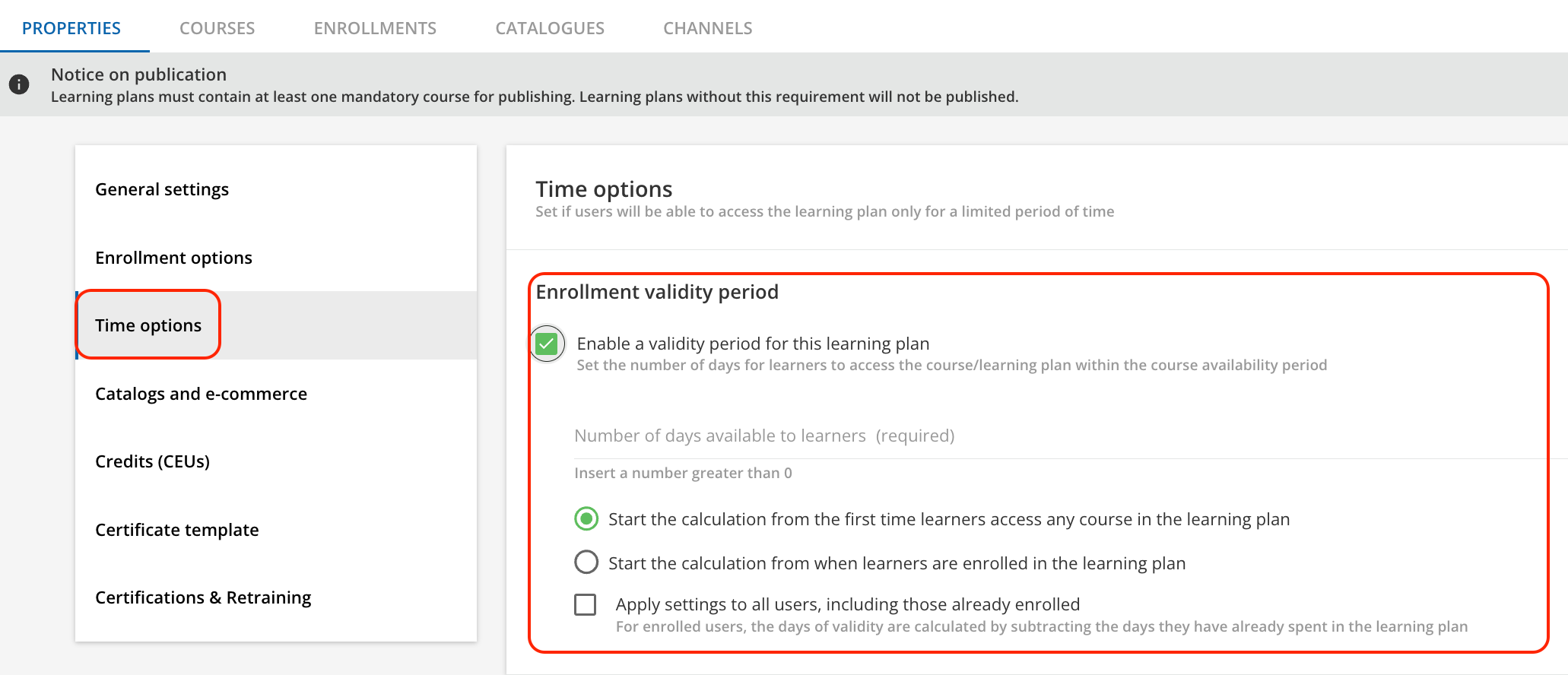
You can set it a the LP level, like this:

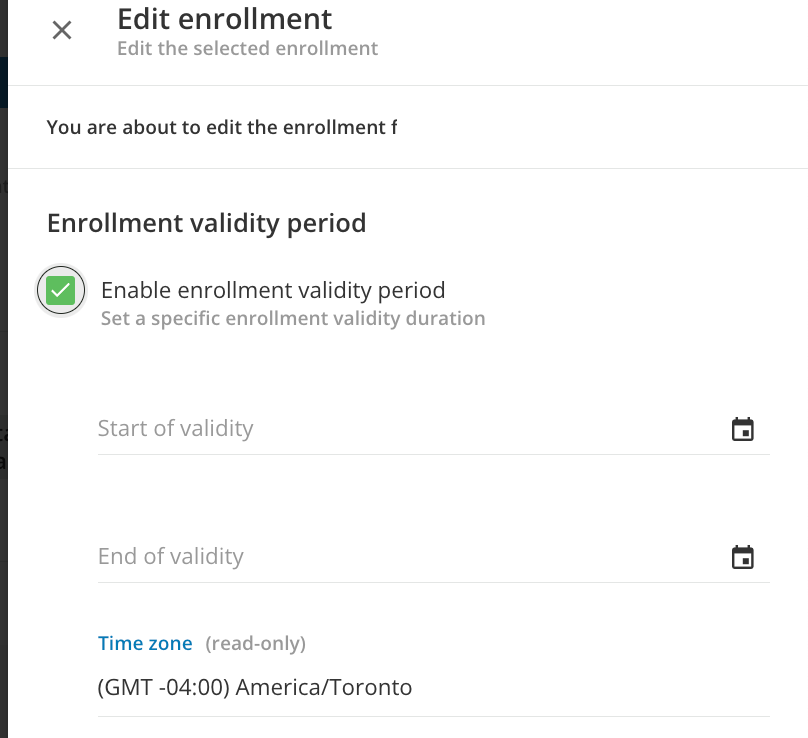
or for an individual on the Enrolment tab, like this:


Forum|alt.badge.img+1
  • Influencer III
  • September 19, 2024

thanks @lrnlab, I have changed the setting to mimic this in the LP. 

At the course level if I set a course enrolment validity period to 14 days, and set up a notification that your course date has expired, will users still be able to access and complete the course within their LP?


dklinger
Hero III
Forum|alt.badge.img+11
  • Hero III
  • September 19, 2024

@Suzy_q - I dont want you to fall into a corner. @lrnlab is spot on...but….

If you set a validity date at the LP level? Your LP will lock all courses once that time has passed. You will find yourself needing to reset individuals access by potentially extending their individual dates. There are some workarounds to this that folks have come up with, but like I mentioned (started with), I dont want you to fall into a corner using one function to block other needs later on.


Forum|alt.badge.img+1
  • Influencer III
  • September 19, 2024

Thanks @dklinger, can you provide any direction to the workarounds.  Essentially I want the Direct manager to receive a scheduled report stating the user has x expired courses within the LP that should have been completed by first 2 weeks and y courses to complete within first 6 months of onboarding.