Question

How to change the size of the calendar in agenda view

  • August 20, 2026
  • 1 reply
  • 23 views

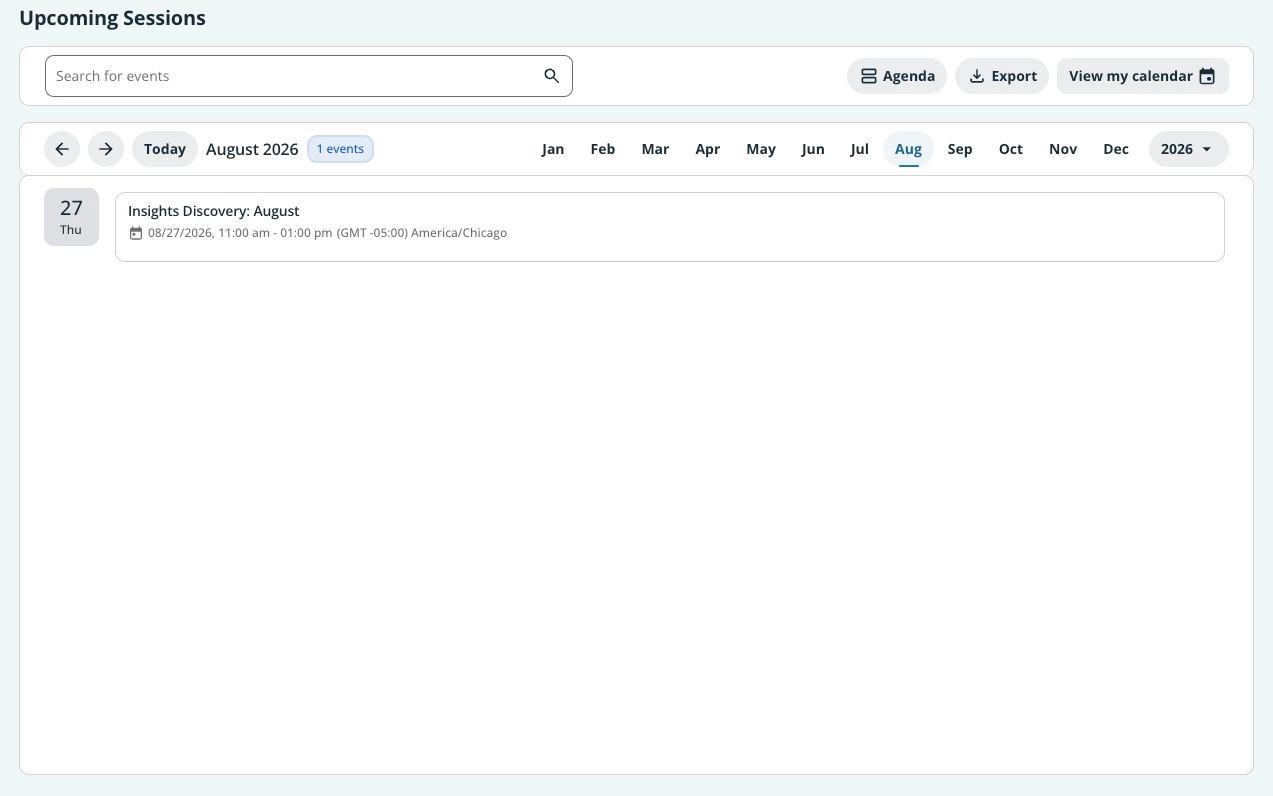
Is it possible to adjust the Agenda view to fit to the size of the number of upcoming sessions? It looks awkward to have all this white space.
 

1 reply

Moshe.Machlav
Helper III
Forum|alt.badge.img+2

Hi ​@Charissa.Stowers !

Before diving into custom code—have you considered adjusting your widget page layout? Placing the Calendar widget in a 1/3 or 1/2 row configuration often masks that extra white space naturally without any development work.

To answer your question directly: Docebo's Calendar widget does not currently have a native UI setting to dynamically shrink its height based on the number of upcoming sessions. The widget will maintain its fixed container size regardless of whether you have one session or twenty.

However, if you want to keep the widget full-width, you can adjust the container size using Custom CSS. Every widget generates a unique ID in the format #doc-widget-{widget_id}. You can target this ID in your platform's Custom Styles (Theme Settings) and apply a max-height (along with an overflow scrollbar) so the widget doesn't take up the entire screen.

When I've deployed custom dashboards for organizations with similar requirements, we typically nest the calendar in a 1/3 column beside announcements or course catalogs. This makes the layout feel much tighter and intentional, preventing that awkward empty space.

You can find more details on how to locate your widget's specific CSS ID in the official documentation here: https://help.docebo.com/hc/en-us/articles/360020080720-Introduction-to-pages-and-menus

Hope this helps!



