


New WYSIWYG image uploader issues

  • August 26, 2026
  • 4 replies
  • 54 views

martiniwinski
Influencer I
Forum|alt.badge.img+1
 

Issue 1: Upload Manager Not Working for One User

One of our Power Users is unable to upload banner images using the new Upload Manager. The upload never starts, regardless of the image selected. However, I can upload successfully using both my account and hers, so the issue appears to be specific to her user profile.

Issue 2: Unable to Reuse Existing Images

The new Upload Manager no longer lets me browse and select previously uploaded images. Instead, I have to upload the same image again each time, creating duplicates. This makes it difficult to manage media assets, as there doesn't seem to be a way to browse, reuse, replace, rename, or delete existing files.
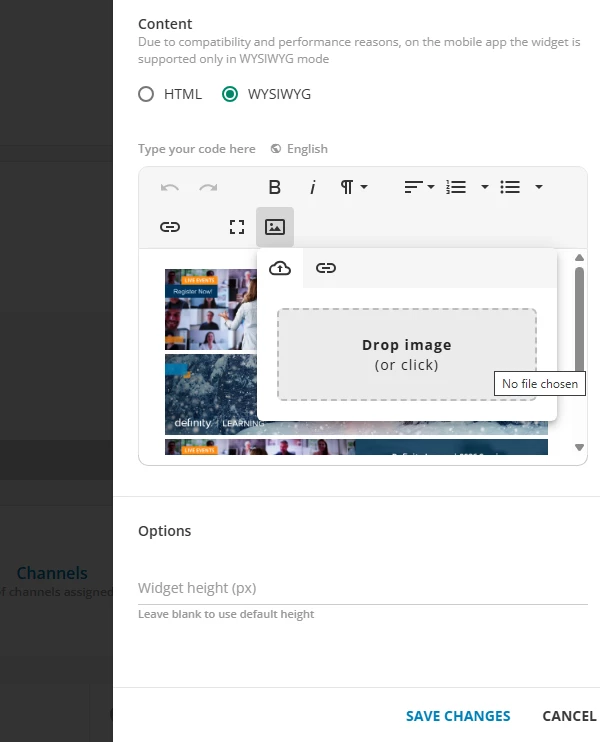
Has anyone else experienced these issues or found a workaround?




4 replies

lrnlab
Hero III
Forum|alt.badge.img+10
  • Hero III
  • August 26, 2026

Hi ​@martiniwinski I feel your pain...when you load the image, you can grab the image url and store it somewhere so you can re-use it. The url should always work since it’s stored on DOcebo’s servers so even if you cannot call it from a previous upload, you could, in theory, still use it elsewhere where an image url is accepted.


martiniwinski
Influencer I
Forum|alt.badge.img+1
  • Author
  • Influencer I
  • August 27, 2026

Yeah, it used to be easier to manage media in Docebo, but this has taken a step backgrounds with this update. I need to keep a notebook open to add my image URLs so I can refer to them. I used to be able to open the media explorer and click on images I wanted.


Kristian Luke Jones
Docebian

Hi ​@martiniwinski thank you for sharing this feedback with us, i’ve made the relevant product team aware of it. 


martiniwinski
Influencer I
Forum|alt.badge.img+1
  • Author
  • Influencer I
  • September 1, 2026

Thanks Kristian!