Best practice for archived event recordings.

  • August 20, 2024
  • 10 replies
  • 146 views

Davefox
Helper III
Forum|alt.badge.img+3

Hello fellow champions. I am lighting the beacon and asking for some help. THere is a bit of setup required here. 

Background

We hold a biweely webinar series where learners can join in live in the session or watch the recording.  Attending/viewing at least 4 of these sessions is a requirement. 

Under the hood

We have built this as a learning plan that contains a series of ILT classes. Each ILT is for a single webinar. So students only have to enroll in one class and then they can see a list of both the recorded and upcoming webinars. In the ILT’s we have a single session with a single event that ties to a teams meeting. After the webinar is completed we post the recording. So once a learner is in the session they get credit for either live attendence or viewing the recording. We use a badge that a student earns once they have completed at least 4 webinars. THis makes it easy for them and reporting easy for us. 

The issue

The problem we have encountered is within the ILT classes. Once the events in a session are in the past, learners can no longer enroll into the session. So unless they have attended the webinar or registered for the webinar before it happens a learner can access the webinar recordings.  I have been going into the classes weekly and manually adding learners to past sessions so they can access the recording, to make the class complete, and earn their badge. I would prefer to not have to do that.

In building this I have discovered

  1. Learners can not enroll in a session that has already happened.
  2. Learners can not access training materials in an ILT unless they are enrolled in a session.
  3. Creating one class that is an ILT and another that is elearning with the recording in it makes for a really unfun reporting and user experience. 

The question

Is anyone else doing something like this and/or is there a best practice to be able to add the recording to the original ILT session AND let people enroll into the session and watch it after the broadcast date?

I am considering changing the date of the session and event to like 100 years in the future but that feels more like a bandage than an actual solution. 

Looking in the main community pages it looks like others have kicked this around for a few years.

Thanks in advance 

10 replies

dkraige
Helper I
Forum|alt.badge.img+1
  • Helper I
  • August 20, 2024

This is a frustrating work flow for sure, and it’s been noted for years.

Currently the way we’re handling this is making a duplicate course.  We initially have the ILT, which we record and upload a recording to, and then we also have an E-learning copy with the recording, that people can just watch asynchronously without having to enroll in a session.  It’s a frustrating burden for admins though to have to make 2 copies of literally every ILT we do where somebody might want to discover it and view it at a later date.


lrnlab
Hero III
Forum|alt.badge.img+10
  • Hero III
  • August 20, 2024

Could you add the recordings to a channel instead? You could them include the link to the channel in the course description.


Annarose.Peterson
Hero III
Forum|alt.badge.img+7

Yeah, that is a a limitation.  :-(.  A possible workaround is maybe you can have a e-learning course with the video loaded, and set a course completion equivalency on the elearning course.  So if they view the video, it will mark the ILT as completed as well? 


JEntis
Helper I
Forum|alt.badge.img+4
  • Helper I
  • August 20, 2024

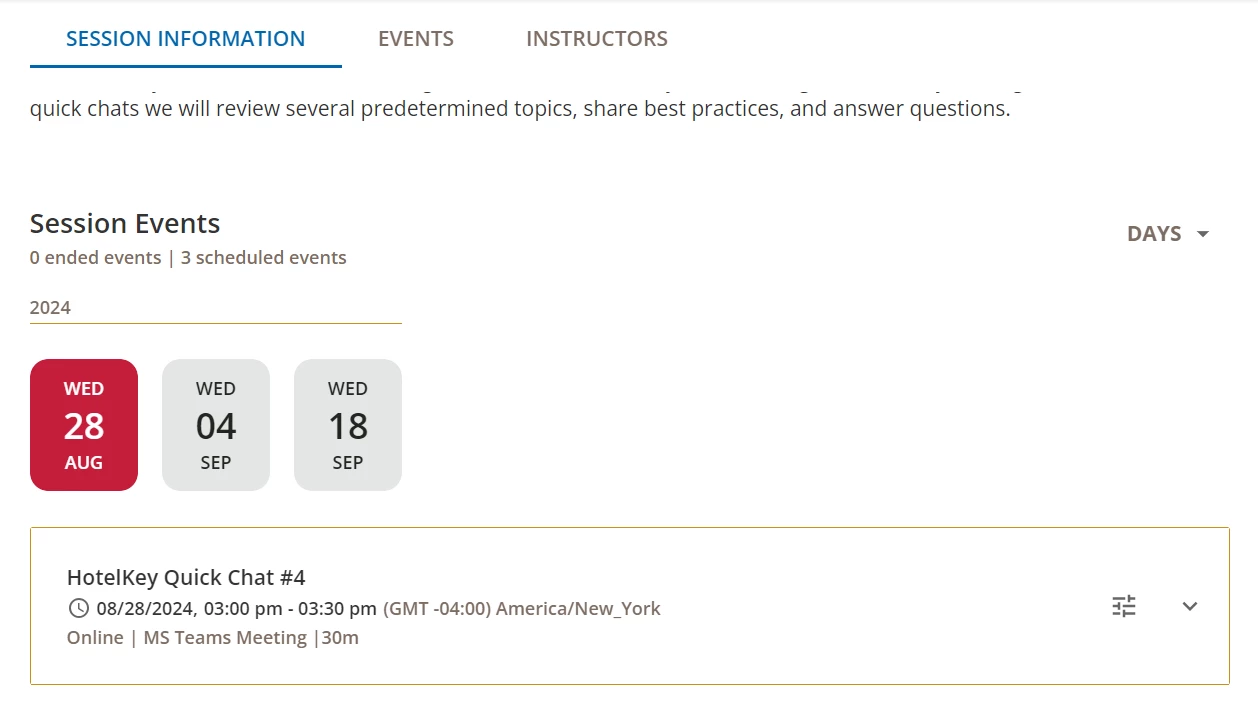
Our learners were too confused by multiple sessions in an ILT course, but we didn’t want to make multiple courses or set up a learning plan. So what we do instead is multiple events in one session, and they have to complete X number of events (either by attending or watching the recording) to complete the course. Once they complete it, a badge is awarded. See example below.

I’m totally with you on the past session enrollment issue. What we’ve had to do is set up an enrollment rule where new learners are automatically enrolled into the ILT. BUT they can’t be automatically enrolled into a session too, which is super annoying. So we have to check on a daily basis and enroll waiting users into the session so they can access the recordings after the ILT has already happened and get credit. This seems to still work even after all events in a session are completed. But eventually, we do create an “evergreen” eLearning course to replace the ILT, which we then put under maintenance (which is the only way to “retire” a course at the moment) and enroll all those learners into the eLearning with an auto-enrollment rule so the content lives on that way. I really hope this is something Docebo improves in the future, because it is very frustrating :(


Davefox
Helper III
Forum|alt.badge.img+3
  • Author
  • Helper III
  • August 20, 2024

Could you add the recordings to a channel instead? You could them include the link to the channel in the course description.

Interesting idea @lrnlab . Can I track completion based on channel content?


Davefox
Helper III
Forum|alt.badge.img+3
  • Author
  • Helper III
  • August 20, 2024

This is a frustrating work flow for sure, and it’s been noted for years.

Currently the way we’re handling this is making a duplicate course.  We initially have the ILT, which we record and upload a recording to, and then we also have an E-learning copy with the recording, that people can just watch asynchronously without having to enroll in a session.  It’s a frustrating burden for admins though to have to make 2 copies of literally every ILT we do where somebody might want to discover it and view it at a later date.

@dkraige Appreciate the suggestion. This is what I am trying to avoid. because then I need to duplicate badging and reporting becomes a mess. 


JEntis
Helper I
Forum|alt.badge.img+4
  • Helper I
  • August 20, 2024

Could you add the recordings to a channel instead? You could them include the link to the channel in the course description.

Interesting idea @lrnlab . Can I track completion based on channel content?

Channel content is considered “informal” which means is it not trackable in the way that “formal” course content is so I don’t believe you can track completions on it, but I haven’t fully dug into this issue. Curious what others have to say.


Forum|alt.badge.img+4
  • Guide II
  • August 20, 2024

I don’t know if this is helpful, but we landed on adding the recordings as training materials in the course so all users can access them. Doing so does not give them session credit. In our use case “completions” are less important. If you did this the badge would only be available to those who attend live sessions. 

When completions are important, we have done the duplicate courses as suggested by @dkraige or the multiple events like @JEntis.

You can put a course in a channel and use equivalents for tracking, but it is still duplicating the courses. If you track via badge earned, you could configure the badge to include 4 of x courses including the ILTs and eLearning equivalents.  


Forum|alt.badge.img+4
  • Guide II
  • August 20, 2024

One more thing, I had a use case where we switched from offering ILTs in one program to eLearning.

  1. I migrated the completions from the ILT to the eLearning course.
  2. I added the eLearning to the learning plan and removed the ILT, enrolling the remaining users with the learning plan into the eLearning course. Learning plan enrollment does not alter the enrollment of a user already enrolled regardless of enrollment status. 
  3. Retired the ILT

Notes on data migration:
I wanted this done quickly so I used the UI vs. APIs. 

  • I ran a report for completions in the ILT. 
  • I enrolled the users in the eLearning via csv import.
  • Edited the enrollments with mass actions to mark the users complete for a specific date.
  • If you only had 1 or 2 live sessions, mass action to change the enrollment status works well.
  • If you have lots of completion dates, API is a better option. 
  • I used an equivalency once, but the completion date = enrollment date and I wanted to keep the original completion date for reporting and historical accuracy. 

Davefox
Helper III
Forum|alt.badge.img+3
  • Author
  • Helper III
  • August 21, 2024

Appreciate all the thoughts. Can anyone think of a reason NOT to add the recording to the event and set the  Session and event to happen for 50 years?

It seems like then anyone who enrolls could get access and anyone who watches the recording gets credit.