Best Answer

Find Users in-progress of completing the courses

  • November 16, 2023
  • 1 reply
  • 50 views

Hi , 

I’m trying to find or create a report where I can get all the users who are still in-progress of completing the courses.. 

I’m planning to update the certification expiration to 1year from 2years. So I want to analyze below scenarios:
 

  • Find all Users who are in-progress of completing the courses
  • Handle users with current certifications that will now become expired after changing the expiration

Can someone help me how to handle Certification expiration update ??
Best answer by Bfarkas

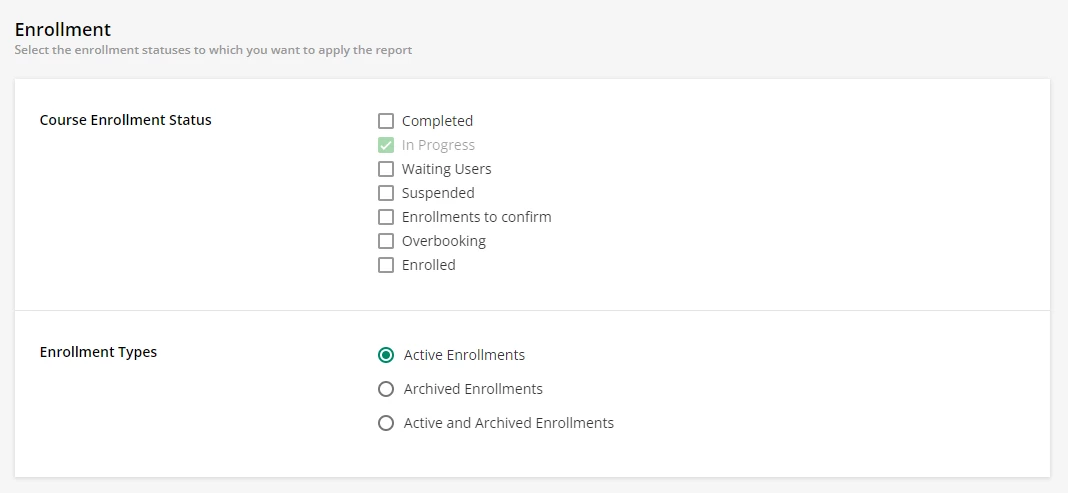
Unless I am missing something, seems like the ‘Users - Courses’ report should get you the first part, you can refine the users and courses you wish to have in the report, and on the Filters tab at the bottom you can filter for just ‘In-Progress’ status’s:


Similarly for part two there is a ‘Users - Certifications’ report. Again pay attention to your filters, you probably only want active certifications, the default includes Expired ones. You can also select specific certifications if you don’t want them all.

In both cases, pay attention to the View Options tab to make sure you select the data you want to be able to filter/sort/calculate on once in Excel. For the first report, you probably don’t need to do anything in Excel, the second one you can filter for users based on issued on or to renew on dates.

1 reply

Bfarkas
Hero III
Forum|alt.badge.img+6
  • Hero III
  • Answer
  • November 19, 2023

Unless I am missing something, seems like the ‘Users - Courses’ report should get you the first part, you can refine the users and courses you wish to have in the report, and on the Filters tab at the bottom you can filter for just ‘In-Progress’ status’s:


Similarly for part two there is a ‘Users - Certifications’ report. Again pay attention to your filters, you probably only want active certifications, the default includes Expired ones. You can also select specific certifications if you don’t want them all.

In both cases, pay attention to the View Options tab to make sure you select the data you want to be able to filter/sort/calculate on once in Excel. For the first report, you probably don’t need to do anything in Excel, the second one you can filter for users based on issued on or to renew on dates.