Best Answer

Lighting the beacon to my fellow champions

  • July 13, 2023
  • 12 replies
  • 88 views

Davefox
Helper III
Forum|alt.badge.img+3

Fellow champions, I am looking to see if anyone has ever encountered a similar situation and has a solution. 

I have been asked to create a self enrollment link for a course that is not in a catalog. However the course is in a learning plan that IS in a catalog. 


Has anyone found a way to provide self enrollment links to courses that are not castalog level visible?


Thanks in advance for any suggestions
Best answer by Annarose.Peterson

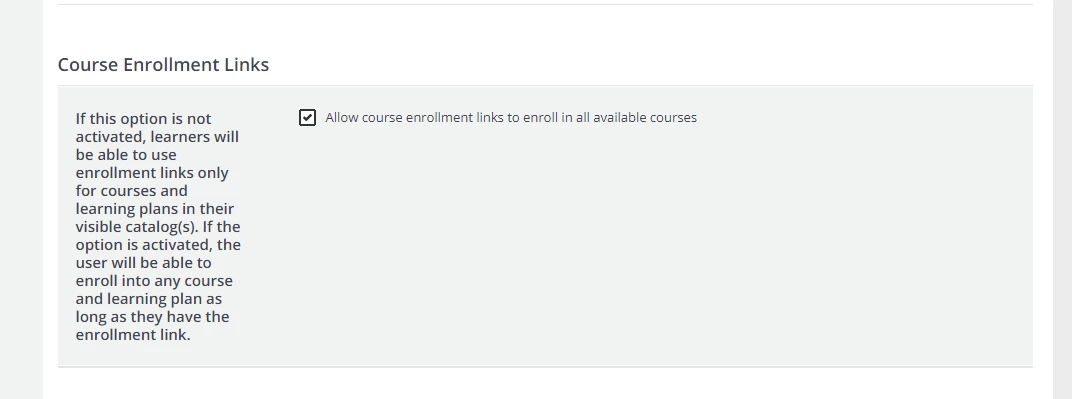
If you turn on this setting under Advanced Settings > Advanced Options, you will be able to share the course enrollment link and not have the course in the catalog: 

Keep in mind this is a platform wide setting, so it will apply to all courses in your system.

12 replies

  • Novice III
  • July 13, 2023

Hi @Davefox.

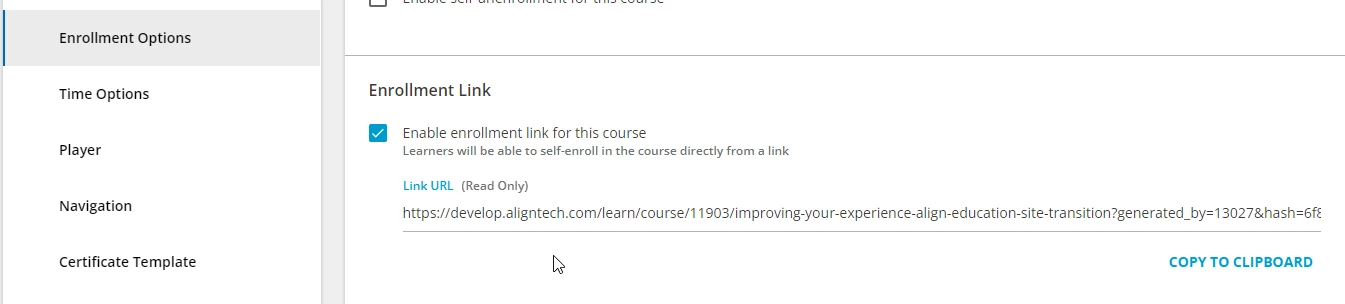
Well, catalogs provide the permissions for individual courses, so I’m not sure if it will work. In the course settings, go to Enrollment Options and check the “Enable Enrollment Link” and copy the link URL. Before testing, be sure the person testing the link is not already enrolled into the course. It’s best if a regular user tests this, vs. a Super. If it still fails, you can place the course in a catalog, apply the necessary permissions to the catalog, and then that enrollment link should work.


Davefox
Helper III
Forum|alt.badge.img+3
  • Author
  • Helper III
  • July 13, 2023

Thanks Steve;


In past experience creating a self enrollment link did not work, unless it was in a catalog. But I will test again. 


captainzelda
Helper II
Forum|alt.badge.img

Forgive me if I misunderstand, but you SHOULD be able to set up enrollment links (different tab) AND set permissions for the course not in a catalog via the Catalog Options course. This is how the majority of our courses have been up until this point - 


Davefox
Helper III
Forum|alt.badge.img+3
  • Author
  • Helper III
  • July 13, 2023

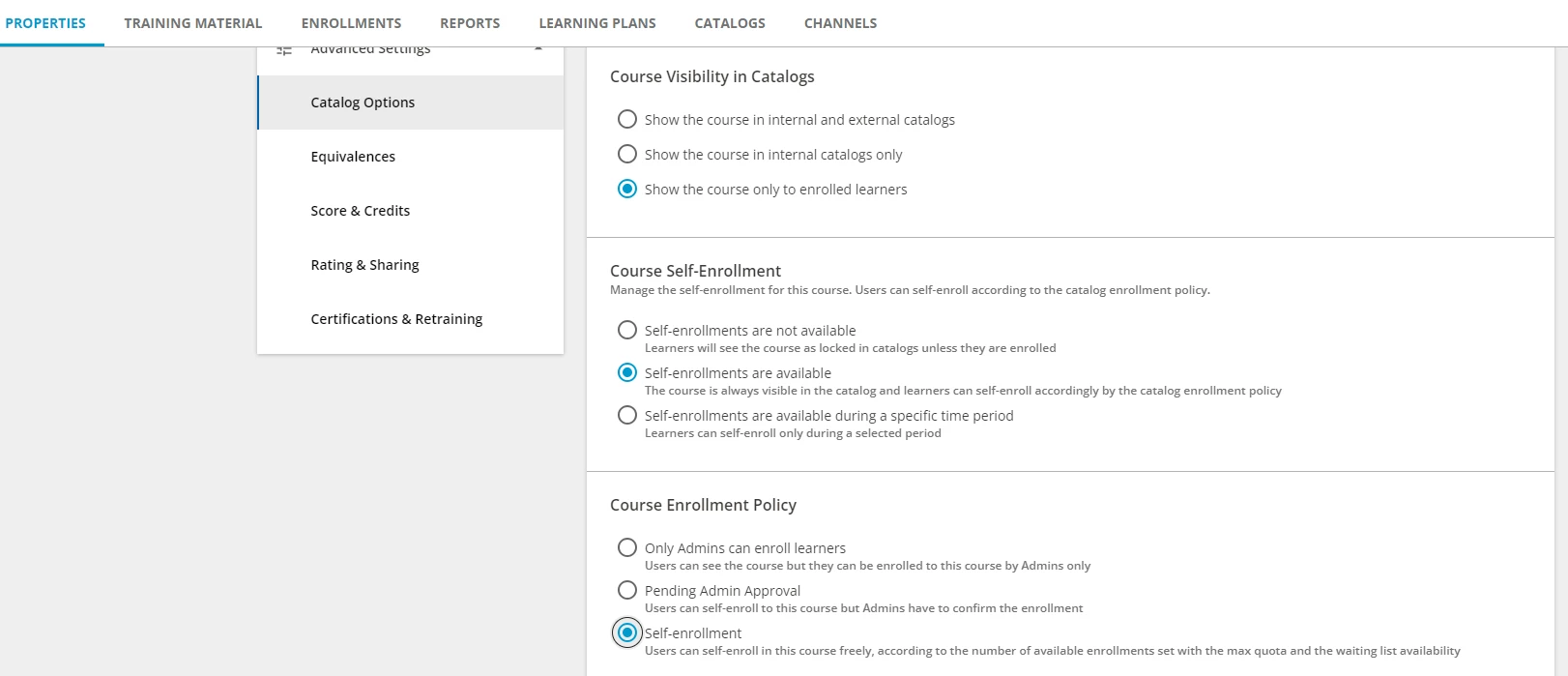
So I did a quick test on a course that is not in a catalog. Used the settings above. 

Tried to enroll in the course using the both the course URL - Fail

Tried using a self enrollment link- Fail

In both cases I get red message warning that the course enrollment links are not available and to contact an Admin. 

Maybe there is another setting somewhere. Any other Champions encounter this?


captainzelda
Helper II
Forum|alt.badge.img

Very odd, it works for our environment. You’re using this self enrollment option?


Jtischler
Helper II
Forum|alt.badge.img+1
  • Helper II
  • July 13, 2023

@Davefox I previously tried to do this exact same thing and was unsuccessful.  Feedback from support was that because the course is not in a catalog, it in essence hides the course and makes it unenrollable using an enrollment link or any other link.  Admin enroll only.  If you do get this working, please let us know!  Best of luck!


Davefox
Helper III
Forum|alt.badge.img+3
  • Author
  • Helper III
  • July 13, 2023

Very odd, it works for our environment. You’re using this self enrollment option?


Yes I am. Do you have multiple branches and catalogs?

We have three separate branches of learners. With intermingled content based on branch and partner roles. 


IanMonk
Helper III
Forum|alt.badge.img+2
  • Helper III
  • July 14, 2023

Connecting users to courses looks something like this:

  • User > Branch/Group > Catalog > Course

Break the chain and you’re going to encounter access issues. Of course, there are some workarounds that require different levels of administration. Here are some things you could try.

  • Create a new catalog and automated group. I assume the course is not in a catalog because you want to restrict access to it. What type of user data do you have in your platform? You could 1) create an automated group of your audience based on some condition such as job title or location, 2) create a catalog that contains restricted courses for that audience, and 3) assign visibility of the catalog to your new audience group. This way, you could meet the course in catalog requirement while also ensuring that only your specific audience can see the content within it. You could even set up an enrollment rule to automatically enroll members of this group into the course. 
  • Bulk enroll users into the course via CSV. You can bypass the course in catalog requirement by manually enrolling users into the course. I occasionally do this when doing reviews with SMEs. This could work if this is a one-off training program; however, manually enrolling users over long periods is not scalable and is an administrative burden. 

Davefox
Helper III
Forum|alt.badge.img+3
  • Author
  • Helper III
  • July 14, 2023

@IanMonk  thanks!! these are some great suggestions. In our case the course is part of a learning plan that is visible in a branch catalog, but the classes individually are not. Then it was decided to make one class available outside the learning plan to the same audience. We hoped a simple self enrollment link would work. Alas no. 


Annarose.Peterson
Hero III
Forum|alt.badge.img+7

If you turn on this setting under Advanced Settings > Advanced Options, you will be able to share the course enrollment link and not have the course in the catalog: 

Keep in mind this is a platform wide setting, so it will apply to all courses in your system.


Davefox
Helper III
Forum|alt.badge.img+3
  • Author
  • Helper III
  • July 14, 2023

@Annarose.Peterson  YOU ARE THE HERO OF THE DAY!!!!!! 


Davefox
Helper III
Forum|alt.badge.img+3
  • Author
  • Helper III
  • July 24, 2023

SO in closing. I took these solutions back to my team and in the end they decided that turning on self enrollment site wide had potential concern. So in the end we decided to publish the learning plan that included the class in a catalog and go from there. 


Thanks to all my fellow champions