

1. What specific problem or challenge are you facing?
We need to give content creators and program owners visibility into how notifications behave—without granting them permission to modify system-level configurations.
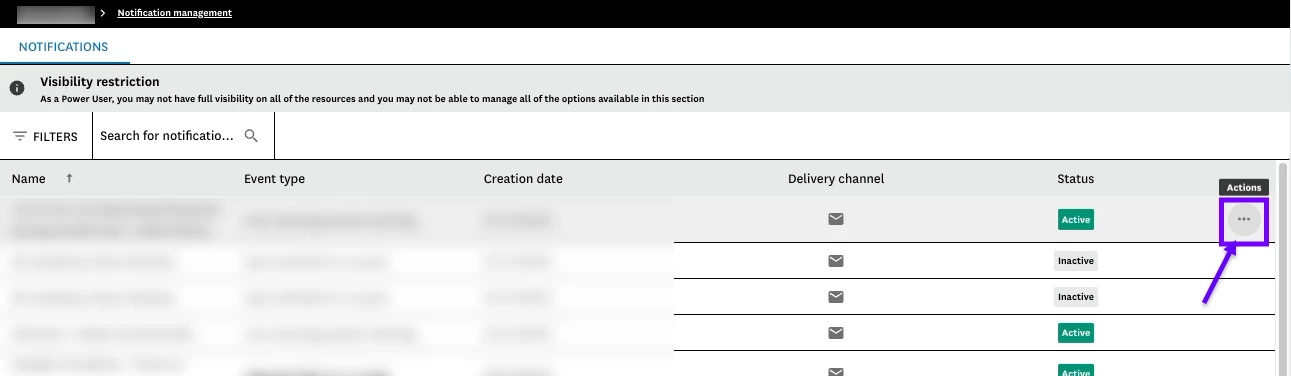
Today, Power Users with Notifications / View permission can see that notifications exist, but they cannot open them to inspect important configuration details such as:
-
Recipient logic
-
Trigger types and timing
-
Groups, branches, courses, and learning plans tied to the notification
To view this information, users must be granted Notifications / Edit, which also allows them to change, enable/disable, duplicate, or delete notifications. Because notifications are complex and high-impact, this creates significant governance risk. With edit access, a user could unintentionally notify unintended audiences at scale.
As a workaround, we are forced to maintain duplicate notification documentation outside of the LMS to explain triggers and recipient logic. This documentation is difficult to keep current, increases training overhead, and is not a reliable source of truth.
2. What outcome are you expecting?
We want the Notifications / View permission to behave as a true view-only permission, consistent with how other areas of the platform already function.
Users with view access should be able to:
-
Open notifications
-
View all configuration details, including:
-
Recipients (Users, Managers, Instructors, ect.)
-
Trigger types and timing
-
Groups, branches,
-
Which courses, and learning plans have been selected
-
All fields should be:
-
Non-editable
-
Disabled / greyed out
-
Clearly read-only
No actions such as save, enable/disable, duplicate, or delete should be available.
This would allow stakeholders to understand notification behavior without introducing risk or requiring advanced system training.
3. How will this feature impact your business and/or industry?
This enhancement would significantly improve governance, efficiency, and scalability.
Business impact includes:
-
Reduced risk of accidental notification changes
-
Elimination of external, duplicate documentation
-
Lower training burden for non-admin stakeholders
-
Less reliance on LMS administrators to explain notification logic
-
Clearer separation of duties between system admins and program owners
Notifications are one of the highest-risk configuration areas in an LMS. Providing visibility without edit access enables safer collaboration and supports enterprise-level governance models that are common across many organizations and industries.
4. Examples / Screenshots / Mock ups (if applicable)
Current ellipsis that Power Users with View Access of Notifications are unable to select and view triggers of that notification of.