
1. What specific problem or challenge are you facing?
Currently, we create a course attendee (user) table in excel. We use an ‘IT Training Signature report’ generated and downloaded via the LMS and the vlook up function (based on the users email address) to populate the information into table columns. This is a time consuming way to collate data that is available in the LMS.

2. What outcome are you expecting?
The data we need to create the course attendee table is within the LMS. However, there are only 9 available filter options within the Event Enrolment and Change User status view:
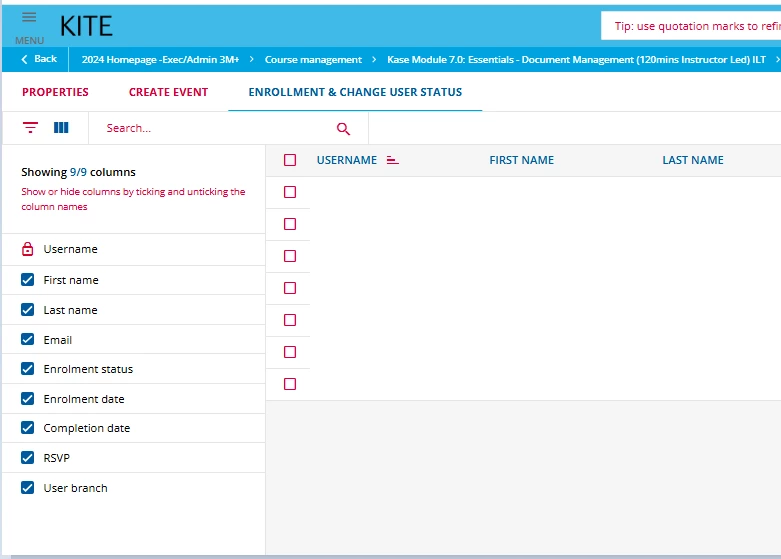
We propose that additional filter options be made available in this view to significantly improve the usability and efficiency of the learning management process.
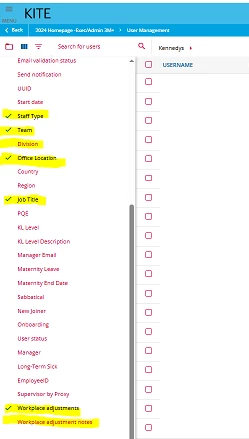
Example of the filter options that would be beneficial:
- Job title
- Staff type
- Office location
- Team
- Division
- Workplace adjustments
- Workplace adjustment notes
The listed filter options are available within the the User Management view:
- How will this feature impact your business and/or industry?*
This would save us time, streamline reporting and contribute to a smoother administrative experience. We no longer have the resource to administrate our current process so this change within the LMS would assist us greatly by enabling us to tailor the view and quickly access relevant data.
4. Examples / Screenshots / Mock ups (if applicable)
The filter options we’d love to see in the Enrolment and Change User status View are available to select in the User Management view: