Question

Users - Edit Info or Column Option

  • October 1, 2025
  • 3 replies
  • 28 views

It would be really helpful to have a column in the Users area that displays each user’s sub-branch.

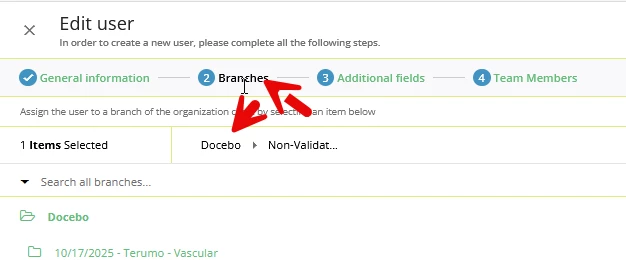
Right now, when I need to see what sub-branch a user belongs to—whether for setting up Power User permissions or other tasks—I have to click Edit and then dig through multiple layers to find their branch location.

Having the sub-branch visible as a column (or even displayed clearly at the top of the edit page) would save a lot of time and make managing users much more efficient.

Another idea: show which branch they’re nestled in within the Power User permission set up so you know where they are in Users, making it a seamless add to Power User branch permissions.

Thank you for considering this improvement!

3 replies

KMallette
Hero II
Forum|alt.badge.img+9
  • Hero II
  • October 3, 2025

@KatieKarkowski  Hi, Katie. There might be an easier way for you to get what you’re looking for.  

User > Edit > Step 2: Branches … not too much digging.


  • Author
  • Novice II
  • October 3, 2025

HI KMallette, thank you for your feedback. So this IS actually what i’ve been doing to find the branch, but our sub branches are extensive so it’s a lot of clicks to just find out what Branch they’re located in when I think that info should be displayed at the top or in a column for the user. Does that make sense? 


I just finished manually editing 168 Power Users by having to do this processes to look at which sub branch they’re in and need Power User permissions over that branch. It took way too long when if the user could just be looked up and a column was set for which sub branch they’re in, would have saved me so much time and my hand would hurt way less.


Thank you


JeanetteMcVeigh
Hero III
Forum|alt.badge.img+7

I would suggest adding this as an Idea, using this template as well (I just copied and pasted their template). Then post back in this post the idea link and we can vote on it.

I would love this as an option!

1. What specific problem or challenge are you facing?*

Describe the specific problem in detail, including how it affects your workflow or organizational goals.

2. What outcome are you expecting?*

What outcome are you hoping to achieve by addressing this problem? How would solving this issue improve your experience or processes?

3. How will this feature impact your business and/or industry?*

Please include specifics such as time saved, cost savings, or improved efficiency. If this will help all businesses within your industry or is specific to your business, please specify.

4. Examples / Screenshots / Mock ups (if applicable)

If available, please add any relevant examples or screenshots that support your idea.