Best Answer

Additional information (guide) on login page

  • July 6, 2022
  • 22 replies
  • 18485 views

Forum|alt.badge.img

I think I already know the answer to this (no) as we can’t add html only css to the login page, but a customer has various users from various company’s logging on their LMS and they want to add a brief guide to the login page explaining who should use SSO, who should use external login and guide on their credentials...etc. Is there a way to make this happen? 


Many thanks,

Gigi
Best answer by pmo

You can sneak in links using the localization tool. 

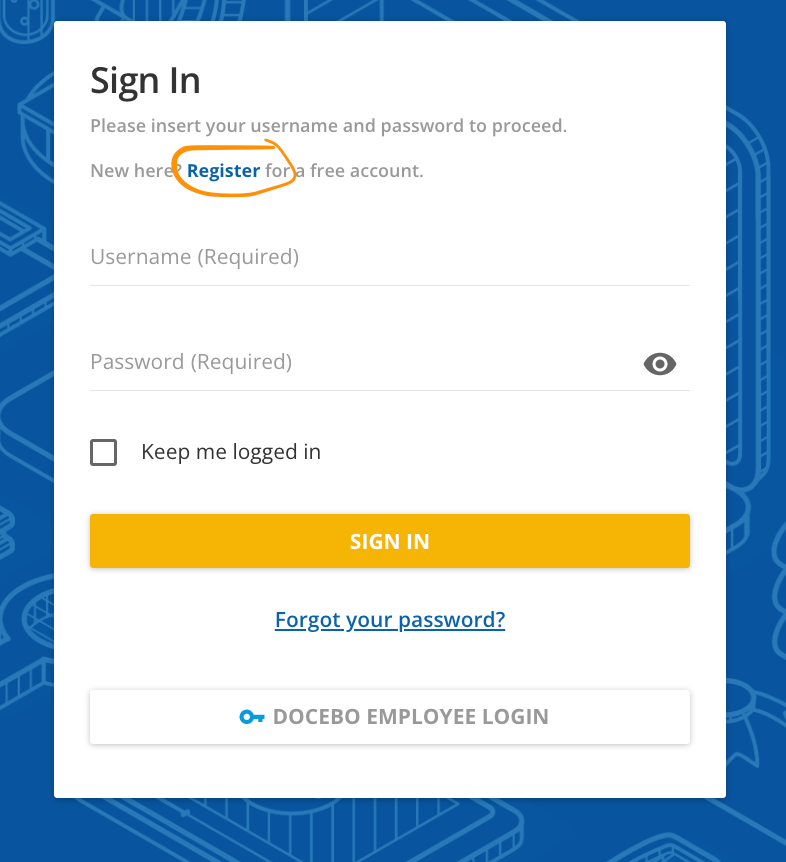
For instance with Docebo University you can see the “register” link redirects to an external website. 

That was done updating the following

Key: Please insert your username and password to proceed    


With: 
 

Please insert your username and password to proceed.
<br><br>New here? <a href="https://www.docebo.com/customer-academy/"><b>Register</b></a> for a free account.


That leads to the following hyperlink: 


22 replies

Bfarkas
Hero III
Forum|alt.badge.img+6
  • Hero III
  • July 6, 2022

So the couple of not great but works methods that come to mind are, add the text(I can’t believe I’m saying this) to the background image, just be careful with various screen sizes. Also, be careful as this is terrible for accessibility purposes.

There are ways to add text content to an object using css too, usually comes down to how much there is and what control you are expecting for it. Things like:

.ExampleDiv:before {
content: "Your text goes here...";
}

Forum|alt.badge.img
  • Author
  • Contributor III
  • July 6, 2022

I’ll shall give it a go tomorrow @Bfarkas . I like the sound of the { content: “...”;} solution. I wasn’t aware of it. I’ll have a play. 

Thanks @Bfarkas (From Hungary by any chance?)

Gigi


Bfarkas
Hero III
Forum|alt.badge.img+6
  • Hero III
  • July 6, 2022

Not myself, but a few generations back are :)


anne.bucci
Docebian
Forum|alt.badge.img
  • Docebian
  • July 6, 2022

If you are using an image file on your Sign-in page you could put all the text on that image in conjunction with the Localization Tool for the Sign In/SSO button text.  Also, depending on your setup, you could add a Public Custom Catalog Page and put the information on that tab.


pmo
Docebian
Forum|alt.badge.img+4
  • Docebian
  • Answer
  • July 6, 2022

You can sneak in links using the localization tool. 

For instance with Docebo University you can see the “register” link redirects to an external website. 

That was done updating the following

Key: Please insert your username and password to proceed    


With: 
 

Please insert your username and password to proceed.
<br><br>New here? <a href="https://www.docebo.com/customer-academy/"><b>Register</b></a> for a free account.


That leads to the following hyperlink: 


pmo
Docebian
Forum|alt.badge.img+4
  • Docebian
  • July 6, 2022

Another thought is using the public catalog custom pages to create a separate tab on the home screen to have supplementary information. 

You could also localize the sso button to be more clear about who should click it (“Employee Login” for example)


Daniel
Hero III
Forum|alt.badge.img+3
  • Hero III
  • July 6, 2022

Hi @gigi galgoczi 

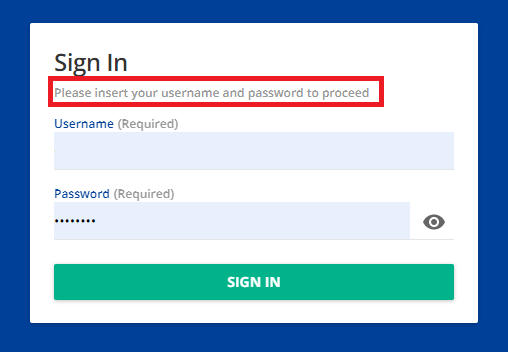
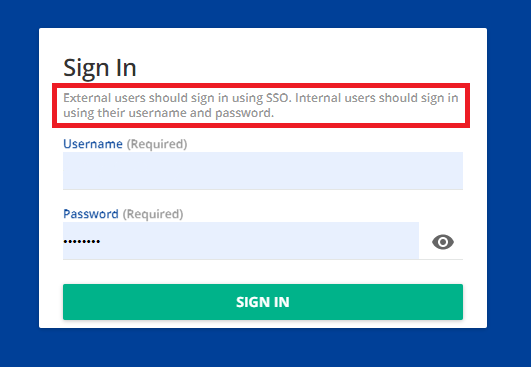
Another option would be to use the translate function in the localization tool to change the existing text in the Sign In form. For example, you could target the following text and change it to whatever you like as shown in the captures below.

Original
Edited using localization tool


Bfarkas
Hero III
Forum|alt.badge.img+6
  • Hero III
  • July 6, 2022

If you are using an image file on your Sign-in page you could put all the text on that image in conjunction with the Localization Tool for the Sign In/SSO button text.  Also, depending on your setup, you could add a Public Custom Catalog Page and put the information on that tab.


I’m curious how this holds up at different screen sizes/resizes? Do the arrows cause confusion at that point?


Bfarkas
Hero III
Forum|alt.badge.img+6
  • Hero III
  • July 6, 2022

Hi @gigi galgoczi 

Another option would be to use the translate function in the localization tool to change the existing text in the Sign In form. For example, you could target the following text and change it to whatever you like as shown in the captures below.

Original
Edited using localization tool


I like this, although I feel like it falls into the bucket of “Users don’t read unless they are smashed over the head, and then they still don’t read”. :)


Bfarkas
Hero III
Forum|alt.badge.img+6
  • Hero III
  • July 6, 2022

You can sneak in links using the localization tool. 

For instance with Docebo University you can see the “register” link redirects to an external website. 

That was done updating the following

Key: Please insert your username and password to proceed    


With: 
 

Please insert your username and password to proceed.
<br><br>New here? <a href="https://www.docebo.com/customer-academy/"><b>Register</b></a> for a free account.


That leads to the following hyperlink: 


This is nice and a good solve for a different thread re:policies available externally and other such things. Will need to keep in mind.


dklinger
Hero III
Forum|alt.badge.img+11
  • Hero III
  • July 7, 2022

@gigi galgoczi - there is alot of advice from @anne.bucci, @Daniel, @pmo here pointing to the localization tool. It is a solid approach. We have used the localization tool with alot of success for levels of customization with little to no hassle.

@Bfarkas has a great note that people do not read...but if you want to keep it simple? You now have some great options.


Bfarkas
Hero III
Forum|alt.badge.img+6
  • Hero III
  • July 7, 2022

Agreed @dklinger I think it all comes down to the type of content you are trying to add. Could always combine some localization tool and some custom css for that area to make it stand out more too!


dklinger
Hero III
Forum|alt.badge.img+11
  • Hero III
  • July 7, 2022

Agreed @dklinger I think it all comes down to the type of content you are trying to add. Could always combine some localization tool and some custom css for that area to make it stand out more too!

yup


Forum|alt.badge.img+3
  • Influencer III
  • July 7, 2022

Hi Gigi,


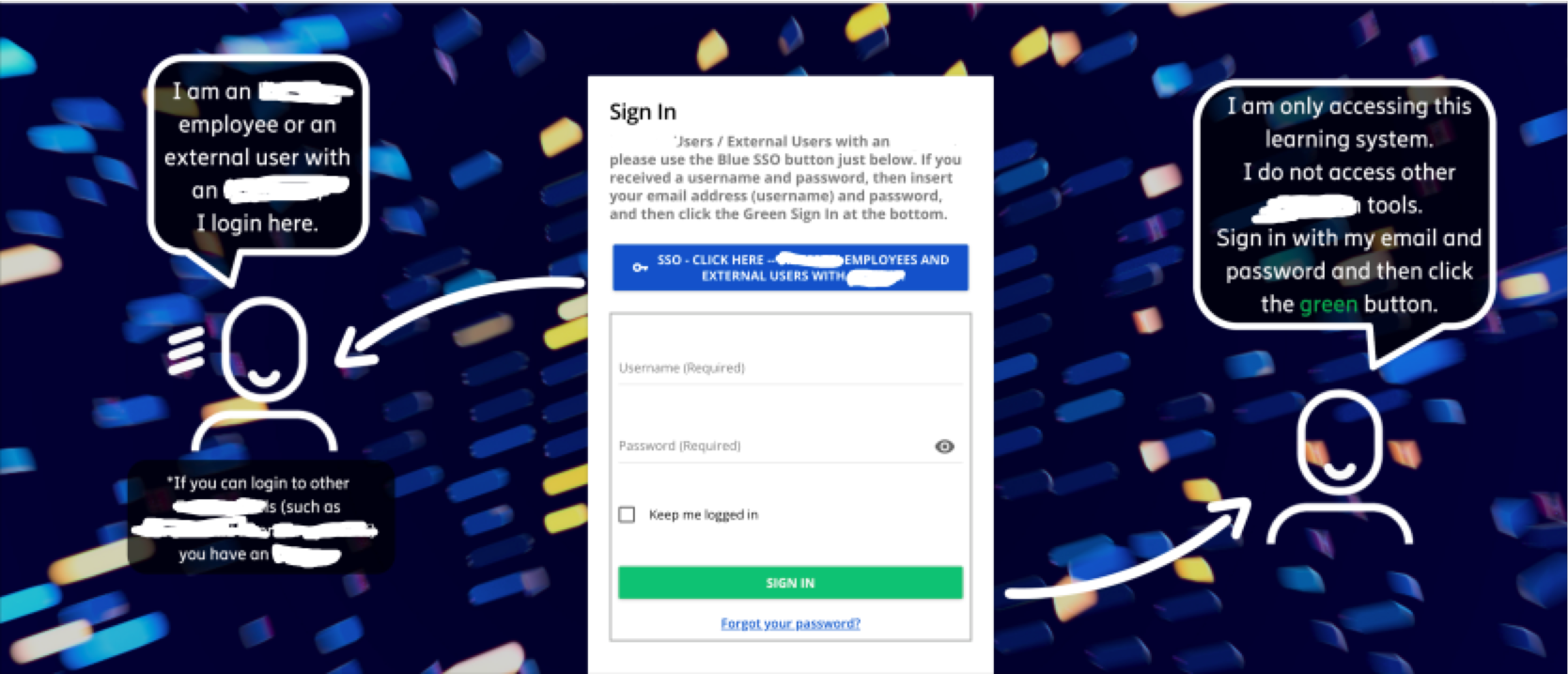
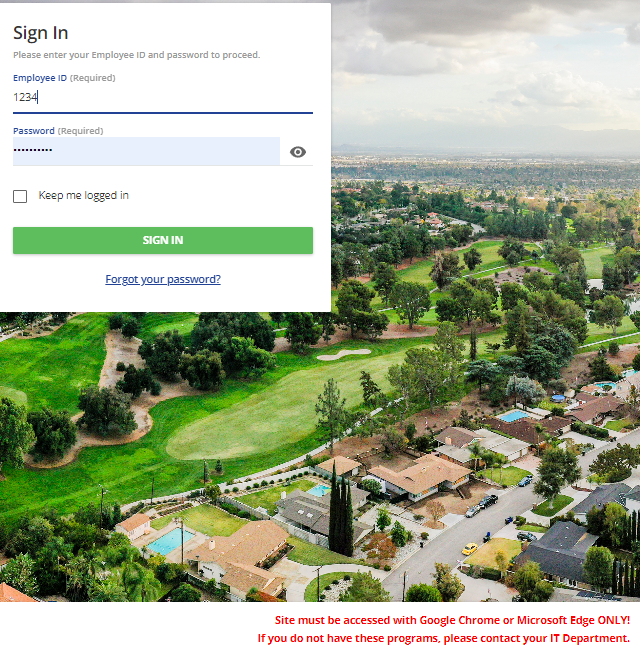
We created our log in page like this which helps employees know to use SSO button and customers to sign in. 


Much like others we used the Localization tool to add information to the page.
such as the red text in the lower right corner of login page
 

Custom instructions in red


Forum|alt.badge.img
  • Author
  • Contributor III
  • July 11, 2022

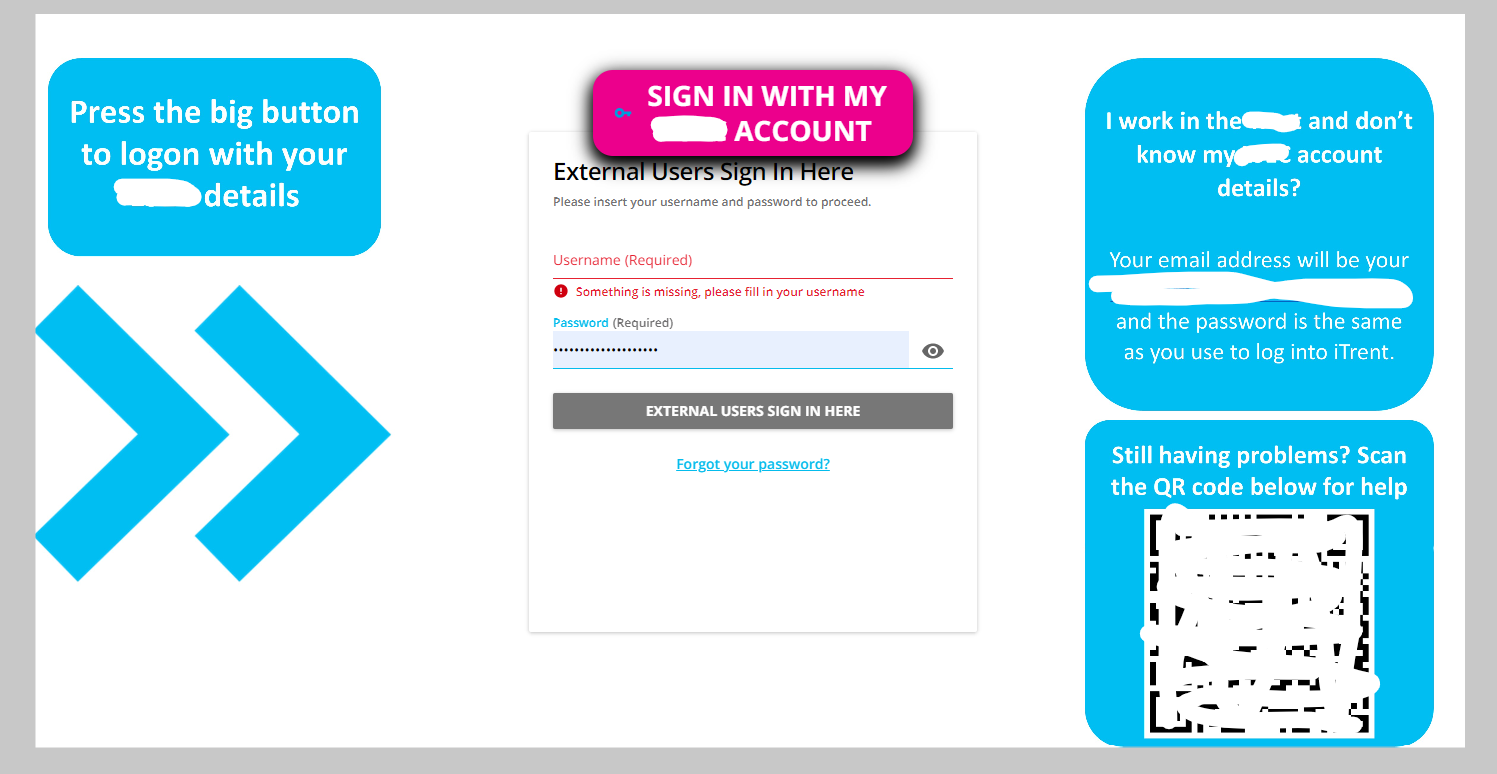
Thanks for everybody for replying. We ended up uploading the guide to google.docs and add a QR code to the login page that takes them to the guide. 


msantos
Helper II
Forum|alt.badge.img+2
  • Helper II
  • August 26, 2022

If you are using an image file on your Sign-in page you could put all the text on that image in conjunction with the Localization Tool for the Sign In/SSO button text.  Also, depending on your setup, you could add a Public Custom Catalog Page and put the information on that tab.


Hello @gigi galgoczi I like very much this login page. Did you do it without CSS programming correct? How do you change the SSO login to the above the page? Thank you for the tip


  • Novice III
  • August 31, 2022

If you are using an image file on your Sign-in page you could put all the text on that image in conjunction with the Localization Tool for the Sign In/SSO button text.  Also, depending on your setup, you could add a Public Custom Catalog Page and put the information on that tab.


Hi @anne.bucci I’m curious as to what code you used to change the login option hierarchy (SSO above login option) Thank you in advance! 


  • Novice III
  • August 31, 2022

Hi Gigi,


We created our log in page like this which helps employees know to use SSO button and customers to sign in. 


Hi @simone.yaghi I love how you separated the login options. What code did you use to implement these custom changes? Thanks in advance!


anne.bucci
Docebian
Forum|alt.badge.img
  • Docebian
  • September 13, 2022

@lizaa - here is the code to change the login form hierarcy.


#doc-layout-login form {

display: flex;

flex-wrap: wrap;

}


#doc-layout-login h1.login-form-title.hyd-typography-heading-2 {

order: -3;

}


#doc-layout-login p.login-form-subtitle.hyd-typography-subtitle.hyd-color-typography-secondary {

order: -2;

font-weight: bold;

font-size: 16px;

}


#doc-layout-login ui-input-text.login-field-username {

border-top: 2px solid #acadac;

border-right: 2px solid #acadac;

border-left: 2px solid #acadac;

padding: 8px;

}


#doc-layout-login ui-input-password {

width: 100%;

padding: 8px;

border-left: 2px solid #acadac;

border-right: 2px solid #acadac;

}


#doc-layout-login ui-input-checkbox.login-field-remember-me {

width: 100%;

padding: 8px;

border-left: 2px solid #acadac;

border-right: 2px solid #acadac;

}


#doc-layout-login .form-button.login-button.ng-star-inserted {

border-right: 2px solid #acadac;

border-left: 2px solid #acadac;

padding: 8px;

width: 100%;

}


#doc-layout-login .forgot-password {

width: 100%;

padding: 8px;

margin-top: 0px !important ;

border-left: 2px solid #acadac;

border-right: 2px solid #acadac;

border-bottom: 2px solid #acadac;

}


#doc-layout-login .sso-buttons {

order: -1 !important;

margin: 20px 0px;


Forum|alt.badge.img+5
  • Influencer III
  • March 20, 2025

Hey all!

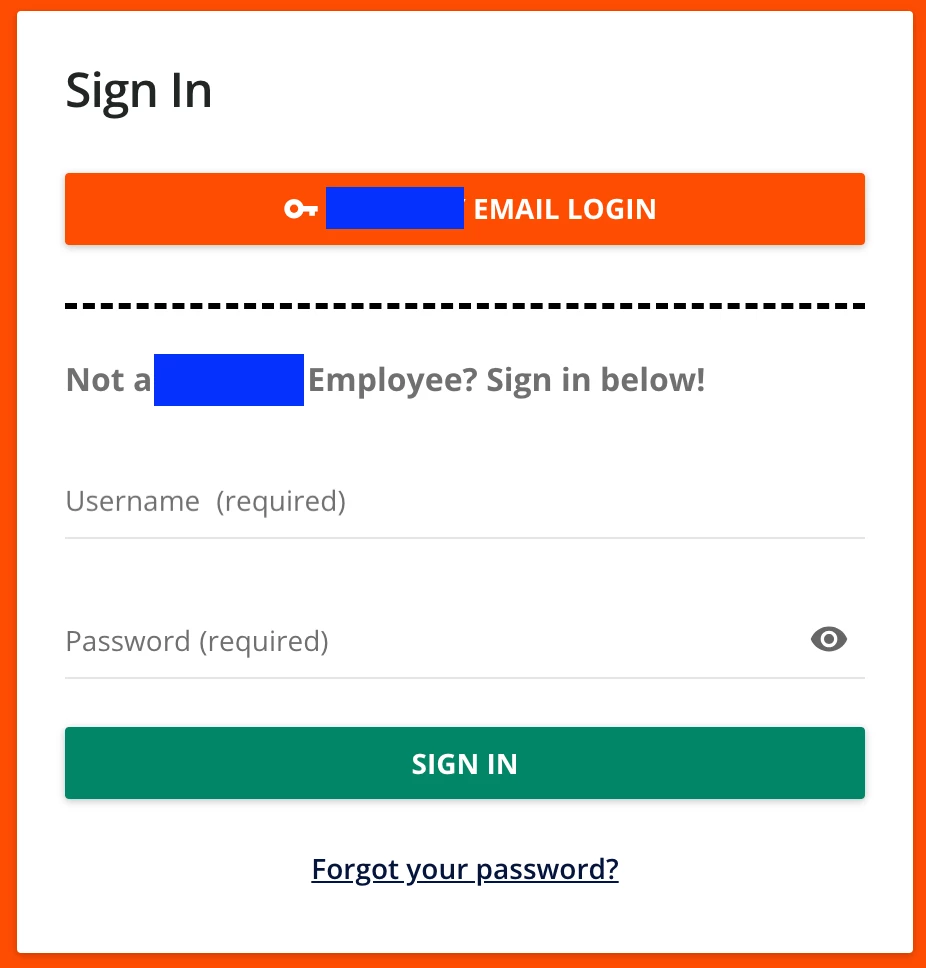
I have used the code in this thread and found it very useful. I think there’s a chance some of the code shared above doesn’t work anymore due to potential HTML updates because when I tried implementing I had some trouble. Made some tweaks, and wanted to share my updated code with the community. Company name censored with blue boxes, not part of the code :)

I have also added code comments to explain what each piece of code does. This is very much based on the already shared code above.

The word changes are done using the Localization tool, the color changes are in Branding.


/*Login Page Code*/
/*Sets up so the elements can change order on the page*/
#doc-layout-login form {

display: flex;
flex-direction: column;
flex-wrap: wrap;

}

/*Places Sign In at the top*/
#doc-layout-login .login-wrap .login-form-title {

order: -3 !important;

}

/*Changes the gray subtitle order (moved to above the username/pass area), changes size, and adds dashed line to separate*/
#doc-layout-login .ui-color-typography-secondary {

order: -1;

font-weight: bold;

font-size: 16px;

border-top: 3px dashed #000000;

padding-top: 25px;

}

/*Places SSO button below Sign In and controls space*/
#doc-layout-login .sso-buttons {

order: -2;
padding-top: 15px;
padding-bottom: 25px;

}

/*Cleans up spacing under Forgot Password*/
#doc-layout-login .forgot-password {

margin-bottom: 0px;

}


jckemv
Helper I
Forum|alt.badge.img+2
  • Helper I
  • May 20, 2025

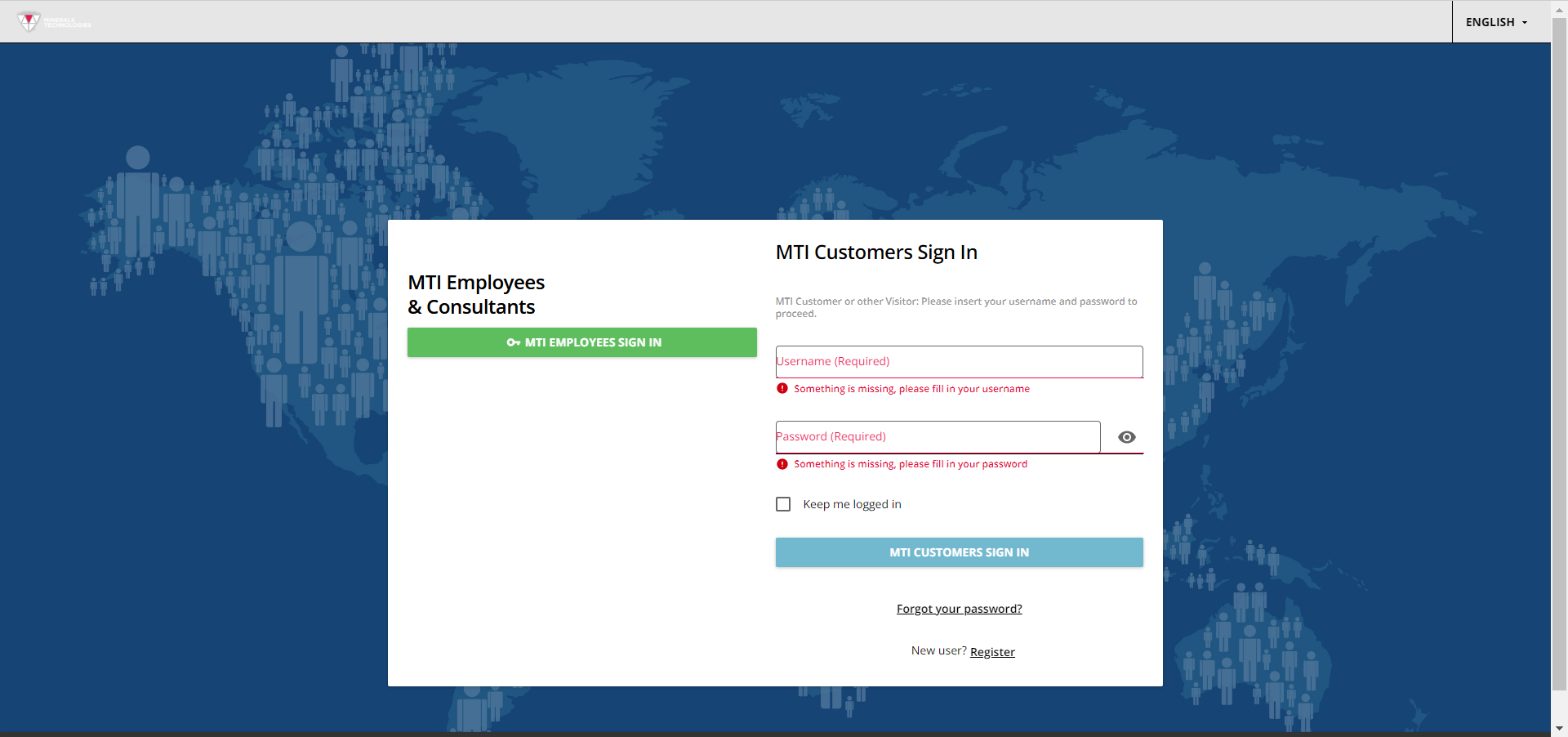
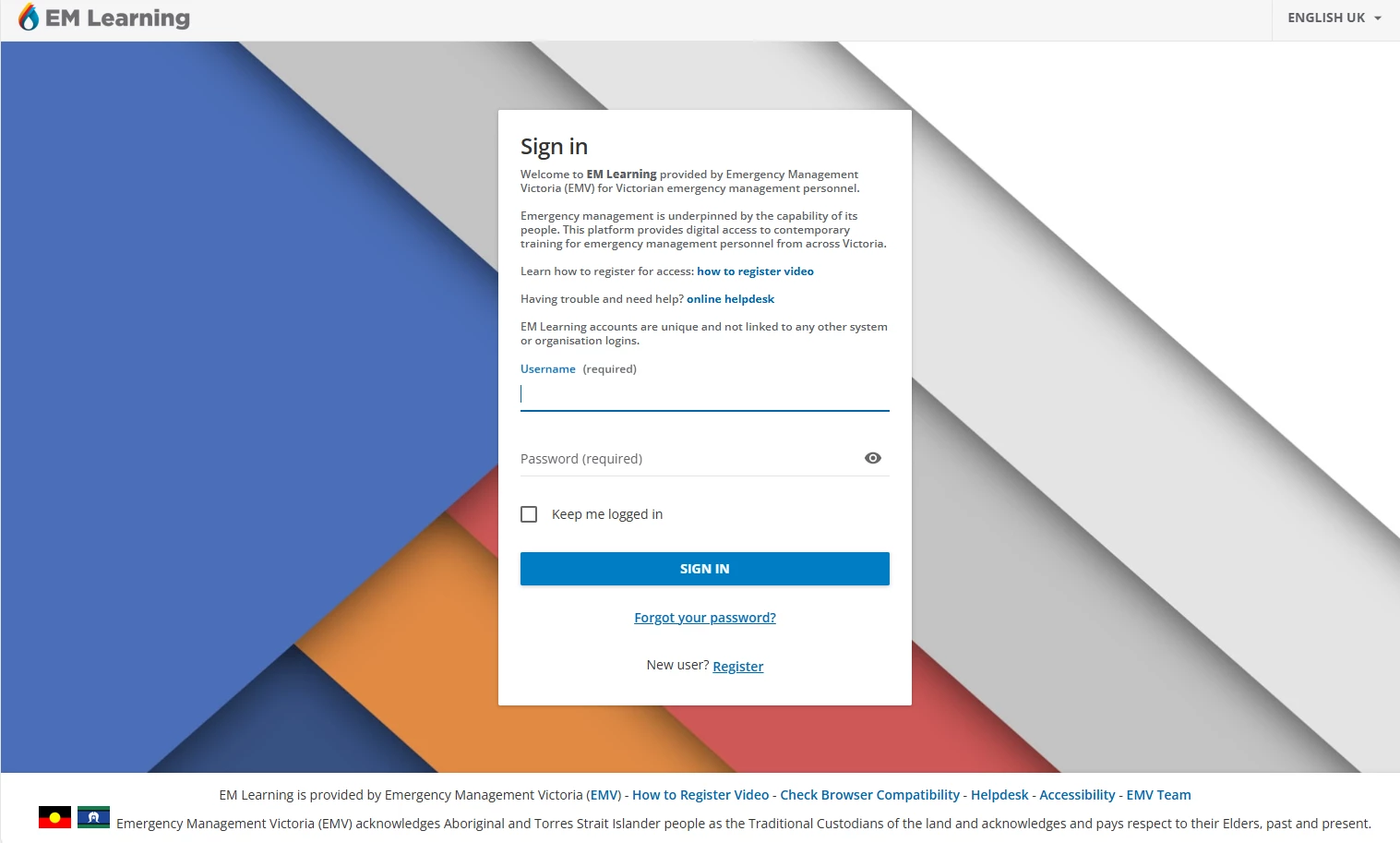
I’ve used help from the Docebo Community (thanks everyone) to modify my login page which looks like this: