Is there any video on 'How to bulk import course shells on Docebo?' that defines the process end to end? I am searching it for some time but unable to find any video.
It’s been a long time since we did this, but we were able to load a lot of courses in bulk at the beginning of our implementation. We did have to go back an individually add training material/tweak some settings, though some additional items might be able to be done via API.
We did ours via the Automation app with the settings:
Scheduled Rule (Even though we turned this off, it had to be selected as a schedule to do what we wanted.)
IF: The administrator has uploaded a file in the FTP Folder
Insert SFTP with credentials, including appropriate folder and File Name
THEN Import courses via CSV
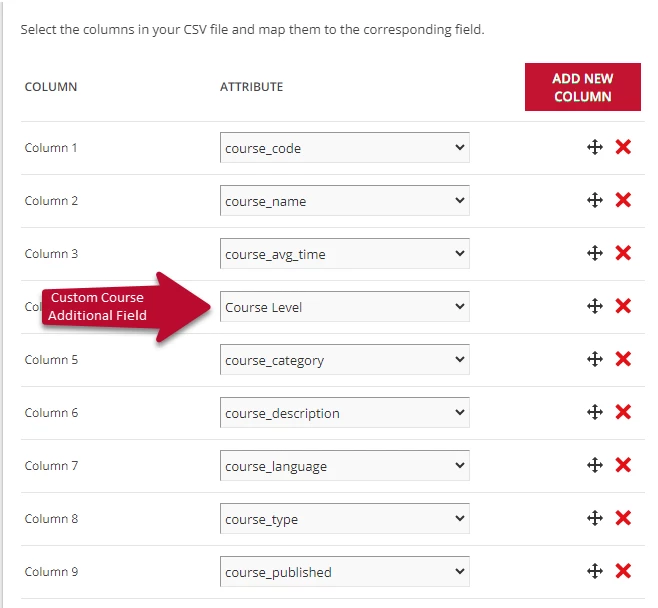
CSV File UTF-8 with your email as error log email address. Auto-detect separator and check Consider first row as header. Import Schema Layout
Save your automation app rule.
Create your CSV file and save appropriately. Upload to SFTP and run rule.
Check the attachment for the template for the Course Shell Upload, which would need to be saved/converted as a CSV UTF-8 File before uploading to the SFTP. Note that some pieces could fail depending on if you entered the information the way the system likes (i.e. elearning cannot be hyphenated, and the “Course_Published” has to be “unpublished” instead of under maintenance.”)
It’s been a long time since we did this, but we were able to load a lot of courses in bulk at the beginning of our implementation. We did have to go back an individually add training material/tweak some settings, though some additional items might be able to be done via API.
We did ours via the Automation app with the settings:
Scheduled Rule (Even though we turned this off, it had to be selected as a schedule to do what we wanted.)
IF: The administrator has uploaded a file in the FTP Folder
Insert SFTP with credentials, including appropriate folder and File Name
THEN Import courses via CSV
CSV File UTF-8 with your email as error log email address. Auto-detect separator and check Consider first row as header. Import Schema Layout
Save your automation app rule.
Create your CSV file and save appropriately. Upload to SFTP and run rule.
Check the attachment for the template for the Course Shell Upload, which would need to be saved/converted as a CSV UTF-8 File before uploading to the SFTP. Note that some pieces could fail depending on if you entered the information the way the system likes (i.e. elearning cannot be hyphenated, and the “Course_Published” has to be “unpublished” instead of under maintenance.”)