
Question

Automation app

  • August 18, 2025
  • 7 replies
  • 168 views

Forum|alt.badge.img+1

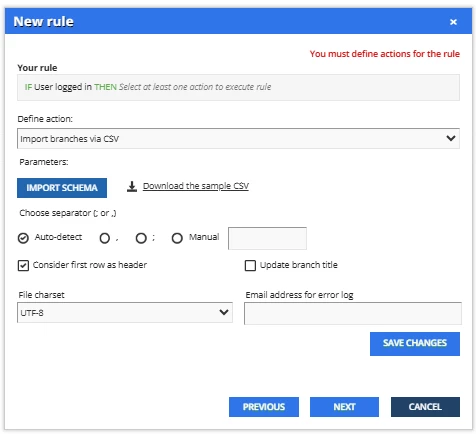
Could someone help me understand the Automation App and what it does when I select “Import users via CSV” and “Import branches via CSV”?

Problem: New employees log in via SSO, these users are not assigned to a branch (because that can’t be auto-populated like a group can). We have several enrollment rules that we want to base on branches so that they are heirarchical (all sub-branches to be included, rather than groups where we would have to capture every subgroup as a unique group), but because these users are not automatically placed in branches, they are missed for auto-enrollment rules and do not see courses that are required of them.

How I think I understand it: I’ve heard over and over that the automation app will do this, so I’ve used the “When user logs in” trigger and the “Import branches via CSV” and “Import users via CSV.” My challenge is that the documentation is not clear. I don’t need to import branches because I already have them defined. Will it assign the logged in user to the appropriate branch? Will it assign based on the user fields? I have something like 70 branches so manually assigning people is a headache. I can update them manually via user account update but that is usually too late to capture the new hires.

Do I need to maintain a “master” csv of every user and their current branch? Is that what it is doing?

I just need someone to explain exactly what is happening when I user these triggers and how I can use it to auto-assign to branches. Even if I could send everyone to a “new hire” branch or group when they create their account, that would be better than where we are now.

 

7 replies

captainzelda
Helper II
Forum|alt.badge.img
  • Helper II
  • August 18, 2025

If you have SSO, could you pass a value via user provisioning when they login in?


Forum|alt.badge.img+4
  • Guide II
  • August 18, 2025

Users should be put into branches when created. How are you provisioning your users? 
If you don’t have an HRIS or CRM integration you can use the automation app with CSV files. 

Using reports from your HRIS or CRM system, you generate reports for new users, including branch as one of the columns. Save it to a secure site. Then the automation app ingests the file from the site and automatically provisions the users into the branch in the data set. 

I believe import branches via CSV is to create new branches vs creating them manually. 


dwilburn
Guide III
Forum|alt.badge.img+4
  • Guide III
  • August 18, 2025

Hi ​@ChrisBurton - we use the automation app to pull in a CSV vile (that has branch information in it) from a SFTP cloud solution on a daily basis. 

In the example you mention, the automation app (as you go through the settings) will try to pull a csv from someplace that you setup. The other solution is in the SAML app to see what provisioning you can pull in there, if you could have a branch code show up.

It took me about 3 months to work through solutions here and get it working.


cheyenne.carpenter
Docebian
Forum|alt.badge.img

@ChrisBurton you’ve got some great answers here! I

f you have interest in learning more and completing an integration very similar to what’s being referred to in the comments here, we build branches, an automation app rule, and watch the integration run in real time in this ILT course offered by Docebo! It’s one of our very few paid courses, but if your organization has any DULCs in their account (like if you’re a Premium Support customer), those can go a long way towards a purchase like this. 

I’m quite sure you’ll figure it out either way, your question merely caught my eye! I happen to be the trainer for that very course, so I couldn’t help but mention it 😆


Forum|alt.badge.img+1
  • Author
  • Influencer I
  • August 19, 2025

If you have SSO, could you pass a value via user provisioning when they login in?

Tried this. The field that I need for 100% accuracy of team/branch mapping is not able to be imported via SSO, I can only pull it manually through another means. I’ve worked with our IT team on this and it is a gap.


Forum|alt.badge.img+1
  • Author
  • Influencer I
  • August 19, 2025

Users should be put into branches when created. How are you provisioning your users? 
If you don’t have an HRIS or CRM integration you can use the automation app with CSV files. 

Using reports from your HRIS or CRM system, you generate reports for new users, including branch as one of the columns. Save it to a secure site. Then the automation app ingests the file from the site and automatically provisions the users into the branch in the data set. 

I believe import branches via CSV is to create new branches vs creating them manually. 

We don’t have an integration but we do pull in their meta-data from our HR system via the SSO. I have automatic rules that put people into Groups based on job title or other similar fields but these have proven to be imperfect and it is easy for people to slip through cracks (slight differences in job titles, inconsistencies in the HR fields, etc). Branches are much preferred because of the way we are structured. There are a few other issues as well that we have with our internal data structure that makes it difficult to do without manual intervention.

I need to look closer at this workflow. There may be a way to maintain a org mapping csv file that I can use for the ingest but I need to figure out the workflow. 


Bkatzman
Influencer III
Forum|alt.badge.img+1
  • Influencer III
  • August 21, 2025

We have users that are created via SSO/SAML user provisioning.

I was told that if you pass an attribution field containing the branch code you can have the new user added to the sub-branch, rather than the branch that Extended Enterprise is pointing to. I haven’t tested it yet.