Question

CSS code to hide email field in My Profile

  • March 8, 2022
  • 10 replies
  • 251 views

hlillibridge
Novice II

Hello,

Does anyone have the css code that would hide or set to read only the email field in the My Profile so users cannot make it editable? Thank you.

Holli

10 replies

This will hide the email address in the user menu


.user-menu-wrapper .user-menu-details .user-menu-details-bottom-wrapper .user-menu-user-data .user-menu-email{
visibility: hidden;
}


Also note that if you want to hide info on the Personal info Page


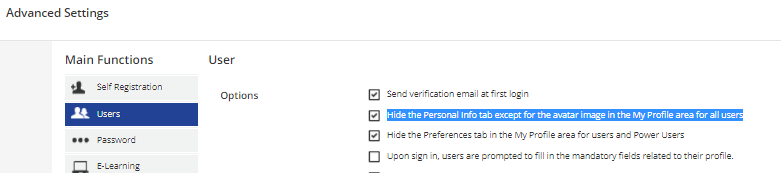
you go to Advanced Settings> Users and then check the “Hide the Personal Info tab except for the avatar image in the My Profile area for all users” box.


This will also hide any additional user fields that are set to be shown to user. 


hlillibridge
Novice II
  • Author
  • Novice II
  • March 8, 2022

@Jeremy.DeLong Thank you for the code. Maybe I am doing something incorrect but this isn’t removing the email field from the My profile> Personal Info area. Copied your code and entered it under the custom styles 7.0 custom CSS.


The code will only remove the email address from the user menu drop down in the upper left hand corner of the LMS.

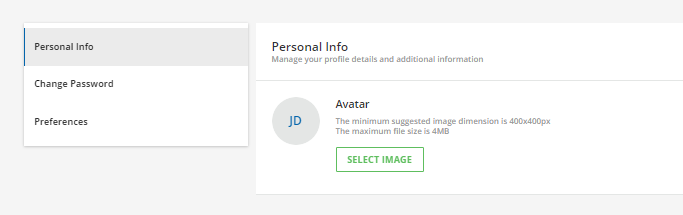
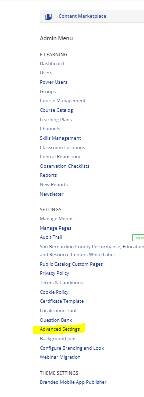
To remove the email address in Personal Info area, you have to go the Admin Menu and click Advanced Settings.


Then click Users tab and check the box as shown below.


hlillibridge
Novice II
  • Author
  • Novice II
  • March 8, 2022

We still want the Personal info tab to be visible due to the additional fields we want users to see, so checking that under Advanced settings is not what we want. We just don’t want users to be able to edit the email field under personal info> details.


Ah I thought that may be what you wanted but was not sure. I have not been able to locate the correct field flag yet.
I will keep looking for the correct tags but I would suggest starting a simple live chat with Docebo support.
they were able to provide me with the code to hide other things in the LMS.

or maybe someone else already has the code. my apologies


Bfarkas
Hero III
Forum|alt.badge.img+6
  • Hero III
  • March 8, 2022

I was looking, the problem seems to be those fields are id’d by number order of setup on the page, which may be different for different systems, this one is probably pretty close at being the fourth field but not guaranteed so worried to post how to hide it on ours since it may not be universal. This is another example of how there’s some serious structural issues in the dom for only doing custom css work. 


@Bfarkas that is what i noticed as well. very hard to locate the correct tags that are needed on that page.


Bfarkas
Hero III
Forum|alt.badge.img+6
  • Hero III
  • March 8, 2022

I mean I can find the right tags for my config, but it’s dangerous to just post it cuz if system differences and changes. 


hlillibridge
Novice II
  • Author
  • Novice II
  • March 9, 2022

Thank you all for your help on this. We do have our user import to update any changes a user might make.  Docebo Support and our Rep. didn’t have an answer for us and suggested we reach out to the community to see if anyone had a solution. Thank you all again, you are awesome!


doukdouk
Contributor I
Forum|alt.badge.img
  • Contributor I
  • June 19, 2025

We still want the Personal info tab to be visible due to the additional fields we want users to see, so checking that under Advanced settings is not what we want. We just don’t want users to be able to edit the email field under personal info> details.

Same here. 

It is such a shame that the additional setting also hides the additional fields, because their visibility can already be set precisely and individually.. unlike for the personal details!