Answer

Docebo Connect Help

  • October 9, 2025
  • 10 replies
  • 184 views

We’re looking to use Docebo Connect to help with compliance assignments.

We want to do assigning based on the completion of the previous year’s course per user. So Year 1 is a full module, years 2 and 3 are refreshers then back to the full module.

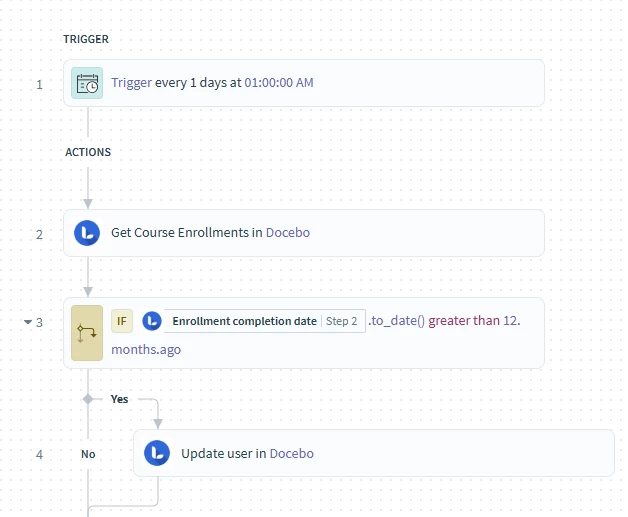
The idea is get the complete course enrollments, then use an IF statement to filter for the results greater than 12 months ago. Despite the test course having all complete enrollments over 12 months ago, we’re not getting any results back.

Any help much appreciated! 

Here’s the recipe
 

Best answer by daniel_smith_9678

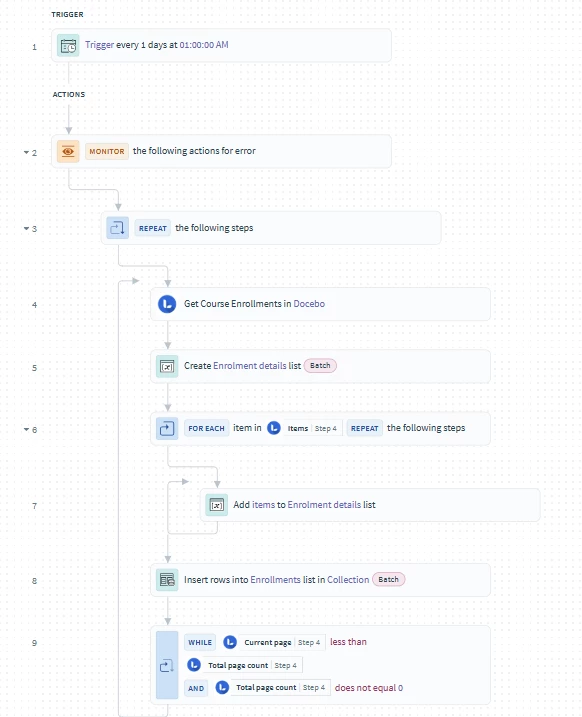
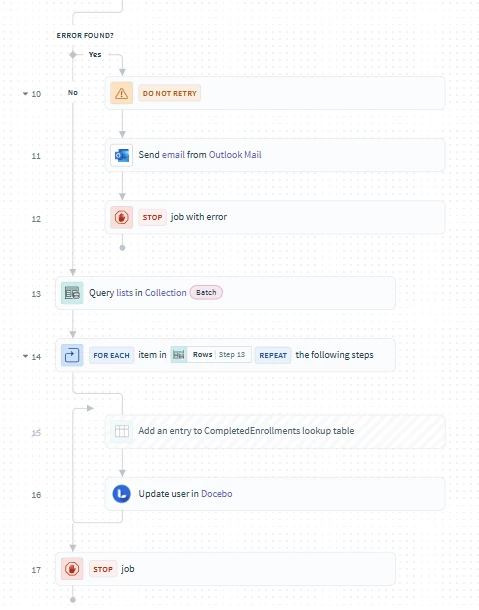
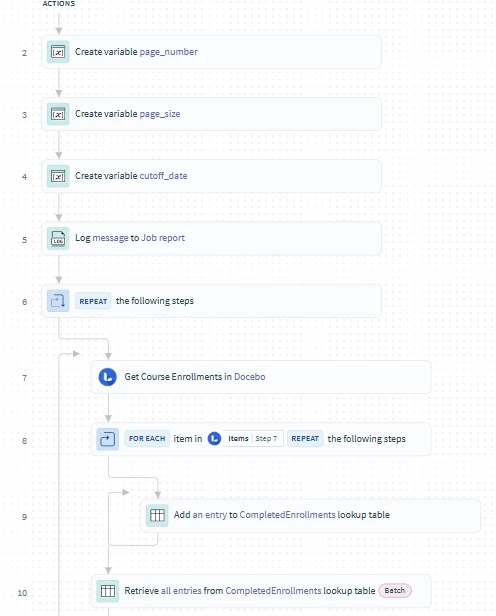
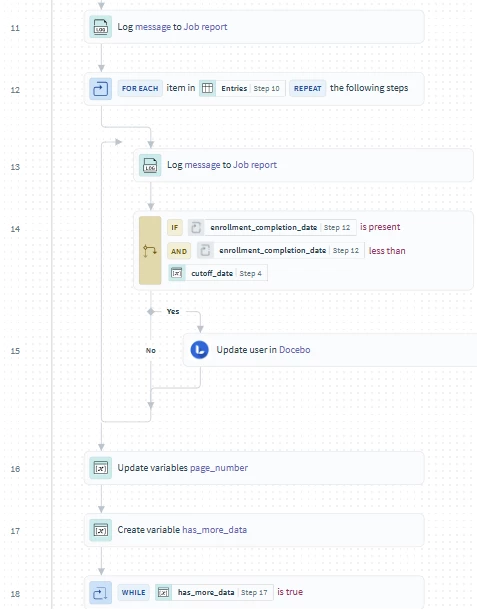
After a fair bit of trial an error, here’s the final recipe:
 

I went back to the built in Get Enrollments module, I was struggling to pick up data in the output of the API call for use later. I set page number to index+1, got the idea from some practice recipes I found in our Docebo Connect instance, under Connect Learning Plans Lab Solutions if anyone else wants to have a look! The date filter is then handled by a SQL query, I also used a lookup table during testing to confirm I was returning the results I wanted.

10 replies

smallc
Helper I
Forum|alt.badge.img+3
  • Helper I
  • October 9, 2025

Hi ​@daniel_smith_9678,

I’m not by any means an expert with Docebo Connect, but I love a good automation puzzle. Would you mind sharing the output from step 2? 

This is a fun challenge and a super useful recipe - when it works :)


Hi ​@daniel_smith_9678,

I’m not by any means an expert with Docebo Connect, but I love a good automation puzzle. Would you mind sharing the output from step 2? 

This is a fun challenge and a super useful recipe - when it works :)

Thanks for your help, here’s the output from a test job (i’ve hidden some real users):

  • {
    Get course enrollments output:
    {
    Data:
    {
    Items:
    [

    {},

    {},

    {},

    {
    User ID: 23864,
    Username: Test3,
    Course ID: 1109,
    Course uid: E-06KWG0,
    Course code: DC1,
    Course name: Dummy Compliance 1,
    Course type: elearning,
    Course begin date: null,
    Course end date: null,
    Enrollment level: student,
    Enrollment status: completed,
    Enrollment created by: 24839,
    Enrollment created at: 2025-10-08 07:33:22,
    Enrollment validity begin date: null,
    Enrollment validity end date: null,
    enrollment_validity_begin_datetime: null,
    enrollment_validity_end_datetime: null,
    Enrollment date last updated: 2025-10-08 07:41:41,
    Enrollment completion date: 2024-05-14 23:00:00,
    Enrollment score: 0,
    assignment_type: mandatory
    },

    {},

    {}
    ],
    Count: 6,
    Has more data: false,
    Cursor: null,
    Current page: 1,
    Current page size: 50,
    Total page count: 1,
    Total count: 6,
    Sort:
    [

    {
    Sort by: enrollment_created_at,
    Sort dir: desc
    }
    ]
    },
    version: 1.0.0,
    Links: []
    }
    }


smallc
Helper I
Forum|alt.badge.img+3
  • Helper I
  • October 9, 2025

Thanks! I wonder if it might work to insert a variable table containing the enrollment completion date and username between steps 2 and 3 for the if statement to reference.


hailey.gebhart
Helper III

Hi there! 

@daniel_smith_9678 

I have some experience dealing with situations like these. First of all, your initial course enrollments call returns as a list of items, called “items”. This means that when you run your IF statement, if you are not specifying that you are working with a list via a for loop or a list-specific formula in Connect, you are only going to be checking on the first item in your list. You don’t want to do that. You want to get every enrollment and do checks off of that. You can also use a Workato list/hash formula, “where” for this, but there are some quirks to working with list and hash formulas, as getting the new list with workable data pills can be a hassle, but I can expand with more detail on that if needed. (documentation here: List and Hash Formulas | Workato Docs)


In addition, your enrollment output likely has multiple pages. This means you need to repeat the number of times you run that call to retrieve course enrollments in docebo until you run out of data (Docebo uses “Page-based Pagination” A guide to REST API pagination). This means another loop before you even get to processing your data. Usually a while loop. 


However, if you are comfortable using a custom action, I would recommend you call the API, GET “Retrieves courses enrollments” - /course/v1/courses/enrollments. This API has search query parameters for upper and lower bound completion dates.

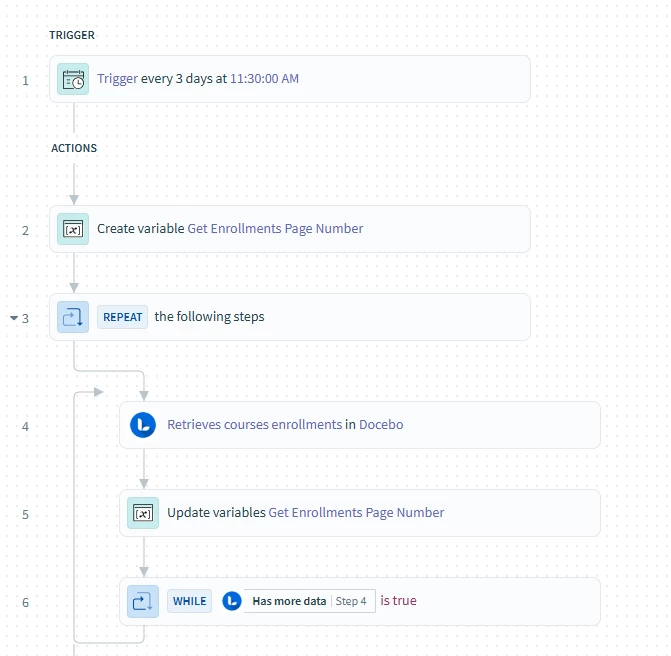
For this, your loop would look something like this:


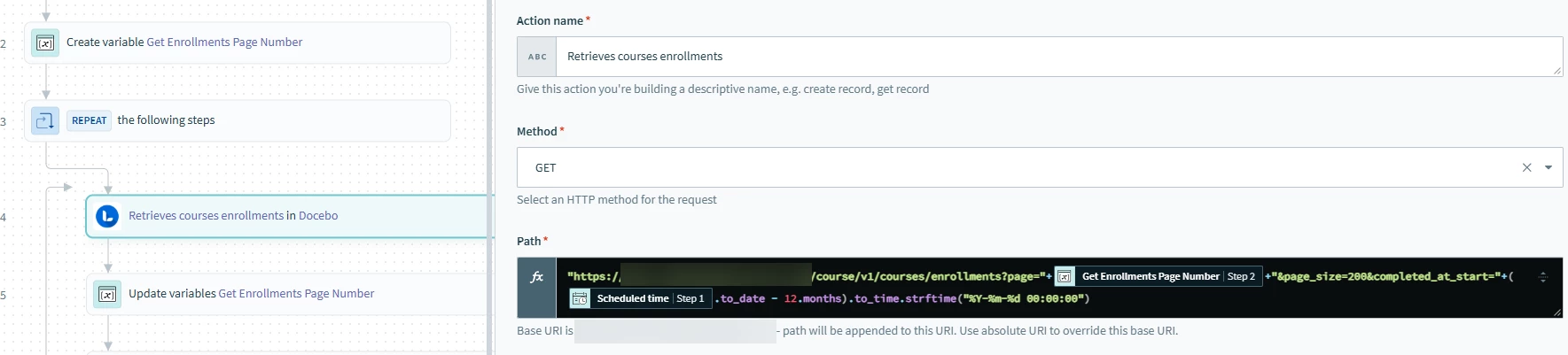
With step 4 looking like: 


The API Path is:


“/course/v1/courses/enrollments?page=”+[get_enrollments_page_number]+&page_size=200completed_at_start="+([Scheduled Time (step 1)].to_date - 12.months).strftime("%Y-%m-%d 00:00:00")


I like to use “Job Scheduled at” for these purposes, so if your recipe fails at all, you can re-run with the data of the INTENDED date instead of whenever you have to re-run the recipe (also reccomend error handling per recipe or RecipeOps by Workato to send notifications when a recipe fails, which should be free with your Docebo plan). You can find the formula for the .strftime() formula in this Workato documentation: Date formulas | Workato Docs. It formats the datetime to be in the correct format for the API. 


Then if you are using a custom action, you need the response body. If you are still new to working with the Docebo API’s in Connect, I am happy to walk through that as well. 


Also notice the page number and page size. Page number is a “Variables by Workato” variable. it starts out as simply the number 1. (important that you define it as a number!). Then, step 5 simply takes the current page number + 1 as a formula. For page size, Docebo usually has a page size of 200, and this API does as well. This minimizes how many calls you will have to make in a row. 


Now, you can either create a list before and outside of your WHILE loop, then add all the items to that list in batch, then work with them after you run all your data or you can perform whatever necessary operation on the data within the while loop. You will likely need a FOR loop on “items” within the while loop for this, if that is the route you decide to go. 


Hope this helps, and I am happy to answer any additional questions!


Thanks for the responses, in the meantime I’ve come up with this that seems to be working as intended. I created a lookup table to record completion date and user id, then loop through each entry in the table with an IF statement to filter out the desired users to update, all within a WHILE loop to handle pagination. The table is populating correctly for a course with over 3000 enrolments.
 

Am I missing anything here?


Hi there! 

@daniel_smith_9678 

I have some experience dealing with situations like these. First of all, your initial course enrollments call returns as a list of items, called “items”. This means that when you run your IF statement, if you are not specifying that you are working with a list via a for loop or a list-specific formula in Connect, you are only going to be checking on the first item in your list. You don’t want to do that. You want to get every enrollment and do checks off of that. You can also use a Workato list/hash formula, “where” for this, but there are some quirks to working with list and hash formulas, as getting the new list with workable data pills can be a hassle, but I can expand with more detail on that if needed. (documentation here: List and Hash Formulas | Workato Docs)


In addition, your enrollment output likely has multiple pages. This means you need to repeat the number of times you run that call to retrieve course enrollments in docebo until you run out of data (Docebo uses “Page-based Pagination” A guide to REST API pagination). This means another loop before you even get to processing your data. Usually a while loop. 


However, if you are comfortable using a custom action, I would recommend you call the API, GET “Retrieves courses enrollments” - /course/v1/courses/enrollments. This API has search query parameters for upper and lower bound completion dates.

For this, your loop would look something like this:


With step 4 looking like: 


The API Path is:


“/course/v1/courses/enrollments?page=”+[get_enrollments_page_number]+&page_size=200completed_at_start="+([Scheduled Time (step 1)].to_date - 12.months).strftime("%Y-%m-%d 00:00:00")


I like to use “Job Scheduled at” for these purposes, so if your recipe fails at all, you can re-run with the data of the INTENDED date instead of whenever you have to re-run the recipe (also reccomend error handling per recipe or RecipeOps by Workato to send notifications when a recipe fails, which should be free with your Docebo plan). You can find the formula for the .strftime() formula in this Workato documentation: Date formulas | Workato Docs. It formats the datetime to be in the correct format for the API. 


Then if you are using a custom action, you need the response body. If you are still new to working with the Docebo API’s in Connect, I am happy to walk through that as well. 


Also notice the page number and page size. Page number is a “Variables by Workato” variable. it starts out as simply the number 1. (important that you define it as a number!). Then, step 5 simply takes the current page number + 1 as a formula. For page size, Docebo usually has a page size of 200, and this API does as well. This minimizes how many calls you will have to make in a row. 


Now, you can either create a list before and outside of your WHILE loop, then add all the items to that list in batch, then work with them after you run all your data or you can perform whatever necessary operation on the data within the while loop. You will likely need a FOR loop on “items” within the while loop for this, if that is the route you decide to go. 


Hope this helps, and I am happy to answer any additional questions!

Scratch my previous comment, the API call is much more elegant. However, I’m really struggling with the pagination I can only return 100 records into my list (or lookup table), if I hardcode the increase to 2 I get 101 records of which the 101st is blank.


dklinger
Hero III
Forum|alt.badge.img+11
  • Hero III
  • October 10, 2025

Hi everyone - at a high level - I have a question for you.

So we use Docebo Connect for some auto-provisioning from OKTA.

I wanted to ask though - because you are only using Docebo Connect to talk directly to the Docebo API. You arent charged for another “connector” right?

Sorry if this sounds naive. But what is illustrated above may lead to some interesting solutions that I have been staying away from simply because I was unsure about the usage.


smallc
Helper I
Forum|alt.badge.img+3
  • Helper I
  • October 10, 2025

@dklinger that’s exactly right! You aren’t charged for another connector. 


hailey.gebhart
Helper III

@daniel_smith_9678 


For final food for thought, I would definitely look into the .where() formula by Workato unless you are truncating your lookup table in-between runs of this recipe. Lookup tables can only hold up to 10,000 rows. They are not meant to store data in a database style. Only to have data that you can reference throughout other recipes. In addition, if you aren’t truncating, you run the risk of impacting data you have already done processing on, which could impact the user experience and will increase processing time if your solution is idempotent.


Great solution! Glad you figured out an outcome that works for you!


For ​@dklinger You already natively have a Docebo connection with Connect that can access the Docebo API. Custom Action is the way to do this. You also likely have Recipe Ops by workato, which is a connection, but offered natively in Workato. This lets you manage other recipes, such as do global error handling. 


After a fair bit of trial an error, here’s the final recipe:
 

I went back to the built in Get Enrollments module, I was struggling to pick up data in the output of the API call for use later. I set page number to index+1, got the idea from some practice recipes I found in our Docebo Connect instance, under Connect Learning Plans Lab Solutions if anyone else wants to have a look! The date filter is then handled by a SQL query, I also used a lookup table during testing to confirm I was returning the results I wanted.