


Best Answer

How to restrict what courses appear for a manager to enroll their team members to?

  • May 19, 2022
  • 2 replies
  • 158 views

Forum|alt.badge.img+1

I am trying to create a user account for a manager and would like them to only be able to enroll their team members into certain courses but all courses appear under the options in My Team. 

I put the account under a different branch but even the courses that are in a category that is not assigned to that branch appears and they can enroll their team member to that course. Then the team member can access it once they are enrolled which previously, they couldn’t see that course because it was not a category for them (their branch).

This account would be for our partners (a manager would like to see their team’s progress) but they shouldn’t be able to enroll them in courses that we have for internals/employees, just the courses we provide our partners.

Best answer by Marco.T

Hi @isaal , Marco (PM of this area)  here, 

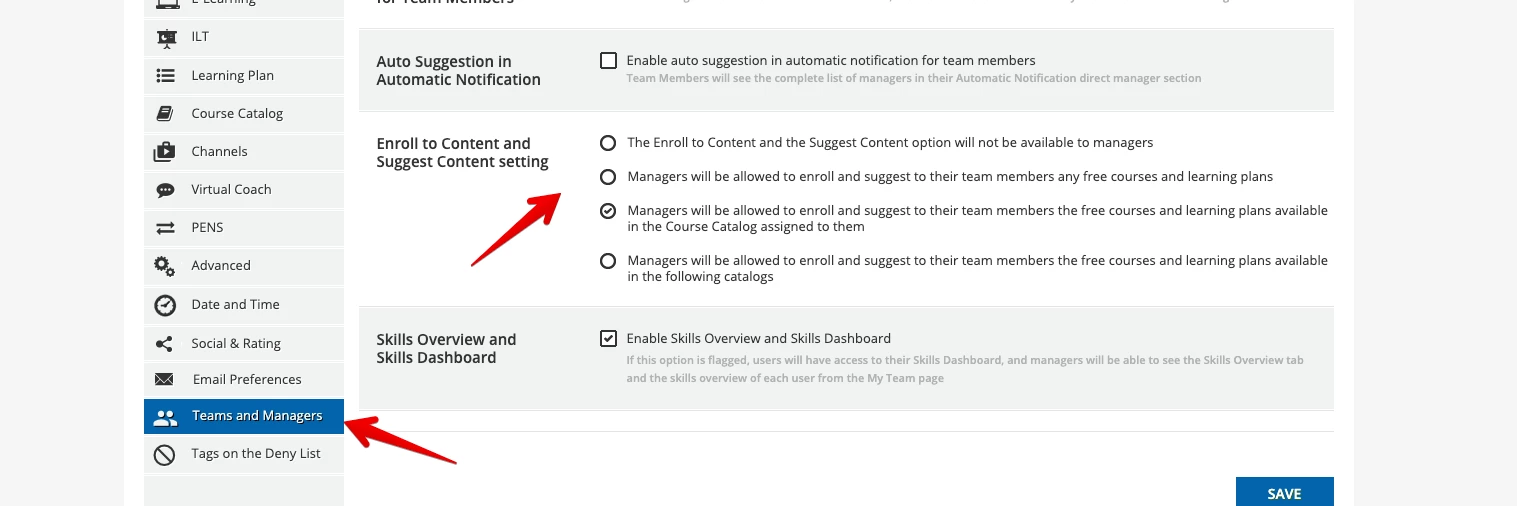
there is a configuration in Advanced Setting / Managers that allows to select the courses available to Managers for enrollments

 Hope this helps

thanks for your interest in My Team!

2 replies

Marco.T
Docebian
Forum|alt.badge.img+2
  • Docebian
  • Answer
  • May 19, 2022

Hi @isaal , Marco (PM of this area)  here, 

there is a configuration in Advanced Setting / Managers that allows to select the courses available to Managers for enrollments

 Hope this helps

thanks for your interest in My Team!


Forum|alt.badge.img+1
  • Author
  • Influencer III
  • May 19, 2022

@Marco.T Thank you! I missed this section in the settings. I only looked at the courses and course catalog areas for enrollment options and totally forgot about the Team and Managers area.