Best Answer

Is there a way to set up manager notification once their employee is enrolled into a class?

  • May 15, 2024
  • 10 replies
  • 215 views

Hello All,

       Is there a way to set up manager notification once their employee is directly enrolled into a class by a super admin?

Best answer by JeanetteMcVeigh

Hi. From what I can see, the only notification deals with enrollment by an instructor OR superadmin...not just superadmin. Will that work?


https://help.docebo.com/hc/en-us/articles/4429113070226-Notification-events-and-conditions#Course.UserEnrolledToACourse


User Enrolled In A Course

Triggered when a Superadmin or an instructor enrolls a user in an e-learning or ILT course. Also triggered when a user self-enrolls from a course catalog into a course.

Applicable Course Types All Course Types
Time Triggers At Time Of & After
Available Shortcodes [first_name]
[last_name]
[username]
[course_name]
[course_link]
[subscribed_at]
[expire_at]
[sso_link]
[reset_pwd_link]
Recipients Users, Power Users, Instructor(s), Superadmins, Managers
Notification Priority Normal
Template Available Yes
Visible To Power Users  
Additional Notes  

10 replies

JeanetteMcVeigh
Hero III
Forum|alt.badge.img+7

Hi. From what I can see, the only notification deals with enrollment by an instructor OR superadmin...not just superadmin. Will that work?


https://help.docebo.com/hc/en-us/articles/4429113070226-Notification-events-and-conditions#Course.UserEnrolledToACourse


User Enrolled In A Course

Triggered when a Superadmin or an instructor enrolls a user in an e-learning or ILT course. Also triggered when a user self-enrolls from a course catalog into a course.

Applicable Course Types All Course Types
Time Triggers At Time Of & After
Available Shortcodes [first_name]
[last_name]
[username]
[course_name]
[course_link]
[subscribed_at]
[expire_at]
[sso_link]
[reset_pwd_link]
Recipients Users, Power Users, Instructor(s), Superadmins, Managers
Notification Priority Normal
Template Available Yes
Visible To Power Users  
Additional Notes  

dklinger
Hero III
Forum|alt.badge.img+11
  • Hero III
  • May 15, 2024

Looks like this fits.


Bart_at_Yamaha Motor
Helper II

We had a similar challenge to above. But for us it was not about the access to the ILT course (enrollment), but when the user actually signs up for one of the classroom sessions in the course. That is more relevant for the managers, as they will want now that there team member will not be available for day or more. Curious if anyone found a way to do that?

Br, Bart


Forum|alt.badge.img+4
  • Guide II
  • May 15, 2024

@Bart_at_Yamaha Motor This is a gap. There is a user enrolled in ILT session notification, but it cannot be sent to a manager. Also, there is a manager report for ILT sessions with a fatal flaw, “enrolled” status is missing from the report. The only workaround I have found is reports for those actively interested and Excel savvy. We have done some formatting with slicers on the supervisor column. Still looking at options. If the need is important enough maybe a BI dashboard to avoid the manual report formatting. 
 

User Enrolled In ILT Session

Notifies the audience when a user has been enrolled in an ILT session. Please note that this does not apply to enrollments requiring approval.

Applicable Course Types ILT (Instructor-Led Training) Courses
Time Triggers At Time Of
Available Shortcodes [session_name]
[session_dates]
[session_location]
[session_classroom]
[course_link]
[first_name]
[last_name]
[course_name]
[calendar_attachment]
[calendar_sync_url]
Recipients Users, Power Users, Instructor(s), Superadmins
Notification Priority High
Template Available  
Visible To Power Users  
Additional Notes  

Vmueller
Contributor II
Forum|alt.badge.img+2
  • Contributor II
  • May 15, 2024

You may be able to add observation checklists to assigned courses that need to be approved by managers and even apply this to ILT courses.


  • Author
  • Newcomer
  • May 15, 2024

Thank you everyone! :-)


Forum|alt.badge.img+1

@Jason Amador ,

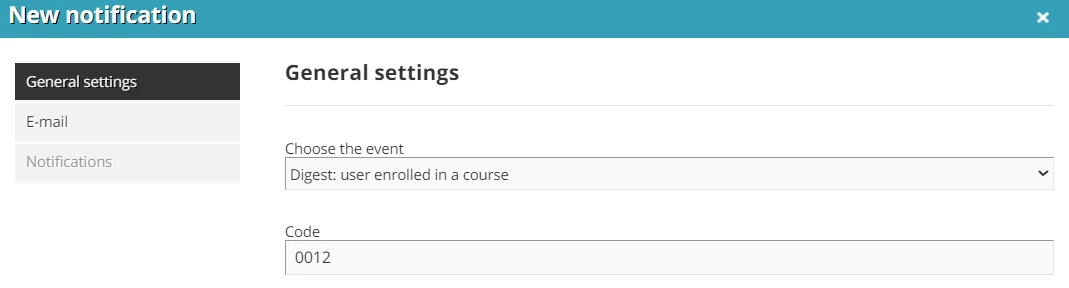
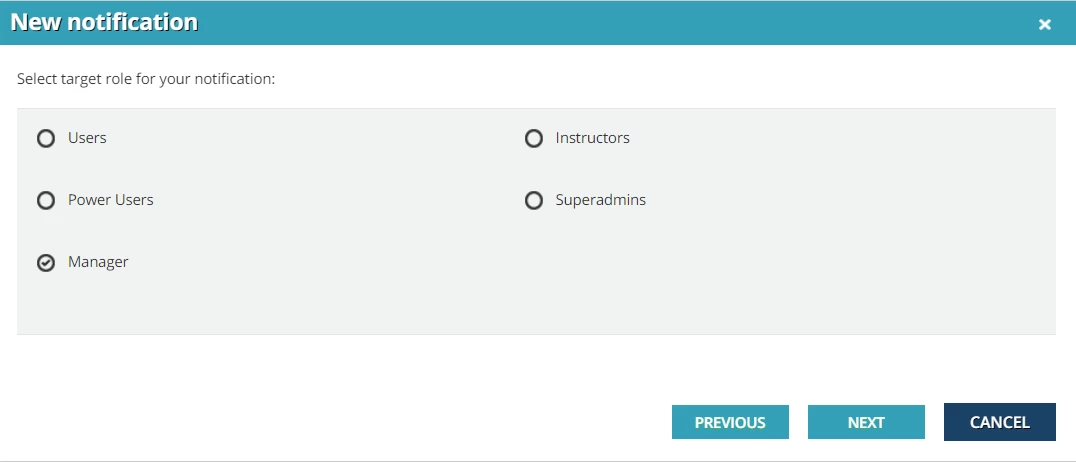
Notification - “Digest - user enrolled in a course” has an option to choose manager as target audience in the setup. Please check if this option fits your requirements.


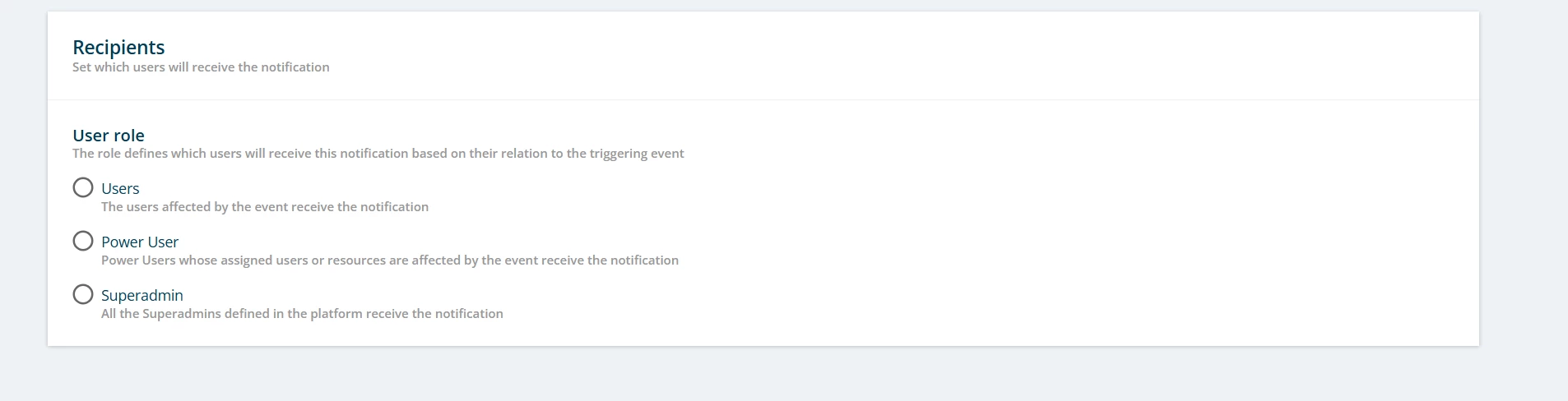
Hi All - Where are you finding the recipient “Manager” field? This is the only available options I am showing. I see some of the above screenshots are from a previous version, I hope this was not deprecated. 


Disregard - I was looking at learning path enrollment, not course enrollment. Its a shame this wasn’t implemented consistently. 


Bart_at_Yamaha Motor
Helper II

Disregard - I was looking at learning path enrollment, not course enrollment. Its a shame this wasn’t implemented consistently. 

Hi Kari, the recipients on different notification events are inconsistent. We have already requested already for multiple events that a ‘manager’ recipient would make sense. But priority was first given to the new engine, hope they will pick-up this minor (but big impact) improvements soon.