Best Answer

Managing enrollments during testing

  • February 17, 2023
  • 10 replies
  • 116 views

dwilburn
Guide III
Forum|alt.badge.img+4

I am working on a Salesforce integration in our Sandbox and I want to go through taking a course as different types of users we support to make sure the slight change in interface doesn’t have any impacts. 

I have a short course to use for testing. I want to set my account to the different users and then go through the course. But each time I do this I would first Iike to “wipe out” my past training records for the course, but I can’t seem to do that.

If I change enrollment status complete back to enrolled then as soon as I start going through the course it shows complete. I unenrolled myself from the course and as soon as I enrolled myself back in it shows complete.

My only choice seems to be, use a test user (meaning having to get them setup in multiple sandboxes SF and Docebo), use them for a course then delete them and add them back and start again.

How do other superadmins do this testing?
Best answer by Annarose.Peterson

Just in case:

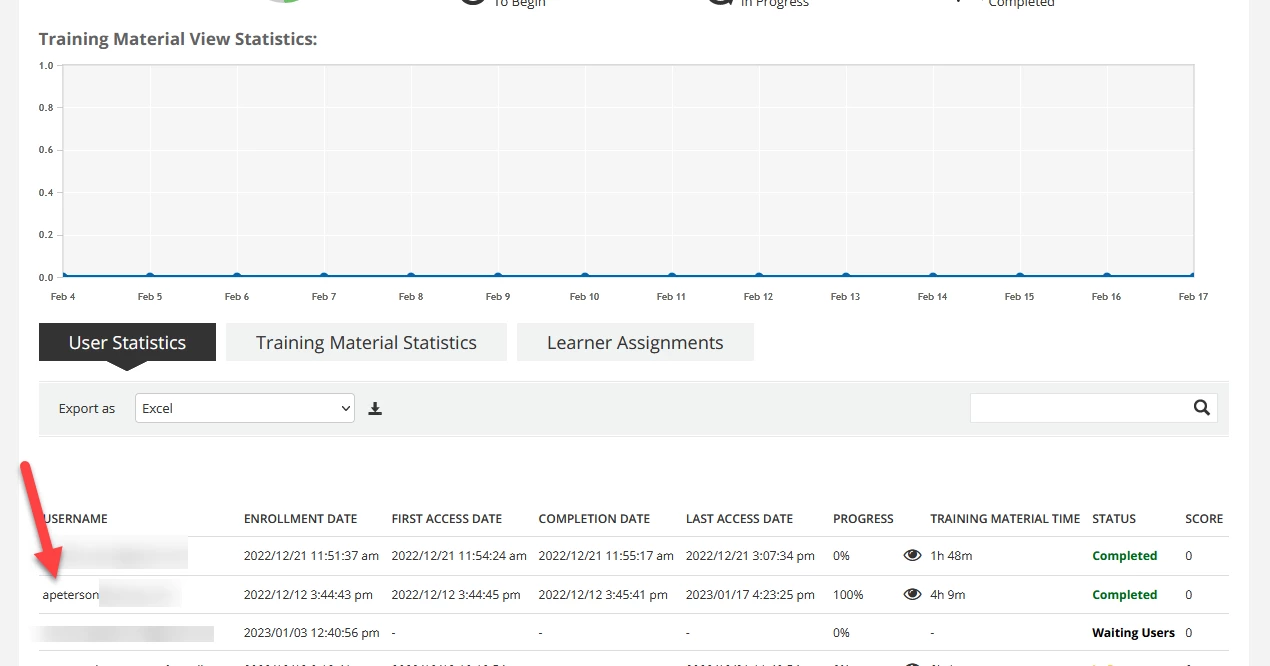
Go to course reports, find the user and click on their name

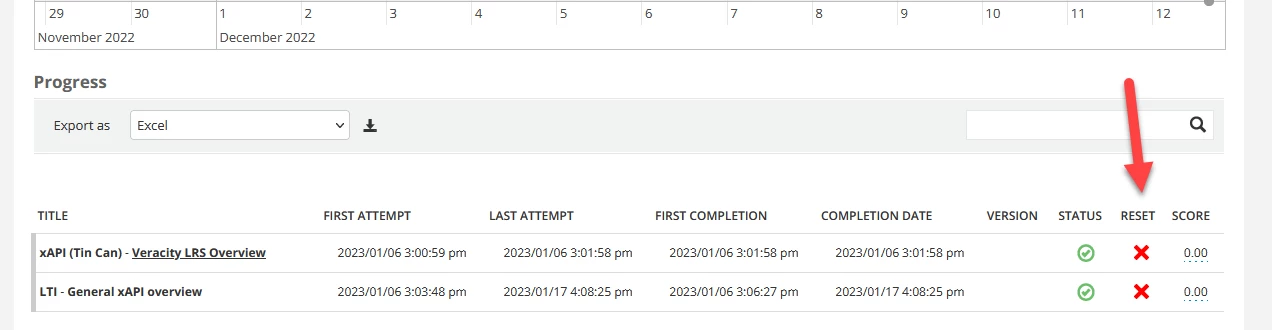
then on the detail report, click the red X next to the training material name


10 replies

Annarose.Peterson
Hero III
Forum|alt.badge.img+7

It sounds like it is holding on to your previous completion of the training material.

If your test course has like a video or SCORM,  you need to go to the course report, and reset your attempt for all the training materials in the course.  Then update your enrollment to Enrolled.  That should treat you like you started over again. 


dwilburn
Guide III
Forum|alt.badge.img+4
  • Author
  • Guide III
  • February 17, 2023

@Annarose.Peterson  I am looking for that ability to reset in that report. Is that in the CLOR?


dwilburn
Guide III
Forum|alt.badge.img+4
  • Author
  • Guide III
  • February 17, 2023

@Annarose.Peterson  ah, I think I found it.


KMallette
Hero II
Forum|alt.badge.img+9
  • Hero II
  • February 17, 2023

@dwilburn I encounter the same issue. In the end, the best way I have found to deal with the lack of 100% reset is to have different accounts, or multiple SCORM uploads (like totally different course shells, but the same training material). I’ve tried changing the enrollment status, and using the Training Materials “reset” button (way in the bowels of Course Management), but I think that the User Unique ID and the Course Unique ID are the data that get collected.


Annarose.Peterson
Hero III
Forum|alt.badge.img+7

Just in case:

Go to course reports, find the user and click on their name

then on the detail report, click the red X next to the training material name


KMallette
Hero II
Forum|alt.badge.img+9
  • Hero II
  • February 17, 2023

@Annarose.Peterson I’ve tried that and it doesn’t seem to do the trick.


dwilburn
Guide III
Forum|alt.badge.img+4
  • Author
  • Guide III
  • February 17, 2023

@Annarose.Peterson  thanks that worked for me.


TMWolfman
Contributor I
  • Contributor I
  • February 17, 2023

@dwilburn  I have test user accounts set up as Learners, PowerUsers, and superadmin.Test user accounts allow me to sign in as the test user, test the course and then switch back to my account, so it does not appear on my dashboard.


Annarose.Peterson
Hero III
Forum|alt.badge.img+7

@Annarose.PetersonI’ve tried that and it doesn’t seem to do the trick.

That’s interesting, I wonder why that won’t work in your platform?  Our TMs are pushed to the central repository too and that will reset my attempts in all courses the TM is pushed to. 


dwilburn
Guide III
Forum|alt.badge.img+4
  • Author
  • Guide III
  • February 17, 2023

@Annarose.PetersonI’ve tried that and it doesn’t seem to do the trick.

I found that when I deleted the reporting activity but did not set enrollment status back to enrolled the system still showed my as complete. But once I changed my enrollment status to enrolled it showed the course as not started.