Question

MS Teams Issues - Participants marked as attended after Instructor closes the event.

  • April 29, 2025
  • 8 replies
  • 97 views

Forum|alt.badge.img

During our testing of ILT using MS Teams, one of my participants joined the event after we finished testing and I as the sole instructor closed the class.

This colleague who joined after the class was closed, was marked as having attended the meeting.

As anyone else had this a happen?  Did you find a solution?

8 replies

lrnlab
Hero III
Forum|alt.badge.img+10
  • Hero III
  • April 29, 2025

It’s odd that the join button was still visible after the session ended unless the actual end time had not passed. In that case, it makes sense since users are automatically tracked as “attended” when they click the JOIN button. Only the Zoom V3 integration offers the ability to set a percentage attendance minimum time for auto-tracking attendance based on the time spent in the session. Otherwise the other webinar tools all act the same, marking the users as attended when they join the call.

Zoom details for comparison: https://help.docebo.com/hc/en-us/articles/11206175970194-Docebo-VILT-for-Zoom-version-3

VILT for Teams: https://help.docebo.com/hc/en-us/articles/360020079600-VILT-for-Microsoft-Teams


Forum|alt.badge.img
  • Author
  • Influencer I
  • April 29, 2025

@lrnlab What I was told, as long as the session is schedule the join button will be active. 

But what if class ends early?  It happened during my test.  We had a 45 min event scheduled.  We took 20 min to do the testing we needed.  A colleague join about 5 min after I closed the class.

Since during the class when I was there, late students could not join after the start time without being admitted.  I would have expected that students joining when there is no instructor would not be allowed into the event. 

What found was contrary to what we expected, participants could join freely after the class was dismissed.


Forum|alt.badge.img+1
  • Influencer III
  • April 29, 2025

Hi ​@RonB, we had the same issue.  A user joined four hours later and was marked as course completed due to attendance status being present.  I only noticed it when I ran a report and saw the time difference from this one user to the rest of the group.

I have lodged a support ticket and am waiting for a reply.


emily.mccarthy
Guide II
Forum|alt.badge.img+4

@lrnlab What I was told, as long as the session is schedule the join button will be active. 

But what if class ends early?  It happened during my test.  We had a 45 min event scheduled.  We took 20 min to do the testing we needed.  A colleague join about 5 min after I closed the class.

Since during the class when I was there, late students could not join after the start time without being admitted.  I would have expected that students joining when there is no instructor would not be allowed into the event. 

What found was contrary to what we expected, participants could join freely after the class was dismissed.

I find users can join any time during the time slot allocated to the virtual training session. I think this is what you are referencing above. Once the instructor joins, the session it is logged in the platform where as leaving is not recorded data and it is solely the times listed in the event that impact the tracking in the platform.


Forum|alt.badge.img
  • Author
  • Influencer I
  • April 30, 2025

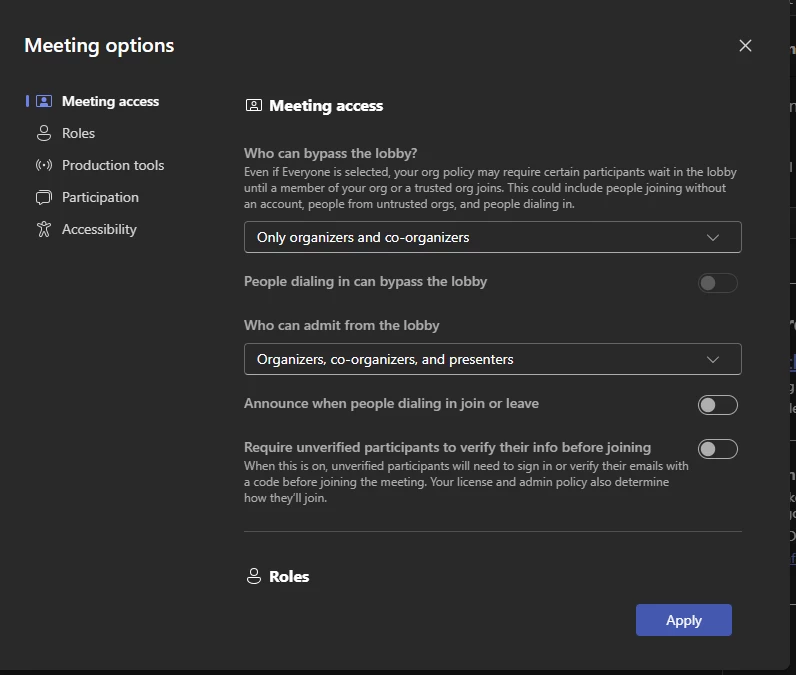
@Suzy_q When I start a teams meeting, I have an option to not allow non-instructors to bypass the lobby.  See image below. My default setting was People in my org and guests, which I just changed to Only organizers and co-organizers.

I don’t know if this setting is for just the meeting I started OR if it is a personalize setting for all of my meetings.

What would be best if if when Docebo creates the meeting via the APIs we have an option to choose who can bypass the lobby or they set a default for the class to Only organizers and co-organizers.

Until you have systemic fix, a good practice may be to have your Instructor, change the setting when they start each class.


Forum|alt.badge.img
  • Author
  • Influencer I
  • May 2, 2025

While I believe that having the Instructor change the “Who can bypass the Lobby”, is a work around.  

Much like we can determine when the Instructor and Students can see “start class” and “Join” buttons respectively.

In my opinion, there should be

  • An option when creating the event, to the Power User can choose “Who can bypass the Lobby” their preferred option they want for the event.
  • The default setting is configured as “Only Organizers and Co-Organizers”, when Docebo creates the event in Teams
  • Admin can choose an organizational default setting “Who can bypass the Lobby” when Docebo creates the event in Teams

I will create an Idea for this in the community.


msantos
Helper II
Forum|alt.badge.img+2
  • Helper II
  • May 8, 2025

Hi ​@lrnlab, if we use the product “Docebo for Microsoft Teams”, is it possible to set a percentage attendance minimum time for auto-tracking attendance based on the time spent in the session like Zoom?

If not, do you know if this feature is on the product roadmap?

Thank you.​


lrnlab
Hero III
Forum|alt.badge.img+10
  • Hero III
  • May 8, 2025

I dont think that’s an option with Teams, just Zoom. The only other tool I've seen this option was with Webex. Havent seen it on the roadmap so you might want to create an idea for it or ask your CSM if they might know.