Normally, when we have a learning plan and people are assigned training with prerequisites to complete, the learner will receive a notification when new content has been unlocked.
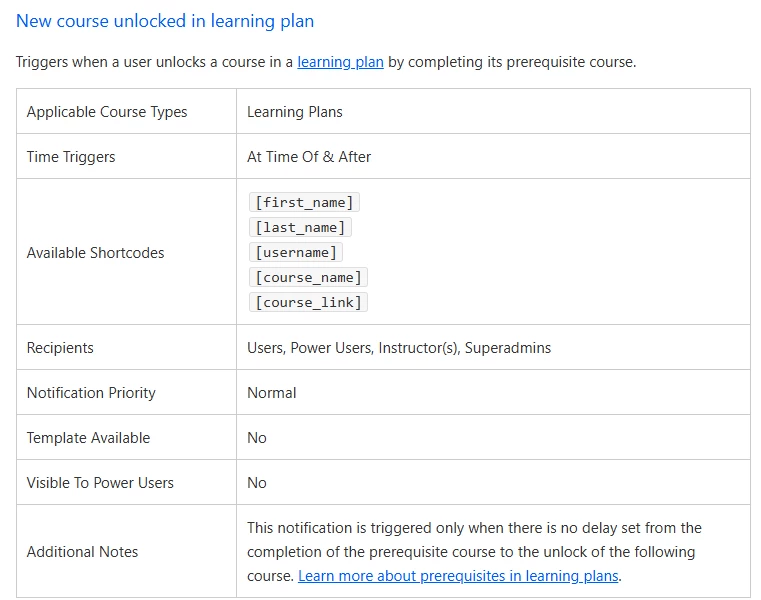
However, I just learned that if you use prerequisites and a delay (which is what we are doing), the "new course unlocked in learning plan" notification will not be triggered. (See additional notes in image below)
Has anyone else worked around this? How do you notify your learners that they have content to take?
Both locked and unlocked content appear in their weekly reminder digest emails that we set up, so that’s not going to give them more information.
Your help is much appreciated!
Best answer by shanejacques
Warning: I don’t have a great answer, but I’m standing in solidarity with you!
I feel your pain here! Learning plans leave a lot to be desired, frankly, and the “spaced learning” challenge has been my nemesis this week.
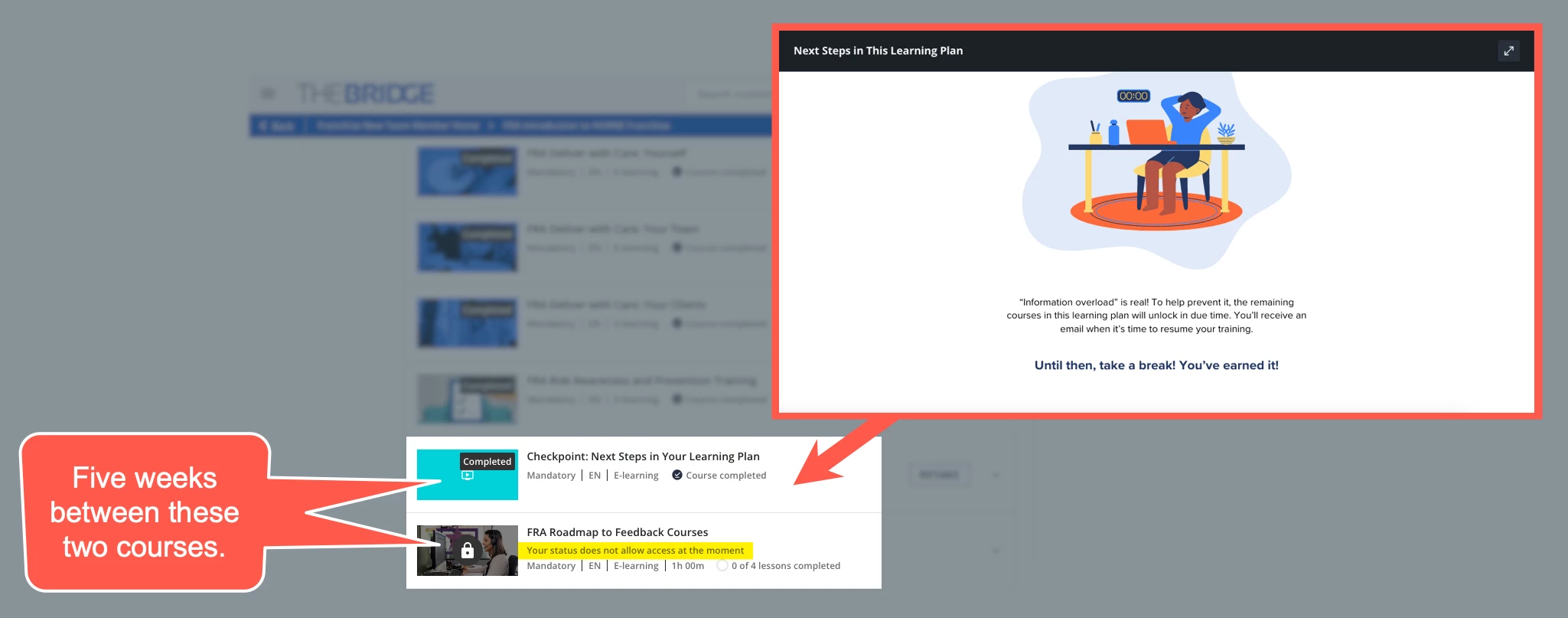
We have a learning plan that has five weeks delay between courses, to manage cognitive load. The issue we face is that because the delayed course is visible but not clickable, users think that it’s a system bug. We get so many tickets asking for help unlocking the course!
We built a course that we call a “Checkpoint” (see screenshot) that sits immediately prior to the locked course, to try to help people understand that it’s by design. But, to your point, when folks see it as “in progress” or they see it in digest notifications, they forget that the lock is intentional.
What’s worse is that there isn’t a great way to alert them when it’s available, as you’ve shown.
We’ve had so many conversations this week about how to work around it. I wish I had something good to share. Honestly, I’m tempted to swear-off learning plans altogether, but it’s not practical to do so in some cases.
Warning: I don’t have a great answer, but I’m standing in solidarity with you!
I feel your pain here! Learning plans leave a lot to be desired, frankly, and the “spaced learning” challenge has been my nemesis this week.
We have a learning plan that has five weeks delay between courses, to manage cognitive load. The issue we face is that because the delayed course is visible but not clickable, users think that it’s a system bug. We get so many tickets asking for help unlocking the course!
We built a course that we call a “Checkpoint” (see screenshot) that sits immediately prior to the locked course, to try to help people understand that it’s by design. But, to your point, when folks see it as “in progress” or they see it in digest notifications, they forget that the lock is intentional.
What’s worse is that there isn’t a great way to alert them when it’s available, as you’ve shown.
We’ve had so many conversations this week about how to work around it. I wish I had something good to share. Honestly, I’m tempted to swear-off learning plans altogether, but it’s not practical to do so in some cases.
in the old days we also worked with a delay, until we found out the issue you mentioned. We contacted the support Team and after a long time they found out, that the notification won’t be triggered if the delay was more then two weeks. Why offer a notification delay, if it stops working after more then two weeks 🙈
My tip in general is to inform the users through the Learning Plan description on how the LP works and maybe provide a general Platform FAQ. In this way the users are informed and will minimize the Support tickets.
We’ve set a learning plan with a prerequisite course and then 20 courses that are triggered in groups of 4 every 30 days, 90 days after the first course is completed.
Last Thursday, I updated the completion date for the prerequisite course for a test user. The completion date was now a date 90 days in the past which unlocked the first 4 courses, as expected.
I did not get the “learning content has been unlocked” notification according to schedule. (I know that’s expected behavior.)
The weird part is that I did receive the “learning content has been unlocked” notification a day and a half later. For all 4 courses that had been unlocked.
Warning: I don’t have a great answer, but I’m standing in solidarity with you!
I feel your pain here! Learning plans leave a lot to be desired, frankly, and the “spaced learning” challenge has been my nemesis this week.
We have a learning plan that has five weeks delay between courses, to manage cognitive load. The issue we face is that because the delayed course is visible but not clickable, users think that it’s a system bug. We get so many tickets asking for help unlocking the course!
We built a course that we call a “Checkpoint” (see screenshot) that sits immediately prior to the locked course, to try to help people understand that it’s by design. But, to your point, when folks see it as “in progress” or they see it in digest notifications, they forget that the lock is intentional.
What’s worse is that there isn’t a great way to alert them when it’s available, as you’ve shown.
We’ve had so many conversations this week about how to work around it. I wish I had something good to share. Honestly, I’m tempted to swear-off learning plans altogether, but it’s not practical to do so in some cases.