Question

Training Material - Test ERROR

  • March 5, 2025
  • 7 replies
  • 109 views

Hello Docebo Community,

I need your assistance, please.

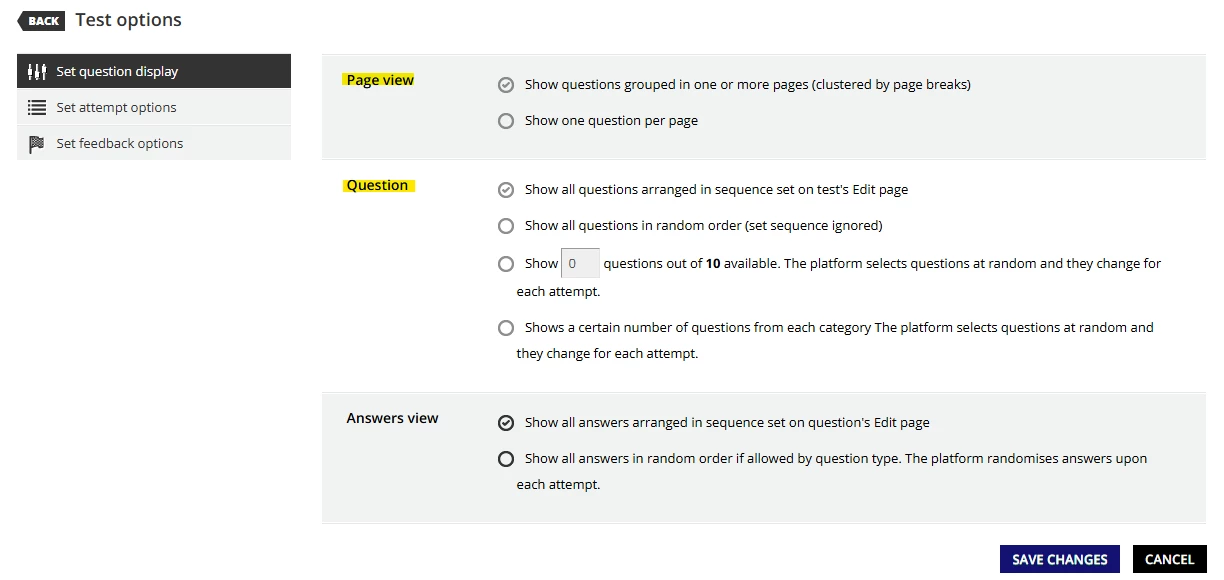
I'm having trouble selecting the "Other" option under "Test Options" when creating a test for training material in a course. What could be causing this issue?
Thanking you. 

7 replies

  • Helper I
  • March 5, 2025

Hi ​@Sha. I’m not sure exactly which ‘other’ option you mean, but anything under the Page View and Question confgurations you’ve highlighted are locked once the test is created (Don’t ask me why. Probably something to do with structure). It’s the same with the score option as well. You can’t change from a numbered score to a percentage.

Your only option, as far as I’ve been able to find, is to delete your test and start again. You can export the questions and import them to your new test, but if you’re using questions from your question bank it doesn’t use them, it just adds the imported questions as new records. I hope this helps.


Forum|alt.badge.img
  • Novice III
  • March 5, 2025

@gus How do you export and import the test questions? I have noticed an option for GIFT file type but I’m not familiar with how those work.


lrnlab
Hero III
Forum|alt.badge.img+10
  • Hero III
  • March 5, 2025

Once a test has been taken by a user, certain options cannot be modified. If you can reset all users to not started, you should be able to make these changes.


  • Helper I
  • March 5, 2025

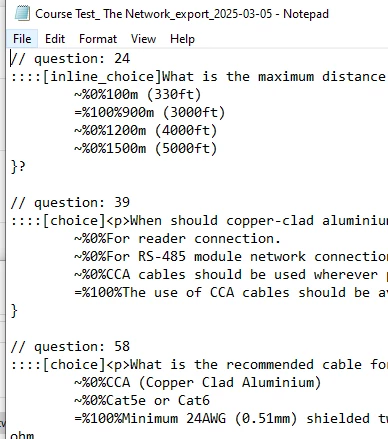
@ashleyb the ‘Export as GIFT’ option exports your test questions as a GIFT file (see https://en.wikipedia.org/wiki/GIFT_(file_format)). It’s essentially a text file that includes a defined question structure (see below). You can then use the ‘Import as GIFT’ option to import that file into any test. It works well. The only issue I encountered is we use the question bank for all our questions as they’re used across multiple tests and courses and we want to maintain tracking of the question, and the process doesn’t import/associate to the existing question bank questions, it just creates new independent questions within the new test, so that doesn’t work for us. Otherwise, it’s a good option for recreating a test and avoiding having to create your questions all over again. I’ve also used the export as a way to provide a list (converted to word doc and reformatted) of test questions for review by trainers.


lrnlab
Hero III
Forum|alt.badge.img+10
  • Hero III
  • March 5, 2025

Keep in mind that not all question types can be exported...The extended text and fill in the blank (if I recall correctly) do not get exported so when using the export/import process make sure to check the total question count after you import not ensure it’s the same. Those questions that cannot be exported/imported would need to be created manually.

details here: https://help.docebo.com/hc/en-us/articles/360020083960-Managing-tests-in-GIFT-format#h_01HAVAFQVXR1JPPTTA3N8CVRCF


  • Helper I
  • March 5, 2025

I did not realise this. Thanks for the heads-up.


jblanchette
Novice II
Forum|alt.badge.img
  • Novice II
  • May 23, 2025

Keep in mind that not all question types can be exported...The extended text and fill in the blank (if I recall correctly) do not get exported so when using the export/import process make sure to check the total question count after you import not ensure it’s the same. Those questions that cannot be exported/imported would need to be created manually.

details here: https://help.docebo.com/hc/en-us/articles/360020083960-Managing-tests-in-GIFT-format#h_01HAVAFQVXR1JPPTTA3N8CVRCF


Wish these fill in the blank questions would export/import too!