Best Answer

Turn-off admin notification of scheduled reports

  • November 2, 2022
  • 5 replies
  • 84 views

dwilburn
Guide III
Forum|alt.badge.img+4

We have created a number of specific reports for users that are periodically delivered to the users, a functionality that is very much appreciated. But the admin that creates the report gets a notification (on the bell, in the web interface) for every report. This is fine for one or two, but it becomes a problem as the number increases. Especially when large numbers of them are delivered on Monday morning.

This is an awesome notification for the user. But is there a way to turn this notification off for admin that created the report?

Best answer by lrnlab

Hi @dwilburn I believe these are not configurable by clients...They must be part of the report background job process. I would suggest you open a quick chat with support to get this confirmed. They might have an option to turn them off…??

5 replies

jennadionn
Helper I
Forum|alt.badge.img
  • Helper I
  • November 2, 2022

I don’t know how familiar you are with notifications but it sounds like there is one that is triggered in-platform for when a report is sent. Maybe this will help? 🤷🏻

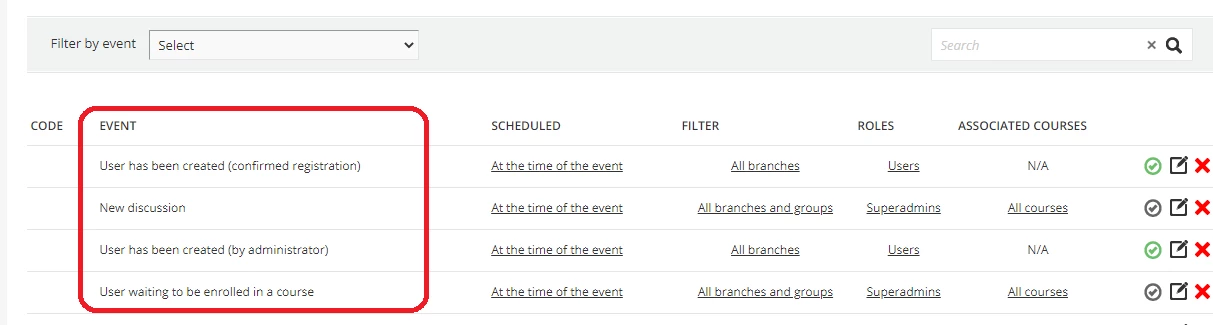
  1. Go to the Admin screen and under Notifications, select Manage
  2. Scroll through and see if you can find an event that looks like it might be triggered when a report is sent. (It’s not one that we use, so I don’t have an example in this screenshot.)
  3. Using the action buttons in the far right of the row, you can either disable the notification, or edit it. 

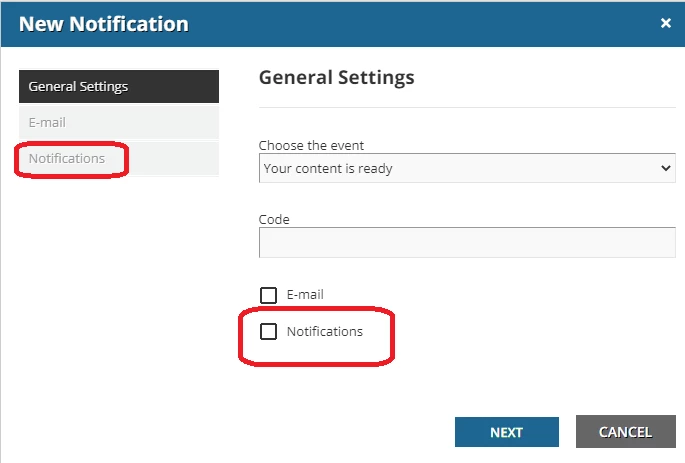
  4. If you choose to edit, it’s this checkbox that toggles whether an in-platform bell notification will occur or not. And then this menu option that programs what that bell notification says. 


dwilburn
Guide III
Forum|alt.badge.img+4
  • Author
  • Guide III
  • November 2, 2022

Thank you @jennadionn for the detailed answer, but I have not created a notification for this.


jennadionn
Helper I
Forum|alt.badge.img
  • Helper I
  • November 2, 2022

@dwilburn Darn, I was hoping it would be an easy fix for you. We still primarily use “old” reports, so maybe that’s the difference. At least there is a “Mark all as read” option in the notifications page, so the admin doesn’t have to do it one-by-one. :/  


lrnlab
Hero III
Forum|alt.badge.img+10
  • Hero III
  • Answer
  • November 2, 2022

Hi @dwilburn I believe these are not configurable by clients...They must be part of the report background job process. I would suggest you open a quick chat with support to get this confirmed. They might have an option to turn them off…??


dwilburn
Guide III
Forum|alt.badge.img+4
  • Author
  • Guide III
  • November 2, 2022

@dwilburn Darn, I was hoping it would be an easy fix for you. We still primarily use “old” reports, so maybe that’s the difference. At least there is a “Mark all as read” option in the notifications page, so the admin doesn’t have to do it one-by-one. :/  

Thank you @jennadionn you are absolutely right. I do use the Mark All as Read functionality. It is one level of annoyance for me, but we have a Reporting Prime and on Monday’s he gets at least 40 or 50. Crazy.