Best Answer

Unenroll from learning plans without losing data

  • July 22, 2022
  • 13 replies
  • 601 views

When a user is unenrolled from a learning plan (after completion), why is their data in those courses lost from their user profile? Is there a way to keep the data?

Best answer by dklinger

@dklinger Once the user completes all courses in the LP, don’t you unenroll from the LP?

Not us - we keep them in the LP because we want the metric from that learning object to be permanent.


13 replies

dklinger
Hero III
Forum|alt.badge.img+11
  • Hero III
  • July 22, 2022

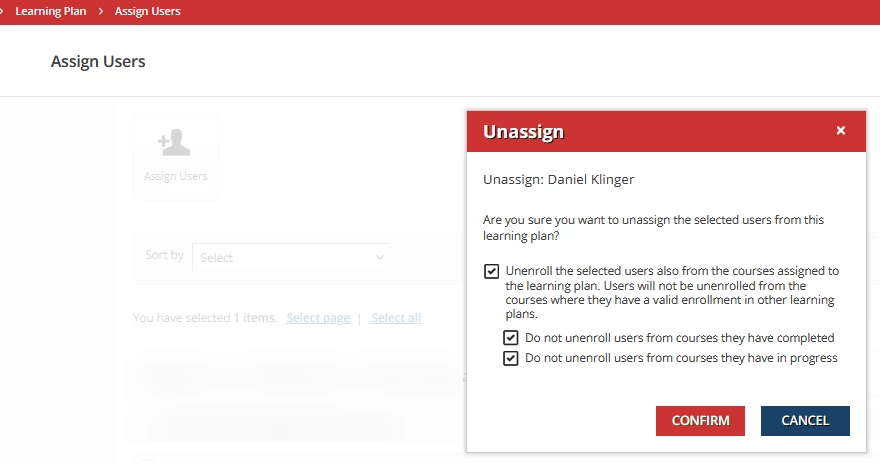
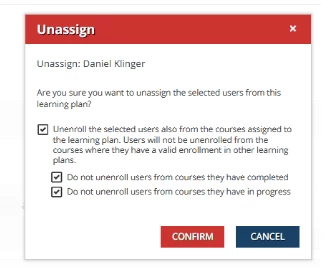
The answer is YES. As you unenroll - there are options that you should use to ensure that you do not unenroll a person from the LP...


  • Author
  • Novice II
  • July 22, 2022

@dklinger Once the user completes all courses in the LP, don’t you unenroll from the LP?


Forum|alt.badge.img+3
  • Helper III
  • July 22, 2022

@MyCity  Check out this KB article. https://help.docebo.com/hc/en-us/articles/360020083980-Creating-and-Managing-Learning-Plans


Scroll down to the part about unenrolling the learners.

If you select unenroll from the courses as well as the learning plan, I believe that is when you see the issue you have right now.


dklinger
Hero III
Forum|alt.badge.img+11
  • Hero III
  • July 22, 2022

Screenshot coming right up


dklinger
Hero III
Forum|alt.badge.img+11
  • Hero III
  • Answer
  • July 22, 2022

@dklinger Once the user completes all courses in the LP, don’t you unenroll from the LP?

Not us - we keep them in the LP because we want the metric from that learning object to be permanent.



lrnlab
Hero III
Forum|alt.badge.img+10
  • Hero III
  • July 22, 2022

Since Docebo does not have an independent history table, use completions are linked/tied to enrolments; meaning that as long as they are enrolled in a course/LP, you can retrieve and report on that user’s history. Once un-enrolled, the data is removed from the user/admin view but not necessarily disappear. If the user is re-enrolled in a course for example, they appear as completed with a few notable omissions and changes. The completion date is changed to the date they were re-enrolled and in some cases (depending on the learning object types that were included in the course), the details of what was completed in the course is reset.

I alway recommend building and running your own test scenarios so can better predict this behaviour…

All that said, Docebo is working on way to track multiple completions for the same course so how will affect Learning Plans? that remains to be seen but I am hopeful that they will consider all aspects of historical tracking.


dave.cerrone
Helper I
Forum|alt.badge.img+1
  • Helper I
  • September 15, 2022

Coming from a compliance background where historically data was so important I was very surprised to see in Docebo that unenrolling a user from a course regardless of status (subscribed, in progress, or completed) would also remove the enrollment record entirely from reporting access.  That historical data can be important from both a customer tracking and billing standpoint.

Where I’m now in the product training space, this hasn’t been much of a concern as we as SuperAdmin managed everything to this point.  

We are now starting to look at giving customers Power User access with enrollment permissions and are struggling with the “unenroll/delete” option where it is ALL or NOTHING.  We’d like for a Power User to have the ability to have restricted access to unenroll a user with a “subscribed” status, but NOT a user with “In Progress” or “Completed” kind of similar to the functionality available with learning plans (make it restrictive permission vs. option selection). 

Giving “Enrollment / Delete” access allows customers to delete “In Progress” and “Completed” user enrollments which in turn removes the records from reporting.  This prevents us and the customer from being able to monitor their overall enrollments, and also allows them to easily “cheat” the system if billed based on enrollments.  They could enroll users, have them start or complete a course and then unenroll them.  This would make it difficult for us to easily track their overall enrollments using custom reports which ties into their “Active Users” which is what we’re billed on.

Another option as mentioned above would be some sort of historical reporting where “In Progress” and “Completed” (or even “Subscribed) enrollments aren’t removed from reporting.  

Power User enrollment delete permissions similar to the learning plan un-enrollment functionality options would be great feature allowing us to set the level of enrollment deletion based on a users status a Power User has.  


  • Contributor II
  • October 29, 2022

Screenshot coming right up


@dklinger , Is there API to approach the above unassign options?

The API DELETE/learn/v1/lp/{learningplan_id}/enroll/{user_id} no way to setup.


dklinger
Hero III
Forum|alt.badge.img+11
  • Hero III
  • October 31, 2022

@liza2022 - way outside my area of expertise. Sorry.


Bfarkas
Hero III
Forum|alt.badge.img+6
  • Hero III
  • October 31, 2022

Screenshot coming right up


@dklinger , Is there API to approach the above unassign options?

The API DELETE/learn/v1/lp/{learningplan_id}/enroll/{user_id} no way to setup.

There is, it’s under the general un-enroll on Learn>enrollment, there’s a bulk end point to remove users from courses/learning plans and the three options are available in that. Was just working on a writeup using that one this morning. 


  • Contributor II
  • October 31, 2022

Screenshot coming right up


@dklinger , Is there API to approach the above unassign options?

The API DELETE/learn/v1/lp/{learningplan_id}/enroll/{user_id} no way to setup.

There is, it’s under the general un-enroll on Learn>enrollment, there’s a bulk end point to remove users from courses/learning plans and the three options are available in that. Was just working on a writeup using that one this morning. 

@Bfarkas , thanks for your suggestion. When using the general un-enroll on Learn>enrollment api, to keep completed course and unenroll incomplete course, need pass both course_ids and learning_plan_id and set options to false in the payload. If passing learning_plan_id only, it will keep all enrolled courses and just remove learning_plan assignment.


msantos
Helper II
Forum|alt.badge.img+2
  • Helper II
  • December 12, 2022

Since Docebo does not have an independent history table, use completions are linked/tied to enrolments; meaning that as long as they are enrolled in a course/LP, you can retrieve and report on that user’s history. Once un-enrolled, the data is removed from the user/admin view but not necessarily disappear. If the user is re-enrolled in a course for example, they appear as completed with a few notable omissions and changes. The completion date is changed to the date they were re-enrolled and in some cases (depending on the learning object types that were included in the course), the details of what was completed in the course is reset.

I alway recommend building and running your own test scenarios so can better predict this behaviour…

All that said, Docebo is working on way to track multiple completions for the same course so how will affect Learning Plans? that remains to be seen but I am hopeful that they will consider all aspects of historical tracking.

It´s a big problem to change the course completion date when the learners were re enrolled. It´s a ERROR. Do you have an information when Docebo will solve it?


Forum|alt.badge.img

Screenshot coming right up


@dklinger , Is there API to approach the above unassign options?

The API DELETE/learn/v1/lp/{learningplan_id}/enroll/{user_id} no way to setup.

There is, it’s under the general un-enroll on Learn>enrollment, there’s a bulk end point to remove users from courses/learning plans and the three options are available in that. Was just working on a writeup using that one this morning. 

Thank you @Bfarkas for the hint about the second API endpoint! I was looking for a way to remove the certificate from a learning plan after un-enroll, but now my search as come to an happy end! 🕵🏻