Best Answer

User has passed an ILT Course

  • April 29, 2025
  • 12 replies
  • 142 views

Forum|alt.badge.img

Can anyone please tell me the trigger for the “User has passed an ILT course” notification? This should be easy, but the knowledge article says it “Triggers when a Superadmin or an instructor passes a learner in an ILT session”. Curiously, “passing” isn’t one of the options when setting a completion status. The instructor can mark attendance or complete the course manually. Alternatively, it can be evaluation-based or training material-based. I’m obviously looking for an automatic notification to send once an attendee is marked as complete or attended. We don't do formal evaluations or tests for most live courses.

What is the exact trigger? Also, is there a more comprehensive description of the notifications anywhere? The knowledge article isn’t as helpful as I had hoped. Thanks for any guidance. 

Best answer by lrnlab

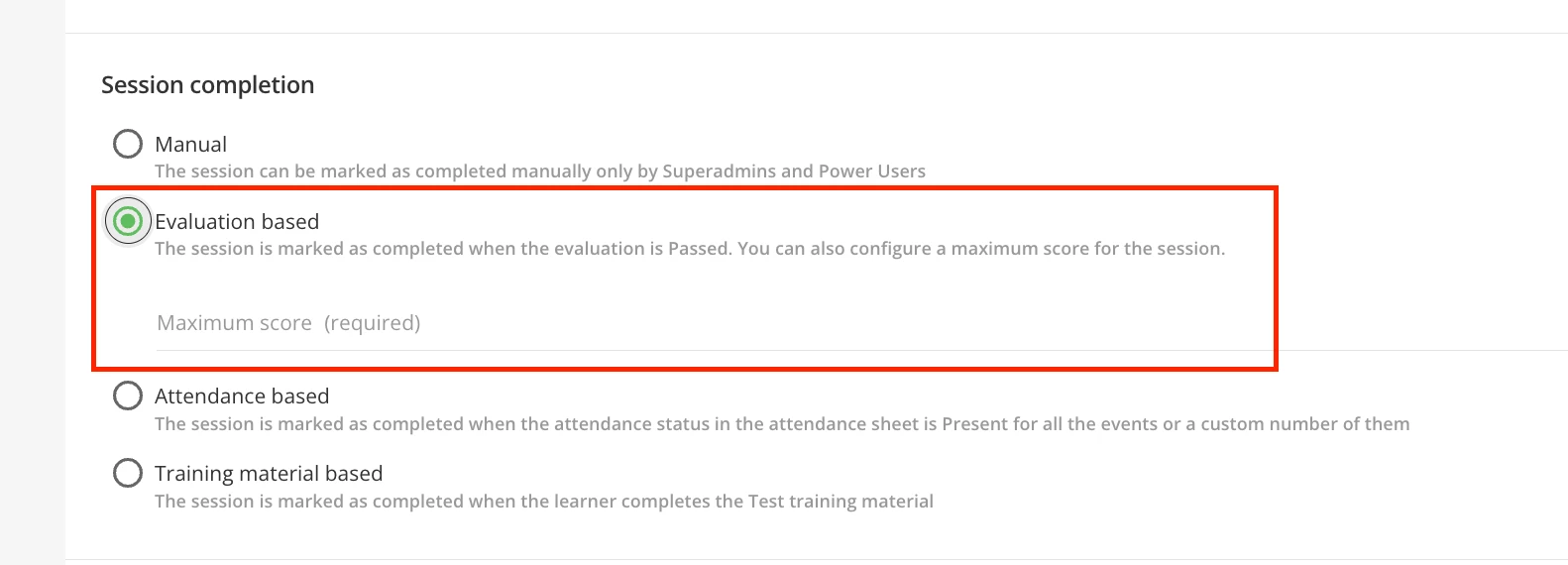
It is triggered with the “Evaluation” method for the session.
 

12 replies

dwilburn
Guide III
Forum|alt.badge.img+4
  • Guide III
  • April 29, 2025

Hi ​@CDoerger, there are a range of solutions that you can setup to “pass” an ILT. It could be that the user logged into a webinar, or that the attendance was marked as present, an instructor evaluation or passing a test. It is based on how you have the Course setup.


Forum|alt.badge.img
  • Author
  • Influencer I
  • April 29, 2025

I had the  course set up as attendance-based. The notification didn’t trigger. 


  • Novice II
  • April 29, 2025

Hi ​@CDoerger,

I’m a new Admin so I’m not sure if this is helpful, but this is what my team has done for our ILT sessions where we just need learns to ‘attend’ and they’re marked as attended/completed for that course.

  1. We created the ILT session/event as a course. Specifically, for us they are in a Learning Plan.
  2. Learners are enrolled, or they self-enroll.
    • This triggers a notification that they’ve been enrolled in a course--the course being the ILT session.
  3. Then, once they’ve attended the session, the notification is triggered that they’ve completed the course.
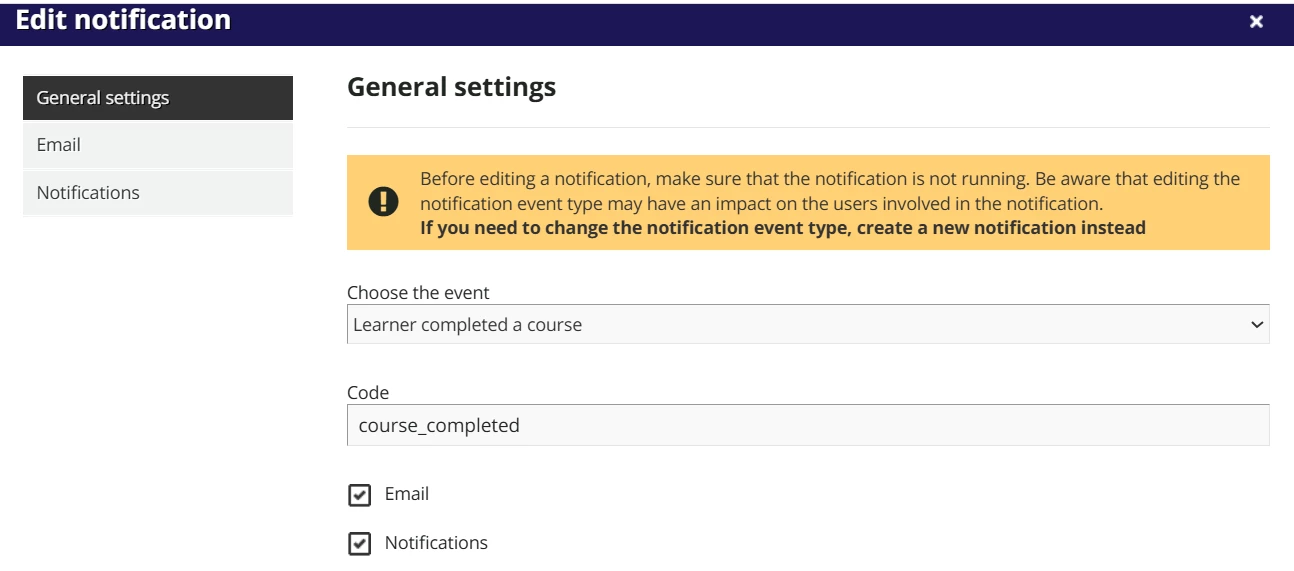
  4. This is how the Notifications setting looks for that one:
    •  

      We’re still in a Soft Launch phase and so we don’t have the Filter set to All Users yet, only those users in this phase.
  5. General Settings:


To setup the actual body of the email was a bit trickier. I wanted to use HTML and CSS, so that took a bit to configure.


Not sure if that’s helpful at all. If you’re looking for help with the source code part I can try to help.


  • Novice II
  • April 29, 2025

@CDoerger , also, are you trying to have an email sent or the platform notification? If it’s email-based, do you have other notifications that are working? We had an issue where our emails were being blocked by our IT dept. Once we figured that out--because the in-platform notifications were working--they had to “whitelist IP’s in our antispoof ruleset”.


Forum|alt.badge.img
  • Author
  • Influencer I
  • April 29, 2025

@jwilson Thanks. We have other email notifications that are working. It’s a good thought, though. 

We have also used the enrollment notification and it works fine when we enroll a user in an ILT course. I’m looking for a notification that can be used once the attendance is marked or a manual completion is done by a Power User. I’m just really not sure what the system means by “passed”.  Thanks again for responding!


dwilburn
Guide III
Forum|alt.badge.img+4
  • Guide III
  • April 29, 2025

I had the  course set up as attendance-based. The notification didn’t trigger. 

Attendance based, and you took attendance and marked the user present? 

And the user’s enrollment status changed to complete?

Just making sure. 😉


lrnlab
Hero III
Forum|alt.badge.img+10
  • Hero III
  • Answer
  • April 29, 2025

It is triggered with the “Evaluation” method for the session.



Forum|alt.badge.img
  • Author
  • Influencer I
  • April 30, 2025

@dwilburn Yes. 

It appears that the trigger is “evaluation”. Thanks ​@lrnlab - Now I need to research Evaluation-based. Haven’t used it yet - thanks all!


P.S. Why can’t the Knowledge document include that very basic information?


lrnlab
Hero III
Forum|alt.badge.img+10
  • Hero III
  • April 30, 2025

@CDoerger I thought it was referenced in the Notifications article but it is not...you can ask support to update the KB article if you find it’s not clear or is missing some information.


Forum|alt.badge.img
  • Author
  • Influencer I
  • April 30, 2025

As soon as I get a raise…. ;-) Thanks again for the assistance!


Davefox
Helper III
Forum|alt.badge.img+3
  • Helper III
  • May 1, 2025

That one caught me too as “passing” really means completing And there are several different ways an ILT is completed.

Whichever one you use will trigger the notification. 


Forum|alt.badge.img
  • Author
  • Influencer I
  • May 8, 2025

Result: I ultimately went with the “Learner completed a course” for the session notification. Both have pro’s and con’s. Ultimately, I didn’t use the “User passed an ILT session” due to the need for the Evaluation-based criteria. It ends up showing the user a “maximum” score. Since we don’t score our ILTs this would just add confusion. 

The downside to the “Learned completed a course” is the need to selectively add ILT courses to the notifications as new courses come up. This notification will include e-learning, so I can’t add all courses to keep it simple. Hope that makes sense.