


Workshop/Conference Page Design

  • May 20, 2024
  • 8 replies
  • 178 views

sostrickfaden
Novice II
Forum|alt.badge.img

Page Design for Live Conference Hybrid Competition and Gamification

Context

The Training and Development team at my company is hosting an in-person, hybrid workshop for our Field Trainers (regionally distributed for the company). 

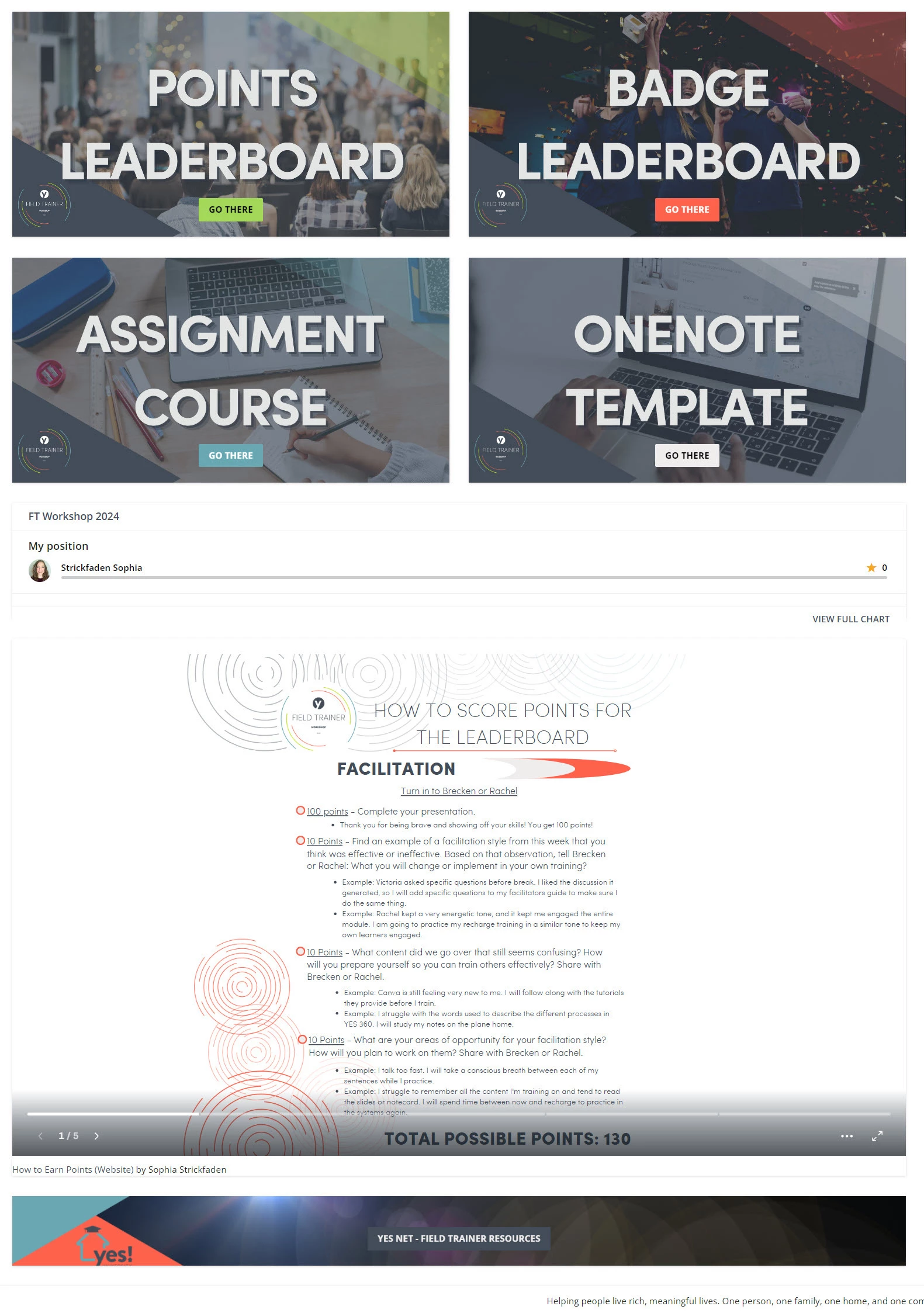
I’m designing a page for the event that only the attendees and presenters will see. I’d like to create a visually stunning page that includes our badge collection, leaderboard (specific to the event), link to our templates and shared OneNote, and embedded visual of the ways they can earn points and badges throughout the week. 

The Ask

What ideas do you have about the page design, widgets to use (even custom HTML), and/or workarounds to make it specific to a week-long conference for a certain audience? If you have done this type of thing in the past, how did you do it and how did it turn out? 


Things we have already set up:

  1. Group for the attendees
  2. Badge Collection
  3. Badges specific to the levels of points they’ll earn for doing assignments and applying concepts from the sessions throughout the week (reinforcing workshop outcomes). 
  4. Competition for the week
  5. Event e-learning course that contains resources for activities and assignments they’ll be submitting for evaluation. 
May 23, 2024

I was just thinking similar to what you see in event/conference apps, e.g., “Join us for a happy hour at the hotel bar tonight at 5PM. Click for more info.” or “Checking out of your hotel and need to store your bag on the last day of the conference? Click here for more info.” Or it could be something more specific to content.

Oh fun! that is a great idea. 
I’m in the camp of trying out something similar to what Contentful does where they host individualized, modular HTML items in a cloud that you can embed and reference throughout the platform but only edit one place. It will be low-cost for now (free hopefully) where I’ll just build things with CodePen and drop them into a server. 

In the meantime, here is a screenshot of what we ended up with. It’s feeling very visually stimulating and fun and enticing. 


8 replies

Forum|alt.badge.img+1
  • Helper II
  • May 20, 2024

Never done anything like this but the one thing I would suggest is to be sure to include a call to action widget of some sort (custom HTML or a custom content box) for announcements or calls to action you want them to be alerted to when logging in.


sostrickfaden
Novice II
Forum|alt.badge.img

Never done anything like this but the one thing I would suggest is to be sure to include a call to action widget of some sort (custom HTML or a custom content box) for announcements or calls to action you want them to be alerted to when logging in.

Mark, I think there is a widget similar to this for Deadlines and Assignments. I also suspect the calendar could work since we are utilizing due dates for assignments and activities. 

How is this similar to what you are imagining as a Call to Action? If it’s not, what details can you add to share more about what you’re vision would be for this? 


Forum|alt.badge.img+1
  • Helper II
  • May 20, 2024

I was just thinking similar to what you see in event/conference apps, e.g., “Join us for a happy hour at the hotel bar tonight at 5PM. Click for more info.” or “Checking out of your hotel and need to store your bag on the last day of the conference? Click here for more info.” Or it could be something more specific to content.


Davefox
Helper III
Forum|alt.badge.img+3
  • Helper III
  • May 21, 2024

Following. We have just started with playing with Bespoke pages and I would love to see what others have done. 


sostrickfaden
Novice II
Forum|alt.badge.img

I was just thinking similar to what you see in event/conference apps, e.g., “Join us for a happy hour at the hotel bar tonight at 5PM. Click for more info.” or “Checking out of your hotel and need to store your bag on the last day of the conference? Click here for more info.” Or it could be something more specific to content.

Oh fun! that is a great idea. 
I’m in the camp of trying out something similar to what Contentful does where they host individualized, modular HTML items in a cloud that you can embed and reference throughout the platform but only edit one place. It will be low-cost for now (free hopefully) where I’ll just build things with CodePen and drop them into a server. 

In the meantime, here is a screenshot of what we ended up with. It’s feeling very visually stimulating and fun and enticing. 


sostrickfaden
Novice II
Forum|alt.badge.img

Following. We have just started with playing with Bespoke pages and I would love to see what others have done. 

I’m new to the idea of Bespoke in Docebo. Is there a good summary somewhere you can share? I’m seeing a lot in my search results but have yet to clearly connect it to the potential here. 


ecc22
Novice III
Forum|alt.badge.img
  • Novice III
  • May 23, 2024

I was just thinking similar to what you see in event/conference apps, e.g., “Join us for a happy hour at the hotel bar tonight at 5PM. Click for more info.” or “Checking out of your hotel and need to store your bag on the last day of the conference? Click here for more info.” Or it could be something more specific to content.

Oh fun! that is a great idea. 
I’m in the camp of trying out something similar to what Contentful does where they host individualized, modular HTML items in a cloud that you can embed and reference throughout the platform but only edit one place. It will be low-cost for now (free hopefully) where I’ll just build things with CodePen and drop them into a server. 

In the meantime, here is a screenshot of what we ended up with. It’s feeling very visually stimulating and fun and enticing. 


It looks like you were able to directly embed an asset into the page. How did you make that work? I cans see several instances where we would want to use that at my org.


sostrickfaden
Novice II
Forum|alt.badge.img

I was just thinking similar to what you see in event/conference apps, e.g., “Join us for a happy hour at the hotel bar tonight at 5PM. Click for more info.” or “Checking out of your hotel and need to store your bag on the last day of the conference? Click here for more info.” Or it could be something more specific to content.

Oh fun! that is a great idea. 
I’m in the camp of trying out something similar to what Contentful does where they host individualized, modular HTML items in a cloud that you can embed and reference throughout the platform but only edit one place. It will be low-cost for now (free hopefully) where I’ll just build things with CodePen and drop them into a server. 

In the meantime, here is a screenshot of what we ended up with. It’s feeling very visually stimulating and fun and enticing. 


It looks like you were able to directly embed an asset into the page. How did you make that work? I cans see several instances where we would want to use that at my org.

@ecc22 - The top four boxes are just custom content boxes with images designed in Canva based on our LMS and event branding. The item underneath the leaderboard is a Canva Website we created from a document and copied the embed code into a HTML/WYSIWYG widget in the Docebo page. 

Here is a brief animated gif of how to get the code you need to paste.