

Best Answer

Zoom v3 plugin - Zoom role settings for pairing - help

  • July 31, 2023
  • 17 replies
  • 524 views

jckemv
Helper I
Forum|alt.badge.img+2

I’ve been using V2 and v1 zoom plugins since 2020 and understand how that all works, but with the Zoom V3 plugin I’m having trouble pairing with the Zoom account.

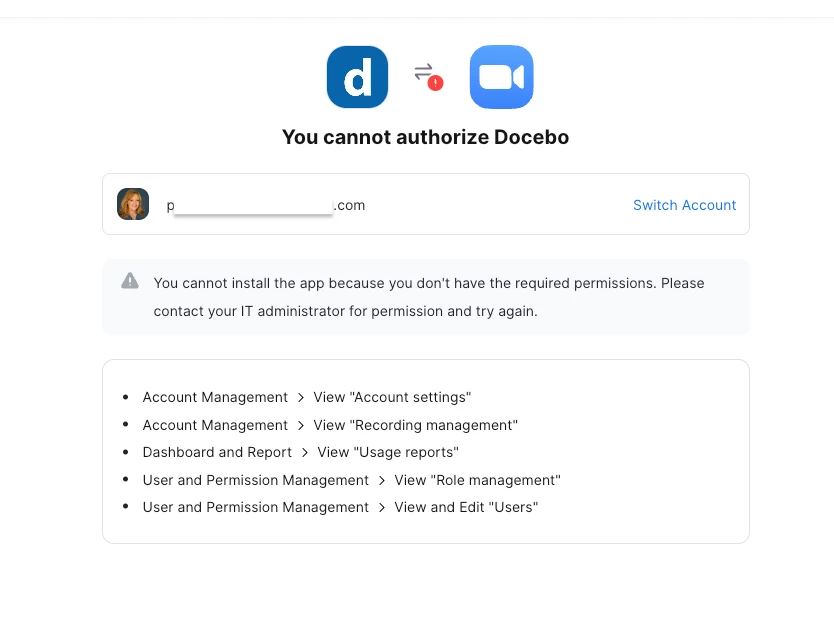
I have a enterprise zoom account but I am not the admin. It is an account for a Gov Dept and previously the plugin and my permissions were sufficient I guess, but now the pairing fails as I do not have enough admin permissions, or the new way of pair isn’t working for me.

I have spoken to both the Zoom account holder admin, and a Zoom rep and they are asking me to find out what “Role Settings” are required by the Docebo pairing to work so they can create zoom role settings in their Enterprise Zoom setup to enable me to be added, and therefore the plugin to work. 

If anyone is a Zoom admin you would know that there are heaps of settings you can adjust, and for role settings you can create setting by setting View and Edit permissions plus a scope if needed. All I am after is a list of the specific settings required for the Zoom v3 plugin to work please, something I could pass to a Zoom admin to configure.

I’m 100% confident there are other Docebo Superadmins using Docebo Learn that are NOT also the Zoom Admin for the account they pair with. Is there anyone else having this problem? meanwhile, I cannot configure any new ILT online courses because I cannot pair and its taken a week already to even determine this problem.

PS: I assume with the new V3 Zoom plugin you do not need to create an app and add it from the marketplace etc.. as the whole integration is done differently yeah? I cannot get past pairing so I cannot tell.

Could you help - davide.pucillo ?

Best answer by AngeWi

Hi @jckemv, I did this last week and yes I didn’t need to create an app with V3.

If I remember correctly, I just needed to log into Zoom as the Zoom admin and also log into Docebo using our “Zoom admin” Docebo Super Admin account to get it paired. 
 

Edited to add, the note on pairing states that for pairing “Users that are assigned as hosts must exist in both Docebo and Zoom with identical names and email addresses. For more information please see the section on Zoom Hosts tab.” This was what stumped me initially until I remembered that we had a “Zoom admin Docebo Super Admin account.

https://help.docebo.com/hc/en-us/articles/11206175970194-Docebo-VILT-for-Zoom-Version-3

17 replies

AngeWi
Forum|alt.badge.img
  • Answer
  • July 31, 2023

Hi @jckemv, I did this last week and yes I didn’t need to create an app with V3.

If I remember correctly, I just needed to log into Zoom as the Zoom admin and also log into Docebo using our “Zoom admin” Docebo Super Admin account to get it paired. 
 

Edited to add, the note on pairing states that for pairing “Users that are assigned as hosts must exist in both Docebo and Zoom with identical names and email addresses. For more information please see the section on Zoom Hosts tab.” This was what stumped me initially until I remembered that we had a “Zoom admin Docebo Super Admin account.

https://help.docebo.com/hc/en-us/articles/11206175970194-Docebo-VILT-for-Zoom-Version-3


  • Influencer I
  • July 31, 2023

We are experiencing exactly the same problem with our V3 upgrade process, so similarly interested in learning if anyone has overcome this frustrating blocker.  (I am not the zoom admin and IT require more info on settings). 


  • July 31, 2023

We just started working on this as well and we came across with the same issue. We worked with one of Docebo’s agents and she helped us to realize that in order for the user to be able to be assigned as “zoom meeting host” they should be an active user in Docebo AND and should be a “licensed” user in the Zoom account that is integrated with Docebo. In our case, we have a business plan in which multiple users can use the same zoom account and they can be either a “basic” or a “licensed” user, so when our role within Zoom was elevated to “licensed” it allowed us to pair the accounts. 

By the way, make sure that the capitalization of the email address is the same in both accounts, if not the pairing won’t take place.


TrishAH
Helper II
  • Helper II
  • August 14, 2023

@jckemv @GRuss After spending time with my IT and Zoom account admin, as well as Zoom technical support, the solution we arrived at was that our corporate Zoom account admin had to increase the permissions of my instructors’ Zoom accounts to allow them the access indicated in the rejection screen. The Zoom Admin created a role for our team members  with these additional permissions and then the roll was applied to the instructors. 


jckemv
Helper I
Forum|alt.badge.img+2
  • Author
  • Helper I
  • August 14, 2023

@jckemv @GRuss After spending time with my IT and Zoom account admin, as well as Zoom technical support, the solution we arrived at was that our corporate Zoom account admin had to increase the permissions of my instructors’ Zoom accounts to allow them the access indicated in the rejection screen. The Zoom Admin created a role for our team members  with these additional permissions and then the roll was applied to the instructors. 


I did ask if a “role” in Zoom would work and was told no by Docebo support via my CRM for my account with Docebo. I thought that a little strange as that feature in Zoom would have been created for this exact reason. I might try it still and see if it works.


TrishAH
Helper II
  • Helper II
  • August 24, 2023

@AngeWi I see your note is marked as “Answer” but this is not working for my situation. I can’t add any Hosts to the account even though they are all SuperAdmins and Power Users on Docebo, and their names in Docebo appear the same way in their Licensed Zoom accounts. The only person I can make a Host is me.


jckemv
Helper I
Forum|alt.badge.img+2
  • Author
  • Helper I
  • August 24, 2023

@AngeWi I see your note is marked as “Answer” but this is not working for my situation. I can’t add any Hosts to the account even though they are all SuperAdmins and Power Users on Docebo, and their names in Docebo appear the same way in their Licensed Zoom accounts. The only person I can make a Host is me.

Same here, doesn’t work for me and in fact I still have not got the plugin working as I do not have the admin account on Zoom and the Gov admin will not allow my account to be an admin. I will also never have my ILT LMS hosts as Zoom Hosts in the Zoom system with accounts as I have different people running sessions all the time, and I do not have admin to create them in Zoom all the time. Basically I have to ditch that avenue which may mean ditching Docebo.


AngeWi
Forum|alt.badge.img
  • August 25, 2023

Hello @TrishAH and @jckemv, I remember your post on 

 a few days ago TrishAH and had hoped your increased permissions had resolved the issue, sorry to hear it’s not.

From everything posted, it appears that we got off lucky with pairing as we had a Zoom admin account also on Docebo as a superuser. This is quite a significant requirement and will not be acceptable to many organisations - as @jckemv has described.

The second road block, which I see our group reaching later this year is with ILT hosts. I was going to run a test using the solution you’d described TrishAH but it sounds like this doesn’t work?


  • Novice I
  • September 18, 2023

Has anyone managed to pair multiple Zoom accounts using V3? We are running into this issue, where if we pair one account, it unpairs any other Zoom account. 


We will be using  Docebo/Zoom to facilitate multiple ILT classes simultaneously, has anyone found a workaround to this?


Thanks!


JKolodner
Helper III
Forum|alt.badge.img+6
  • Helper III
  • September 26, 2023

I believe that the mid-September maintenance update made some difficulties in this area (at least for my company). Our paired names no longer show on the Zoom host dropdown menu. So there may be more going on than just your initial pairing problem if you’re experiencing this type of issue. Hoping to have an update today.


  • Novice III
  • October 13, 2023

Has anyone managed to pair multiple Zoom accounts using V3? We are running into this issue, where if we pair one account, it unpairs any other Zoom account. 


We will be using  Docebo/Zoom to facilitate multiple ILT classes simultaneously, has anyone found a workaround to this?


Thanks!

We are having the same issue.  We have four dedicated “service” Zoom accounts and with V3 each time I attempt to pair a 2nd account, the first one paired, unpairs.  


lrnlab
Hero III
Forum|alt.badge.img+10
  • Hero III
  • October 13, 2023

Following as we are about to implement v3 soon. Great insights everyone, thank you.


TrishAH
Helper II
  • Helper II
  • November 29, 2023

Hello All, I posted an update on this in the thread regarding https://community.docebo.com/topic/show?tid=7680&fid=45

Hope this helps. It’s been a journey :)


Jason Kocur
Helper I
Forum|alt.badge.img+1
  • Helper I
  • January 25, 2024

Hi All, 

We were able to successfully pair Zoom V3, but there are a few things to know. 

  • V3 doesn’t use multiple accounts in the same way Zoom V2 did
  • V3 requires one Zoom Account to connect, from which it can access any employees file that has a licensed Zoom Account
  • We had to work with our Internal Zoom Admin, he needed to create a specific Zoom V3 account for us to use
  • From there the process was as follows:
    • We opened an Incognito browser, logged into that specifically created Zoom account using our SSO Platform Okta. 
    • We then logged out of Okta and back in with one of own personal accounts and accessed Docebo
    • From there, we accessed the admin menu, clicked on Zoom V3 and were then able to successfully add and pair the account
  • Ultimately, you need access to an Admin Level Zoom account to pair the connection
    • You will likely need to speak with your IT Zoom Admin to do this
    • Every employee account that needs to be an instructor/Host/Alternate Host needs to have a licensed Zoom Account as explained in the Zoom V3 documentation
    • If you want to use the Registration and Authentication features it will force your users to create Zoom Accounts, if they dont have one. 
    • For extended enterprise, while we have not officially begun using Zoom V3, it appears from our testing that both Registration and Authentication cannot be turned on
      • However, having registration only enabled allowed external users to access the system and track attendance. Keep in mind their, Docebo and Zoom emails must match and Docebo will need First/ Last Name and email filled out. 


We’ve been going through the Zoom V3 testing process for quite some time now and have not fully implemented it yet. We are still using Zoom V2 functionality as a result. 


lrnlab
Hero III
Forum|alt.badge.img+10
  • Hero III
  • January 25, 2024

thanks for these notes @Jason Kocur ...really helpful...we are in the same situation...just about to start using Zoom v3 and have run into some snags already...


TrishAH
Helper II
  • Helper II
  • February 7, 2024

@Jason Kocur We’ve been using the V3 since December and have worked through various issues that have continued to be fixed through the updates that are pushed out, and there had been some weirdness.

Your statement about the process using the Incognito browser was interesting but not what we did. Perhaps it’s due to how your systems are set up but in our case, our Zoom Admin created a profile for all users of our Zoom v3 account and then I was able to add all of those people as Hosts on Docebo. This was also back in October, so maybe the process has changed.


Jason Kocur
Helper I
Forum|alt.badge.img+1
  • Helper I
  • February 7, 2024

@TrishAH it’s possible our Zoom Admin simply wanted us to use the Incognito browser to ensure no issues appeared when we connected our Enterprise Zoom account to Docebo. Unfortunately, our testing has highlighted so many Zoom V3 issues that should really be fixed first before we implement it within our systems. Creating an SOP to document how to maneuver around them would be extensive.

Have you set up alternate hosts in the a session yet? If they begin the session/event do they show up in their own Zoom profile or the primary hosts? Have you noticed that setting a host in a Session/Event does not directly give them access to the course within the platform? They need to be added separately as instructors for the session/event for the course to be visible to them. These are some of the many issues we have questions on. CSV file uploads are another large area of issue I’ve had multiple tickets open on.